SignalFlare is an iPhone app that delivers curated crypto trade signals for markets such as BTC, ETH, SOL and XRP. Each signal is marked long or short and shows entry, stop loss, take profit, timeframe, age and invalidation level. Alerts arrive as push notifications with distinct sounds, in the Dynamic Island and on widgets, and a built-in trade diary records what you did. Signals are informational, not financial advice.
What is in a signal
| Part | What it tells you |
|---|---|
| Market | The pair, such as BTCUSDT |
| Direction | Long (green) or short (red) |
| Style and timeframe | Scalp or swing, and the chart interval it came from |
| Entry price | The price when the signal triggered |
| Stop loss | The level at which the idea has failed |
| Take profit | A target level |
| Strategy and strength | For example trend or contrarian, normal or strong |
| Age | How long ago it fired. Old signals matter less |
| Detail | Rationale, market context and confidence |
The signals are curated by SignalFlare. You do not set your own price alerts or indicators in the app, and it does not cover stocks.
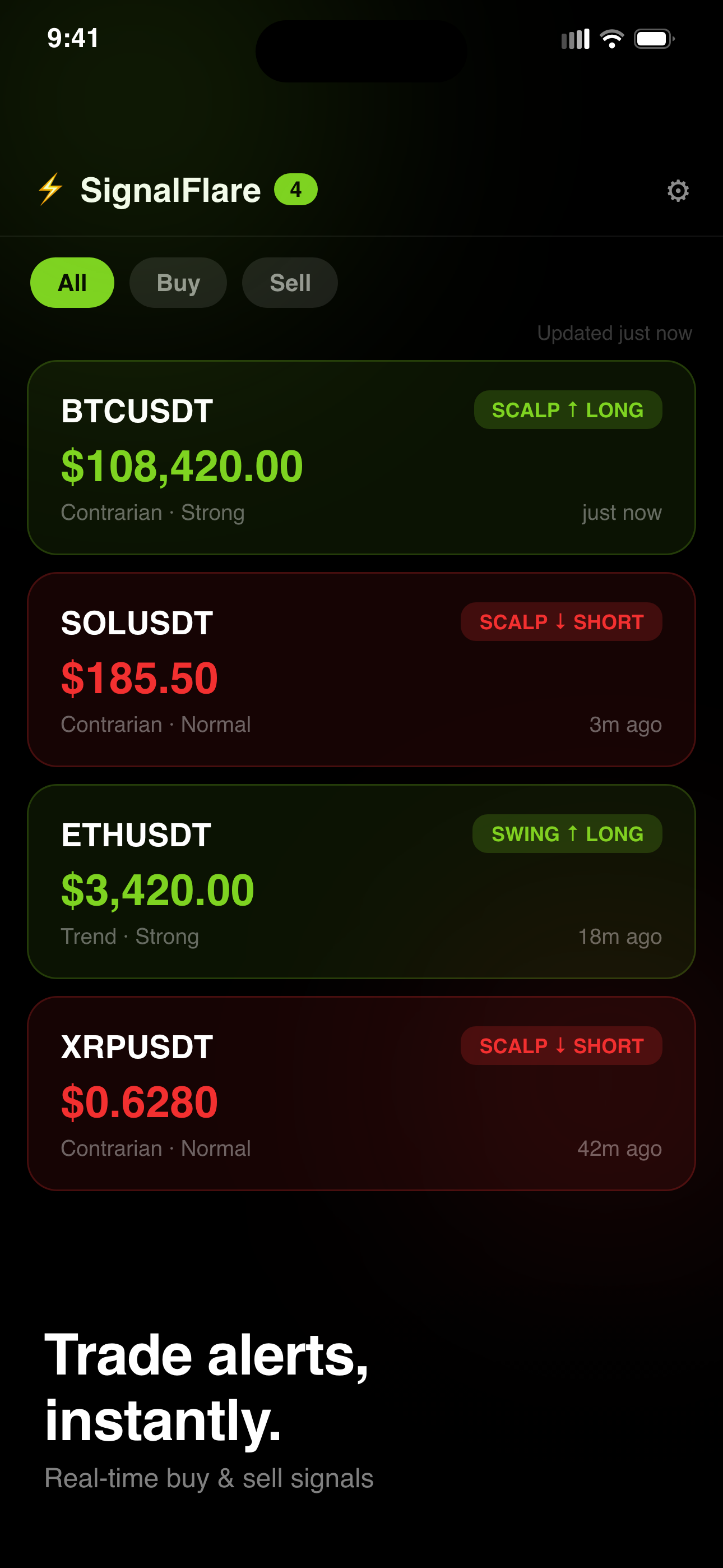
Where signals show up
- Push notifications, with different sounds and haptics for buys and sells, so you know the direction before you look.
- Dynamic Island and Live Activity show the latest signal without unlocking the phone.
- Home Screen widgets in small and medium sizes.
- Lock Screen widgets: circular, rectangular and inline.
- The feed, filterable by buy and sell, with a compact list view if you want to scan more at once.
Keeping the noise down
- Watchlist. Pin the markets you follow.
- Mute a market or strategy when you want fewer alerts.
- Auto-expire. Signals clear after a window you choose: 1 hour, 4 hours, 24 hours, or never.
- Filters for longs and shorts.
More alerts do not make better decisions. Two markets you understand beat ten you do not.
The trade diary
Tap any signal to log what you did: win, loss or skipped, with entry and exit prices and notes. Stop loss and take profit are calculated from the signal's entry price, and the diary can close the entry when price reaches one of them. Over a few weeks, the diary answers the only question that matters about any signal source: how did it go for you, with your timing and your discipline? Skipped signals are worth recording too.
Who it suits, and who it does not
- Suits: people who already trade crypto, understand long and short positions and stop losses, and want timely prompts without staring at charts.
- Does not suit: beginners looking for something to tell them what to buy, anyone who cannot afford losses, or anyone wanting stock or custom price alerts.
A signal is a prompt to look, not an instruction. See how to use trade signals responsibly.
Limits to understand
- Signals can be wrong, often. No signal service wins consistently.
- Notifications depend on your connection and iOS delivery; a signal may be stale by the time you act.
- SignalFlare does not place trades or connect to an exchange.
- It does not know your finances, so it cannot tell you how much to risk.
- iPhone only.
Free worksheets on this site: a crypto signal checklist, a risk sizing worksheet and a market brief template.
Trial and subscription
SignalFlare is an iPhone app. A 3-day free trial unlocks live signals, notifications, the trade diary, widgets and Dynamic Island. After the trial, access and notifications stop unless you subscribe, weekly or yearly, at the price Apple shows at purchase. You can cancel in your Apple Account settings.
Common questions
Does SignalFlare cover stocks?
No. It delivers curated crypto signals.
Can I create my own alerts?
No. You follow SignalFlare's signals and can pin, mute and filter markets.
Does it trade for me?
No. It does not connect to an exchange or place orders.
Is it free?
There is a 3-day free trial. After that a subscription is needed.
Are the signals financial advice?
No. They are informational and educational only.
SignalFlare's signals are for information and education only. They are not financial advice or a recommendation to buy or sell anything. Crypto trading carries a high risk of loss, past signals say nothing reliable about future ones, and you are responsible for your own decisions. Only trade money you can afford to lose.
See the signal feed for yourself: Get SignalFlare.