To plan a group trip without group-chat chaos, separate talking from deciding. Pick one organizer, set a deadline for dates, collect options in a shortlist people can vote on, and move every confirmed decision into a shared plan that holds the itinerary, bookings and costs. The chat stays for conversation. Troupe is one way to do the shared plan on iPhone; a shared document works too if you keep it disciplined.
Why group chats fail at planning
- Decisions scroll away. The agreed dates are 140 messages up, between a meme and a voice note.
- Silence is ambiguous. Did four people agree, or did four people not read it?
- There is no current version. "The plan" is whatever the last person to summarize it remembered.
- Money gets lost. "I've paid the deposit, £40 each please" is easy to miss and awkward to repeat.
- Loud voices win. The people who reply fastest decide, and the others resent it quietly.
None of this is anyone's fault. A chat is a stream, and a plan is a state. You need something that holds state.
The method, step by step
- Name an organizer. One person owns the plan. They do not make every decision; they make sure decisions get made and written down.
- Fix dates first, with a deadline. Offer two or three options and a date to reply by. No reply by the deadline means you go with the majority.
- Agree a budget range. Per person, for the whole trip. This filters the options before anyone falls in love with a villa.
- Collect options in a shortlist, not the chat. Destinations, places to stay, things to do. Each with a link and a rough price.
- Vote. One vote per person per decision. The organizer breaks ties.
- Book, and record it immediately. The booking goes into the plan with its reference and what it cost.
- Post one summary in the chat. "Dates and flat are booked, details in the trip." Then the chat can go back to memes.
What needs to be in the shared plan
| Section | Contents |
|---|---|
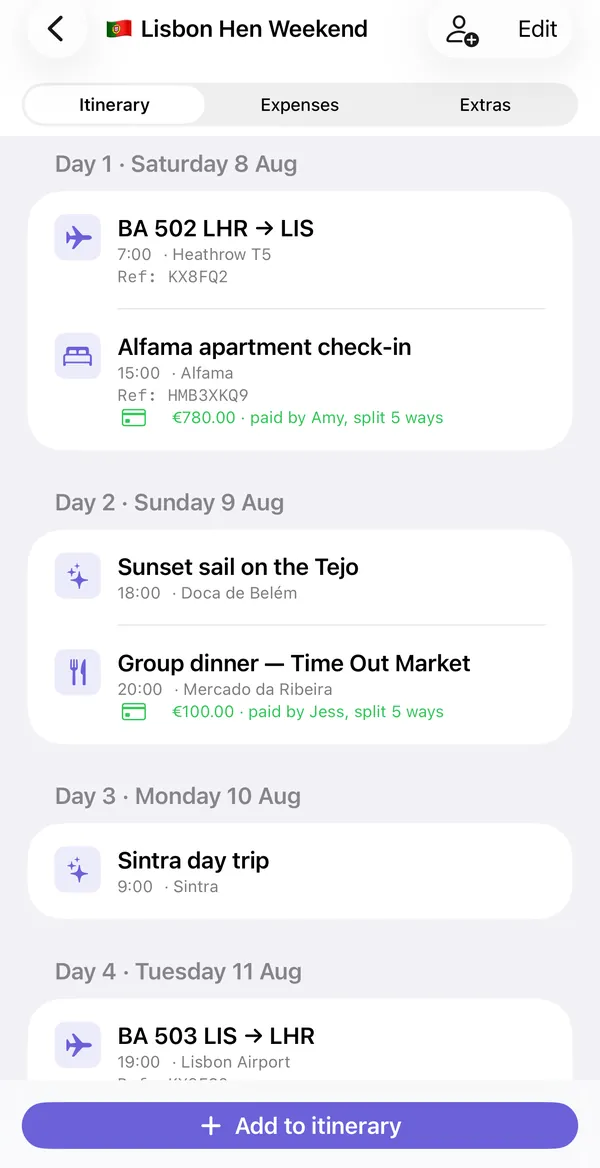
| Confirmed itinerary | Day by day: travel, stay, booked activities, with times and references |
| Shortlist | Options still being decided, with votes |
| Costs | Every payment: amount, who paid, who it covers |
| Who brings what | Shared items with a name against each |
| Documents | Tickets, confirmations, insurance, emergency contacts |
You can build this in a shared document or spreadsheet. It works if one person keeps it tidy. Where it tends to break is the money, which needs formulas, and phones, where spreadsheets are miserable to edit.
How Troupe covers each part
- Confirmed itinerary: the Itinerary tab, by day, with flights, stays, activities, food and transport.
- Shortlist and votes: "Places to consider" in Extras. Anyone adds a place with a link, people vote, and "Add to itinerary" promotes the winner.
- Costs: the Expenses tab, with live balances and "Who pays whom" for the fewest transfers.
- Who brings what: the packing list, with an assignee per item.
- Documents: photos of tickets and confirmations, and emergency contacts.
- What changed: a trip activity log shows recent edits, so nobody has to announce every update.
You invite the group with a link sent in the same chat you were already using. They tap it and the trip opens. There is no account to create, which removes the usual "I couldn't be bothered to sign up" drop-off.
Etiquette that helps regardless of tools
- Deadlines with defaults. "Reply by Friday or we book option B."
- One decision per message. Three questions in one message gets one answer.
- Do not relitigate. Once it is booked and in the plan, it is decided.
- Money is logged, not announced. Nobody should have to chase in public.
- Let people opt out of activities. Not everyone has to do everything, and costs should follow that. See how to split trip costs fairly.
What Troupe does not do
- iPhone and iPad only. There is no Android or web version, so everyone in the group needs an Apple device to join the shared trip.
- It syncs through iCloud. There are no Troupe accounts and no Troupe server. Each person needs to be signed in to iCloud.
- It does not book anything. You add flights, stays and activities yourself; Troupe organizes them.
- It does not move money. It works out who owes whom and can open a payment link. The transfer happens in your banking or payment app.
It also does not replace the chat. There is no messaging in Troupe, by design. Keep WhatsApp or iMessage for talking.
Free version and Pro
| Free | Troupe Pro |
|---|---|
| One trip | Unlimited trips |
| Up to 4 people | Any group size |
| Itinerary, expenses, packing list and documents | Everything in free, without the limits |
| Everyone you invite joins free | Only the organizer needs Pro |
Pro is a monthly subscription or a one-time lifetime purchase. Only the person who creates the trip pays; the people they invite never do. Check the App Store for current prices.
Common questions
Do we have to stop using WhatsApp?
No. Keep it for conversation. The point is to stop using it as the record of what was decided and who paid.
What if some people will not install another app?
Joining a Troupe trip needs the app but no account. If someone still will not, export the trip as a PDF and send it to them; they will just not see live updates.
Can the group vote in Troupe?
Yes, on places. "Places to consider" lets people add options and vote, and the organizer can add the winner to the itinerary.
How big a group does this work for?
The method works for any size. In Troupe, the free version covers four people; Pro removes the limit for the organizer's trips.
Is there a chat inside Troupe?
No. Troupe holds the plan, costs and lists. Conversation stays in your existing group chat.
Troupe is for iPhone and iPad. Trips sync through your own iCloud, with no accounts, ads or tracking. Other apps named on this page are trademarks of their owners.
Move the plan out of the chat and into one shared trip: Get Troupe on the App Store.