Every indie has been here. The app is live, the icon looks great, and the dashboard reads 1 sale. The App Store is a 2-million-app ocean and you're a rowing boat. The instinct is to “do some marketing.” The better move is to find out whether this fight is winnable, where the open doors are, and what it would cost to walk through them — before spending a penny or a week.
Here's that exact process, run on a real app a friend just launched: a free screenshot-editor for iOS, zero ratings, one sale. Every screenshot below is Dispatch doing the work on public App Store signals — nothing leaves the Mac.
- The app
- A free screenshot / collage editor, iOS
- Status
- Just launched · 0 ratings · 1 sale
- Category
- Photo & Video
- Goal
- Out-rank incumbents, earn the first real downloads & reviews
1Read the niche before doing anything
Open Niche Scout, type screenshot editor, pick the US store, hit Scout. In ten seconds Dispatch scans the top apps and scores the whole field — so you know what kind of fight you've walked into.
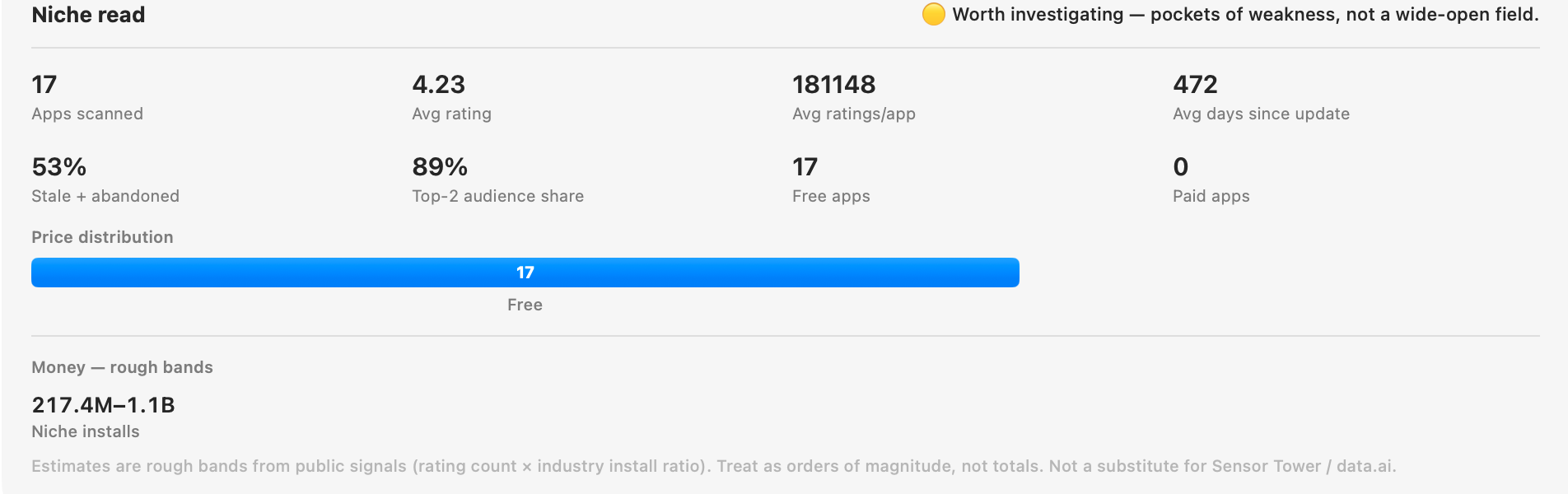 Niche Scout's “niche read” for screenshot editor — the shape of the whole field in one card.
What it says, in plain English:
- Verdict: 🟡 worth investigating — pockets of weakness, not a wide-open field and not a closed one either.
- 89% top-2 audience share. Two apps own almost the whole head term. You will not beat them at the word “screenshot editor” on day one — so don't try to.
- 53% stale + abandoned. Over half the field hasn't shipped in ages. That's the opening: the long tail is guarded by apps whose owners have moved on.
- Everyone's free. 0 paid apps — so the game is downloads & retention, not price.
2Find the winnable keywords he isn't targeting
Switch to Keyword Discovery, seed it with screenshot editor. Dispatch expands that one phrase into ranked ideas — from App Store autocomplete, the terms the top-ranking apps actually use, and a second pass on the strongest of those — then scores each on popularity vs. difficulty so the winnable, high-traffic ones float up.
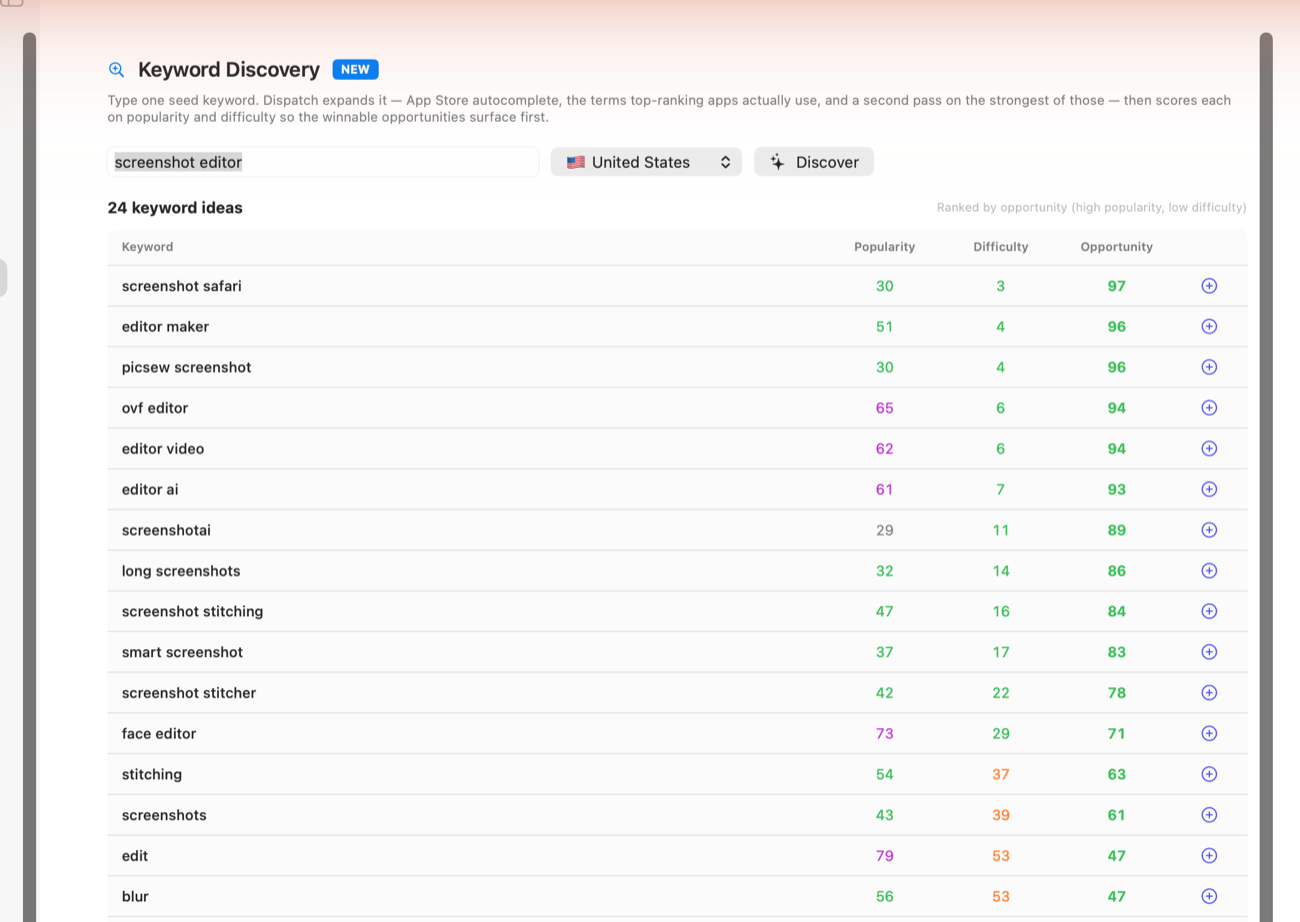 One seed → two dozen scored ideas. The green Opportunity column is where the doors are.
The head terms (photo editor, video editor, screenshots) score red — bloodbaths, skip them. But the long-tail stitching cluster lit up green: screenshot stitching, long screenshots, screenshot stitcher, smart screenshot. High intent, modest difficulty, and half guarded by stale apps. It even surfaced a rival to study — Picsew.
3Price the fight before paying for it
Thinking about Apple Search Ads? Open Ad Insights, search the term, and Dispatch reads the incumbents ranking for it to estimate what it would cost you to compete — a realistic cost-per-tap band, a monthly spend range to buy enough taps to matter, and a 🟢🟡🔴 winnability verdict.
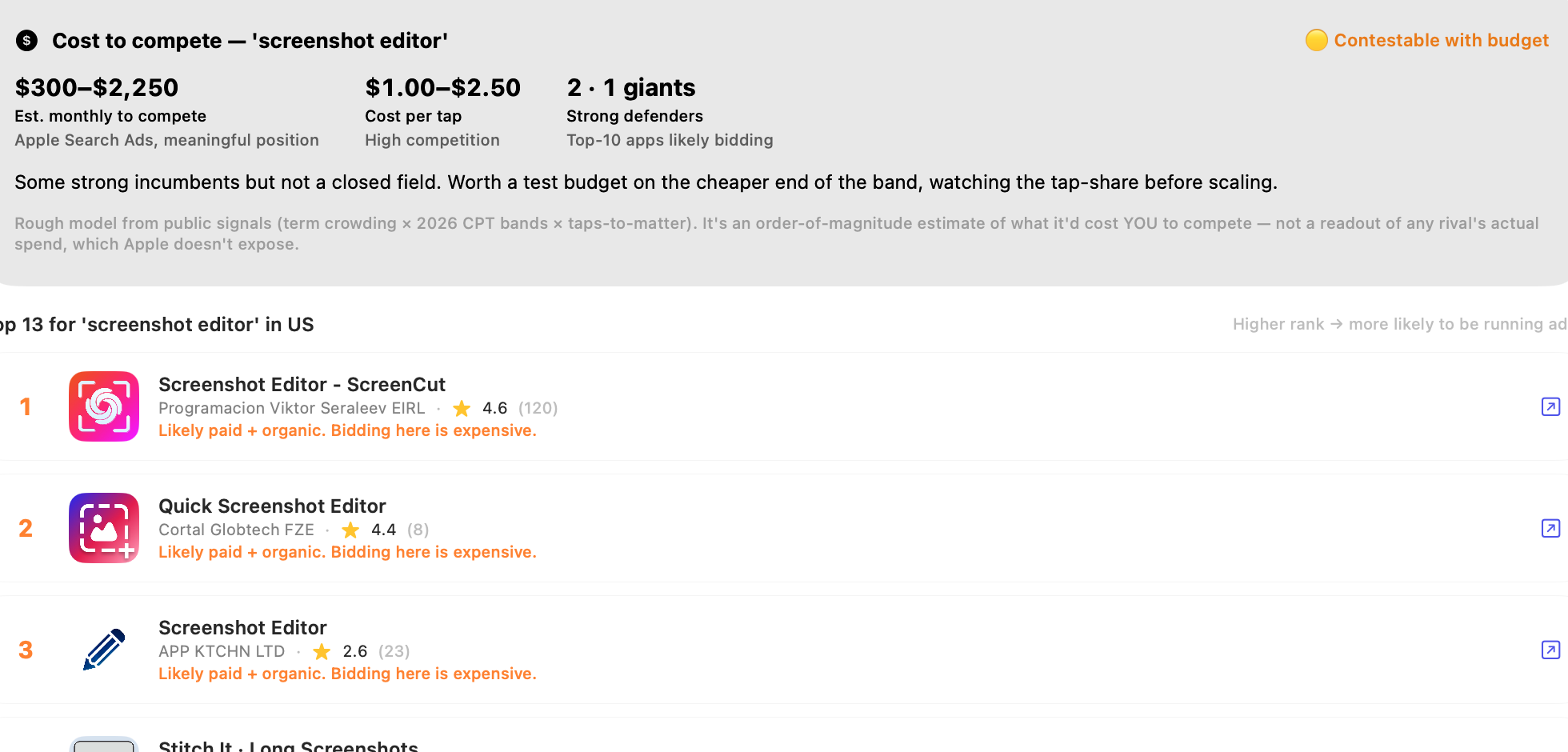 Cost to compete on screenshot editor: ≈ $300–$2,250/mo, $1–$2.50 per tap, “contestable with budget.”
For the head term that's a real bill for a one-sale app. But the same tool run on the long-tail stitching terms from step 2 prices much lower — fewer strong defenders bidding. So the plan writes itself: a small test budget on a long-tail term, watch the tap-share, scale only what converts.
4Beat the incumbents where they're already weak
Notice in step 3 that the #2 and #3 apps for the head term are abandoned and sitting at ~2.6★. That's not just an SEO gap — it's a quality gap. In Competitor Spy → “What their users hate,” point Dispatch at the top stitching apps (Picsew, Stitch It) and it pulls their recent public reviews and clusters the complaints on-device: the bugs they're shipping, the features users beg for, the pricing gripes — plus what users love, so you know what not to break.
5Fix the listing, then earn the first reviews
With a sub-niche chosen and the gaps known, tighten the storefront:
- AI ASO Audit grades the current listing 0–100 and hands back quick wins — title, subtitle and keyword-field fixes built around the winnable terms.
- Metadata Editor drafts the new copy per locale and pushes it to App Store Connect.
- Worldwide Reviews Radar then watches the app's reviews across every major storefront, and Dispatch-kun pings him the moment a fresh 1–3★ lands — so the first negative review gets a reply before it scares off the next buyer.
The 30-day plan, on one page
- Reposition the listing around the long-screenshot / stitching sub-niche (steps 1–2).
- Rewrite title, subtitle & keyword field with the green-scored terms; run the AI ASO Audit until it's 80+ (step 5).
- Ship the top 3 fixes mined from incumbents' 1-star reviews, and name them in the listing (step 4).
- Test a small Search Ads budget on one long-tail term — scale only if tap-share & conversions hold (step 3).
- Watch reviews worldwide and reply fast; every early 5★ compounds (step 5).
None of this is guesswork or a $300/mo data subscription. It's one native Mac app, public signals, and on-device AI — turning “one sale, now what?” into a concrete, sequenced plan in an afternoon.
All figures above are estimates derived from public App Store signals (rating counts, update cadence, autocomplete, current cost-per-tap bands). They are orders of magnitude for decision-making, not totals, and are not a substitute for licensed market-intelligence feeds. Dispatch labels every estimate as such inside the app.