🛂
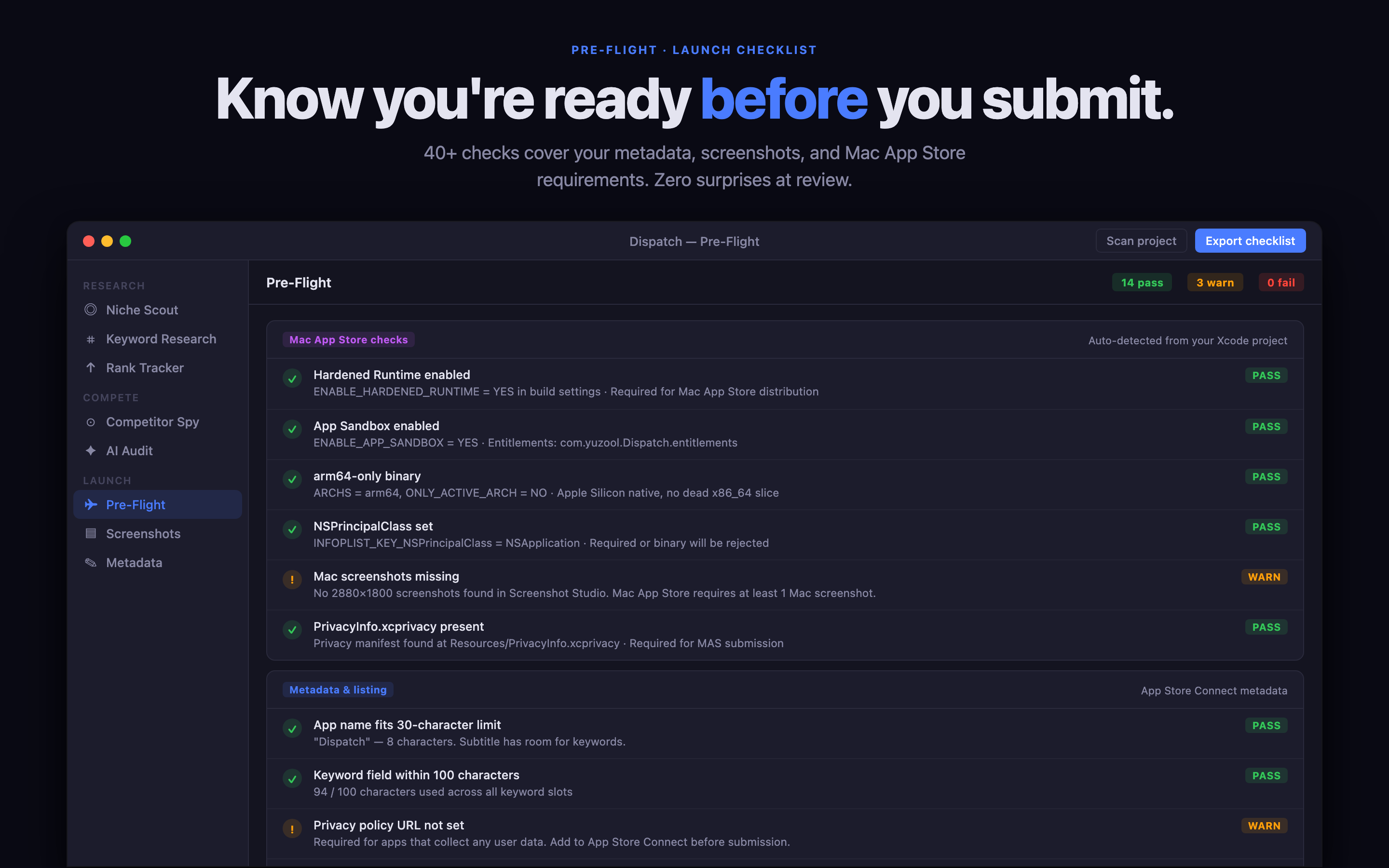
Pre-Flight rejection checks NEW
Catch App Store rejections before you submit. Pre-Flight scans for the most common rejection causes — each linked to the exact Review Guideline — auto-checks and pulls your live App Store Connect listing across locales (other-platform mentions, placeholder text, prices in the description, keyword-field issues, dead support URLs it actually pings). Rejected anyway? The on-device Rejection Doctor reads Apple's message, names the guideline, and hands you concrete fixes — private, no API key.
📈
Rank Tracker NEW
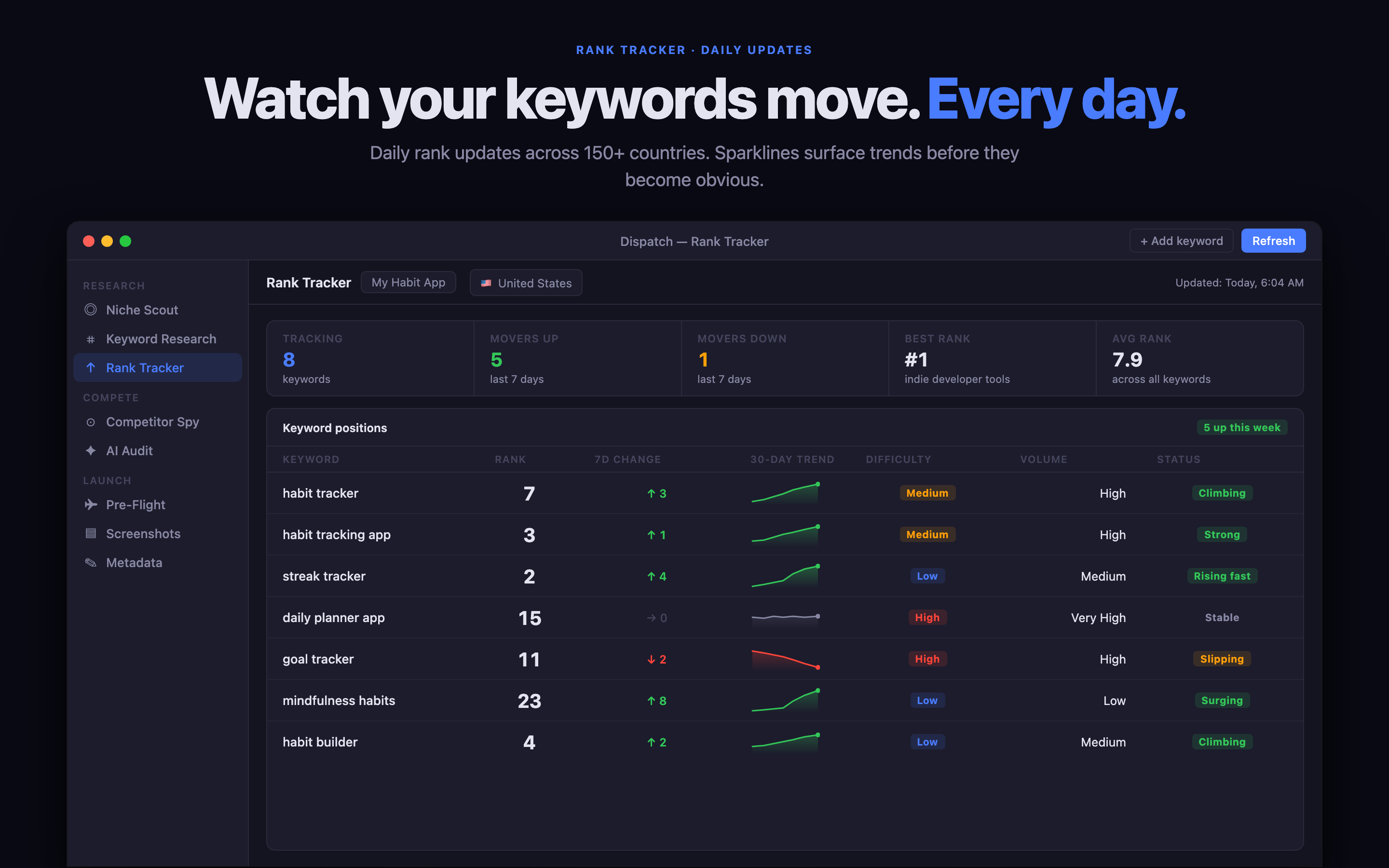
Every keyword you track, across every storefront, on one dense movers board — inline difficulty and opportunity bars, your live App Store position, and a trend sparkline with a signed delta. Sort by biggest movers to see exactly what changed overnight. Built on the daily rank history Dispatch already collects, so it fills itself in over time — no extra setup.
💰
Cost to compete NEW
Before you sink a budget into a keyword, Dispatch reads the incumbents ranking for it and tells you what it would take you to compete: a realistic Apple Search Ads cost-per-tap band, a rough monthly spend range to buy enough taps to matter, and a colour-coded 🟢🟡🔴 winnability verdict. An honest order-of-magnitude estimate from observable signals — not a readout of any rival's actual spend, which Apple doesn't expose.
💡
Keyword Discovery NEW
Type one seed keyword. Dispatch expands it into a ranked list of keyword ideas you didn't think of — from App Store autocomplete, the terms top-ranking apps actually use, and a second pass on the strongest of those. Each scored on popularity and difficulty, ranked so the winnable, high-traffic ones surface first, one-click savable to rank tracking.
🌍
Worldwide Reviews Radar
Sweep an app's public reviews across every major App Store storefront at once — see where your ratings are landing worldwide in one view. Each sweep is remembered, so the next flags what's new since you last looked, and Dispatch-kun pings you the moment a fresh 1–3★ review lands anywhere so you can reply before it festers.
🔭
Niche Scout
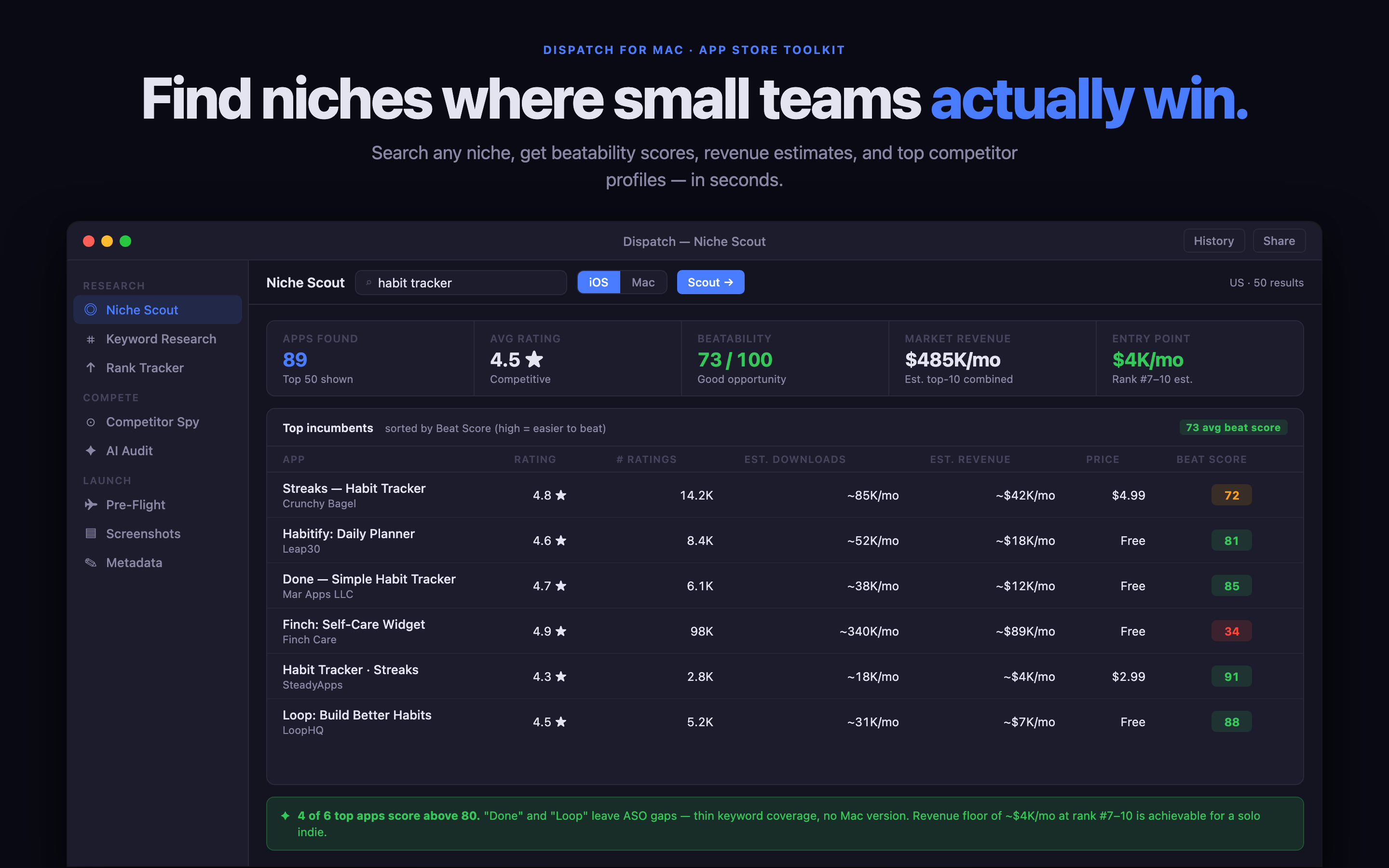
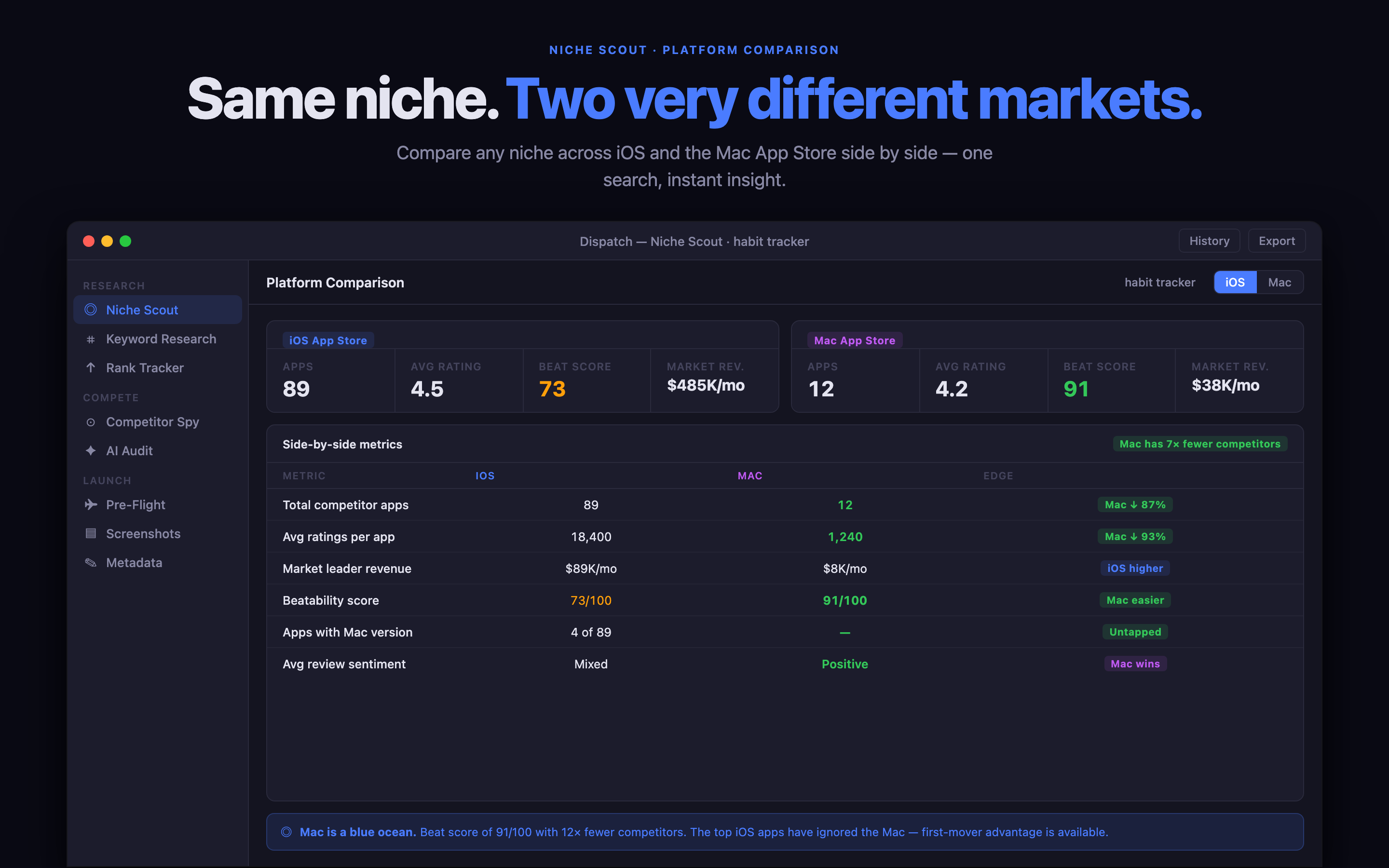
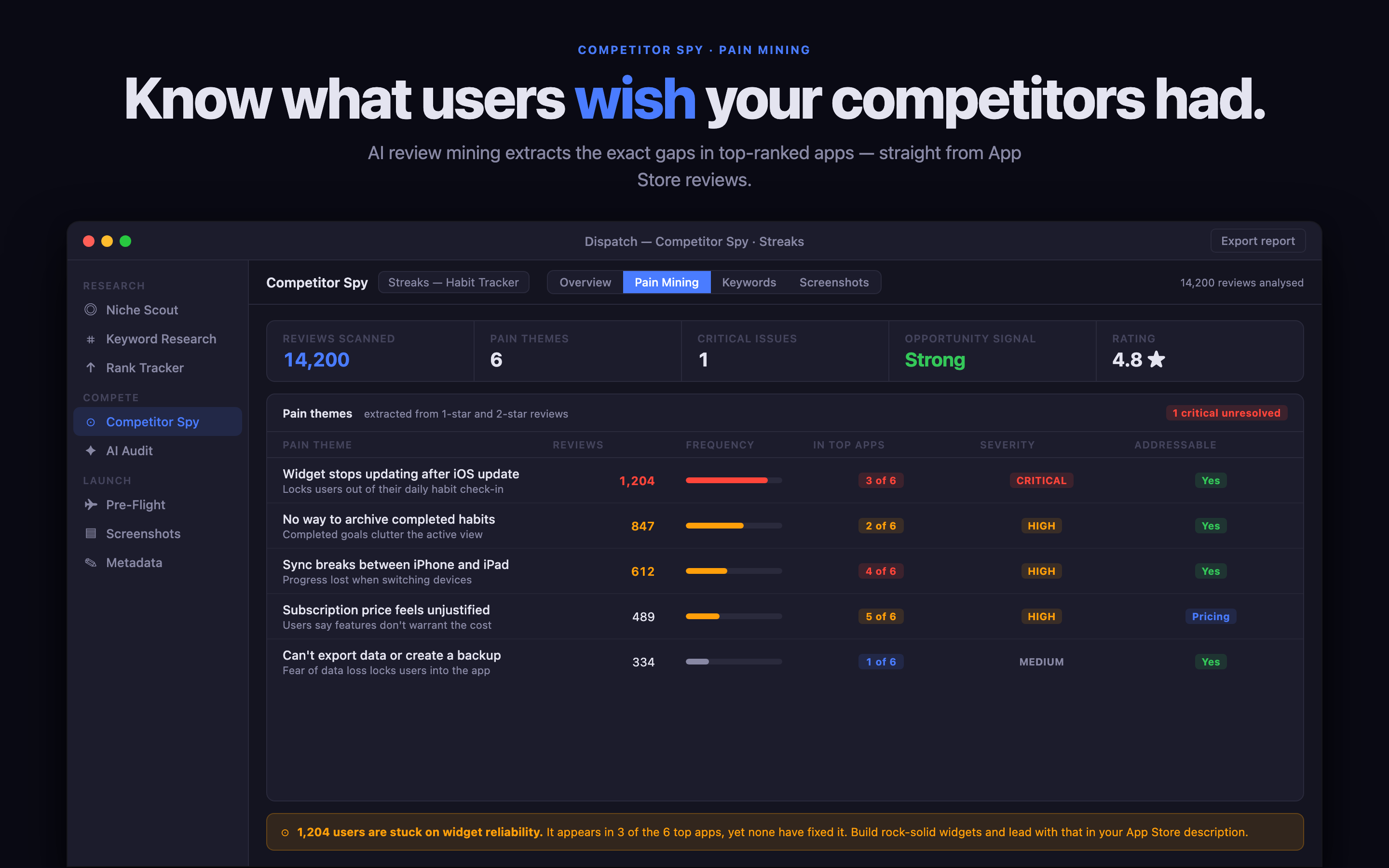
Decide which app to ship next. Pick a niche, pick a country — get top-20 incumbents scored on beatability (update cadence, rating, footprint, listing effort), abandonment flags, price distribution, rough install + revenue bands, and an on-device AI clustering of what users actually hate about today's apps. Export a Markdown niche report. Built on public App Store signals + Foundation Models — nothing leaves your Mac.
🕵️
Competitor intelligence that compounds
One click clusters any rival's reviews on-device into bugs, feature requests, pricing gripes and UX friction — a ready-made list of where to beat them. Then it remembers: re-check weeks later and Dispatch shows what they fixed, what's new, and what's still unaddressed. It even watches your tracked competitors weekly and pings you the moment one ships a fix you were going to win on. Longitudinal competitive intel no browser tab — or rival tool — gives an indie.
🎯
Keyword Gap (AI)
AI-grounded keyword gap analysis: pulls the listings of the apps that actually rank for your search term and finds the phrases they lean on that your listing is missing — read semantically, not just word-counted, with High/Medium/Low priority and the reasoning behind each gap. Pre-fills from your latest metadata draft. On-device.
🤖
Meet Dispatch-kun
Your on-device AI co-pilot lives in a chat panel from any page. Ask "what's my MRR?", "draft a press email", "audit all my apps", "reply to a review" — Dispatch-kun answers using your live data and proposes a one-click action. 12+ approvable commands, mood-aware avatar that proactively pings when something needs attention, full conversation history. Runs entirely on Apple Foundation Models — nothing leaves your Mac.
🌅
AI Daily Briefing
The "morning newspaper for your apps." On-device Foundation Models reads every signal Dispatch tracks — chart positions, MRR, reviews, crashes, competitor moves, keyword ranks — and writes a 90-second exec summary with three prioritised actions, a win to share, and a risk to watch. Auto-runs once a day, persists across pages. Strict grounding rules so it cites real data, not invented milestones.
⌘
Quick Switcher (⌘K)
Spotlight-style command palette from anywhere in the app. Indexes every sidebar tool, every metadata draft, every saved keyword, plus curated quick actions. Fuzzy match, arrow-key navigation, Enter to open. The fastest way to get anywhere in Dispatch — never lift hands off keyboard.
📋
Workflows + Bulk Operations
Save common Dispatch sequences as one-click recipes (Weekly Review, Launch Prep, Health Check, Monthly Retro, Crisis Mode, and 5 more starter templates). A floating banner walks you through each step. Plus real bulk operations across all your apps: Import all from ASC, Audit all apps with a clickable scoreboard, Generate all press kits at once.
🧾
Custom Product Pages
List, create, and delete CPPs across every app on your account. Copy the ?ppid= share URL for ad campaigns and A/B tests. State pills, locale counts, and a one-click jump to ASC for the per-version asset config.
🧮
Bulk Localization Grid
Every locale × every field in one scrollable matrix. Edit in place, live char counters that go red over Apple's limits, automatic detection of words wasting your 100-char keyword budget by repeating name or subtitle. Add any of 39 locales from a flag-prefixed picker.
💬
Testimonials Pipeline
Turn 5-star App Store reviews into three outputs: branded PNG share cards for X / Mastodon, a /testimonials block published to your Site Studio site, and a "Loved by N+ users" homepage CTA auto-derived from the count. Attribution masked per Apple's reuse terms.
📰
Press Kit Generator
One click → journalist-ready ZIP. Icons at 7 sizes, hero screenshots, README with quick-facts, drop-in press release template, top reviews as testimonials, embeddable HTML badge, and JSON-LD structured data for SEO. Email it to writers, drop into Site Studio, or attach to a Product Hunt submission.
📣
Launch Day Coordinator
Coordinated cross-channel launch console for 10 channels: Product Hunt, Show HN, r/iosapps, r/macapps, r/iosdev, X, Bluesky, Mastodon, Indie Hackers, MacStories pitch. Per-channel checklists + optimal timing + open-the-submission-page links. On-device AI drafts a different post per channel tuned to each community's culture — Show HN gets anti-fluff technical, PH gets a hook + 3 differentiators.
📈
App Store Charts tracking
Live Top Free / Paid / Grossing rank across 19 countries and 25 categories, from Apple's public RSS feeds. Daily snapshots build a 14-day sparkline per app per chart. One-click "Share win" cracks open a branded PNG card and pre-written caption ready for X / Mastodon / Slack — 🥇 #1, 🚀 Top 10, 🔥 Top 50.
📱
iOS Simulator Companion
Drives any booted Simulator from inside Dispatch: send push notifications, open deep links, pin the status bar to 9:41, set GPS, switch language / locale, toggle dark mode and dynamic type, capture pristine PNG screenshots or H.264 video. All via Apple's supported simctl — no entitlements, no private APIs.
🚨
Crashes by build + spike alerts
Pulls ASC Diagnostics per build across every app you own. Surfaces total crash weight + the top stack-sample signatures inline, and fires a menu bar notification when a build's crashes spike >50% between refreshes.
💸
Subscriptions & MRR
Pulls Apple's daily SUBSCRIPTION report and surfaces estimated MRR, active paying subscribers, free-trial pipeline, and at-risk (billing retry + grace). Per-product table with median-of-countries proceeds. Most indies make money on subs — Dispatch now tracks it.
🗂️
Home dashboard: Your Apps grid
Card grid of your actual apps right on Home, each with live marketing icon and four quick-action chips (Audit · Preview · Edit · Gaps) that jump straight to the right tool with the right draft pre-selected.
🧭
"Next steps" ASO coach
Runs heuristics across every draft and gives you a prioritised to-do list: what to do, why it matters, and a button that takes you there. A dismissible "research → decide → act" explainer onboards anyone new to ASO.
🎟️
In-App Events — end to end
Plan, localize, illustrate, schedule across 44 territories, AI-draft copy per locale, and submit for review without leaving Dispatch. Optional timezone-staggered launches.
📋
AI ASO Audit
One-click audit grades your listing 0–100 and writes a structured report: quick wins, keyword gaps, differentiators, risks, and a 30-day strategy. Export as PDF, PNG, or Markdown to share.
💡
Keyword Opportunity Finder
Mines every tracked competitor's description for terms your draft doesn't mention. Scores by competitor breadth + frequency + length. One click appends winners to your draft.
🎯
Plan a Campaign
AI-powered Apple Search Ads planner. Get keywords + bid suggestions tuned to your monthly budget. New What-If slider lets you drag $5–$1,000/mo and watch coverage scale live.
📊
Conversion Funnel
Pulls App Store Connect Analytics — impressions → page views → downloads. Honest funnel chart, daily trend, and a share-ready PNG card with overall conversion %.
🌍
Multi-country rank tracking
Save any keyword across up to 32 App Store countries at once. Daily background scheduler refreshes them all overnight; menu bar alerts when rank moves ±3 positions.
🔍
ASO Toolkit
Keyword research with on-device AI suggestions, ranking snapshots, competitor compare, screenshot OCR, and a metadata editor that pushes and pulls directly with App Store Connect.
🌍
Localize to 30+ locales
Write your App Store copy once. Translate every locale with Apple's on-device Foundation Models. Your text never leaves the Mac.
📥
Pull from App Store Connect
Import your existing live listing in seconds — metadata, the marketing icon, every screenshot per device class, and app previews.
📸
Screenshot Studio
Full-resolution canvas with device frames, headlines, custom palettes, AI background suggestions, per-locale variants, and one-click upload to ASC.
🎨
Icon Lab
Design app icons with Apple's Image Playground, extract palettes from your screenshots, and export a complete AppIcon set.
🌐
Site Studio
Generate a marketing site in seconds: themes including Liquid Glass, per-locale pages, blog, documentation, portfolio landings, JSON-LD, sitemap, and analytics embed.
🚀
Launch Hub
Pre-flight checklist, TestFlight panel, submissions tracker, notarization status, promo code batches, and an export pack that ZIPs every asset.
📊
Live Dashboard + Menu Bar
Today's downloads, 7-day trend, per-app breakdown, and unread alerts for review state changes — right in your menu bar.
🔒
Local-first & private
No backend. No analytics. Your drafts, screenshots, and credentials live on your Mac. API keys stay in the Keychain. On-device AI keeps your data off the wire.