Version 1.5.13 — August 2026
Dispatch is now available on the Mac App Store as a streamlined edition, alongside the deeper research edition sold directly by Yuzool.
Two ways to get Dispatch
The Mac App Store edition keeps the core App Store launch workflow focused and is purchased and updated through Apple. The direct Polar edition remains available for developers who want deeper competition analysis, expanded review mining and more detailed niche research.
Version 1.5.12 — July 2026
Mac-first research: the two things every other ASO tool skips entirely.
Mac App Store Pre-Flight checks
Pre-Flight now has a dedicated Mac section — a "macOS-only" card that surfaces the rejection causes that iOS-focused tools don't know exist. It auto-detects whether you have Mac screenshots in Screenshot Studio, then surfaces reminders for the rest: App Sandbox (required for MAS submissions), Hardened Runtime (required for notarization), arm64 native binary (Rosetta-only shows "Not optimized for Apple Silicon"), NSPrincipalClass = NSApplication (missing it causes a launch crash at review), entitlements matching API usage, and the PrivacyInfo.xcprivacy requirement for Mac.
Mac vs iOS niche comparison
After any Niche Scout result, a new Platform comparison card appears. One click fetches the same search term on the other App Store (Mac ↔ iOS) and shows a side-by-side metric table — apps scanned, avg rating, stale + abandoned %, top-2 audience share, avg days since update, and estimated installs. Green highlights show whichever platform gives you the better opening. The insight "this iOS niche is saturated but wide open on Mac" is now a one-click answer.
Version 1.5.11 — July 2026
Polish and research power-ups: sortable app tables, Mac App Store scouting, and a window-position fix for smaller displays.
Sortable incumbents table in Niche Scout
Every column in the Scanned Incumbents table is now clickable — sort by Beat score, Cadence, Rating, Ratings count, Price, Est. installs, or Est. revenue. Click a column again to reverse the direction. The default view stays sorted by Beatability descending (most beatable first), but now you can instantly pivot to find the highest-rated incumbents, the most-abandoned apps, or the biggest revenue bands.
iOS / Mac platform picker in Niche Scout
Niche Scout now has an iOS | Mac segmented toggle next to the country picker. Switch to Mac to scout the Mac App Store instead — incumbent data, beatability scores, and the review pain miner all work identically. Platform is saved per-search and shown as a badge in your scout history.
Window offscreen fix
On smaller displays (11" MacBook Air, 1280×800, external monitors with large Docks) Dispatch could open partially off-screen — the title bar under the menu bar, bottom cut off. The window now clamps to the screen's usable area on launch. It's a no-op on roomy displays.
Version 1.5.10 — June 2026
Pre-Flight grows teeth — from "are my assets ready?" to "will Apple reject this — and if they did, why?"
Guideline-referenced rejection checks
Pre-Flight now checks for the most common App Store rejection causes, each linked to the exact Review Guideline. It auto-scans what it can read from your metadata (other-platform mentions, placeholder / beta wording) and surfaces guideline-linked reminders for the rest — account deletion (5.1.1(v)), the privacy manifest + Required Reason APIs (5.1.2), meaningful usage descriptions, and demo accounts for review.
Live App Store listing scan
One click pulls the metadata that's actually on App Store Connect — across every locale — and scans it for rejection triggers: other-platform mentions, placeholder text, prices baked into the description, keyword-field problems (duplicate terms, your app name wasting characters), and dead support / marketing URLs — it actually pings them. Every finding comes with its guideline.
Rejection Doctor
Got rejected? Paste Apple's message and Dispatch names the guideline, explains in plain English what they're objecting to, and gives concrete fixes — preferring the cheapest correct path (a metadata edit over a code change over a written reply). Runs entirely on Apple's on-device model: private, no API key, nothing leaves your Mac.
Version 1.5.9 — June 2026
Your keyword ranks, finally at a glance.
Rank Tracker — the movers board
New under ASO Toolkit. Every keyword you track, across every storefront, in one dense table: inline Difficulty and Opportunity bars, your live App Store position, and a Trend column — a sparkline of where the rank's been plus a signed delta (+12 climbed, −8 slipped). Sort by Biggest movers to see exactly what changed overnight — or by best position, easiest, or top opportunity. It's built entirely on data Dispatch already collects: your saved keywords, their scores, and the daily rank history the background refresher quietly fills in for every storefront you track. No new setup — the board fills itself in over time.
Version 1.5.8 — June 2026
Ship a notarized Mac app outside the App Store — without remembering a single command.
Build & notarize a DMG from any .app
The Notarization tool can now turn a bare .app into a polished, distributable .dmg (drag-to-Applications layout and all) and notarize it — in a single paste. Pick your app and Dispatch generates a ready-to-run command, copies it to your clipboard, and opens Terminal; you paste once and it builds the disk image (create-dmg for a nice window, falling back to hdiutil), submits it to Apple's notary service, staples the ticket, and cleans up after itself. With App Store Connect connected you get the whole pipeline — select .app → distributable, notarized, Gatekeeper-ready .dmg — from one button.
Why a copied command rather than a click-and-wait? Dispatch runs in Apple's App Sandbox (so it can't invoke hdiutil/notarytool itself), and recent macOS refuses to run double-clicked scripts. Handing you a clean command to paste is the one approach that's both sandbox- and Gatekeeper-proof — and it leaves you fully in control of what runs.
Version 1.5.7 — June 2026
Two SEO upgrades: turn the competitors you already track into long-tail SEO real estate, and finally see your real Google performance.
Google Search Console
New under ASO Toolkit. Connect your Search Console account (on-device OAuth — Dispatch only ever stores a refresh token in your Mac's Keychain, and every call goes straight to Google) and see the queries you actually rank for, your top pages, and your average position — clicks, impressions, CTR and rank over the last 7/28/90 days. This is the authoritative, first-party view of how your marketing site performs in Google: no scraping, no third-party data subscription, nothing leaving your Mac except the requests to Google itself.
Comparison pages
New in Site Studio: flip one switch and Dispatch generates a polished “/vs/” comparison page for every competitor you track — “{Your App} vs {Competitor}” — built entirely from data it already has: their App Store snapshot (rating, rating count, category, seller) and the complaint themes mined on-device from their public reviews. Each page is a clean side-by-side table, an honest “what their users mention” section, your own pitch and a download CTA, with the right canonical tag, breadcrumb schema and a sitemap entry. They're internally linked from your homepage and regenerate per locale, so a few tracked rivals become a dozen pages targeting “{competitor} alternative” searches — the queries with the highest buying intent in the whole funnel. One click, no extra writing, no data subscription.
Version 1.5.6 — June 2026
Two themes: your research becomes shareable content, and the marketing sites you build get genuinely search-optimised.
Shareable cards — turn research into reach
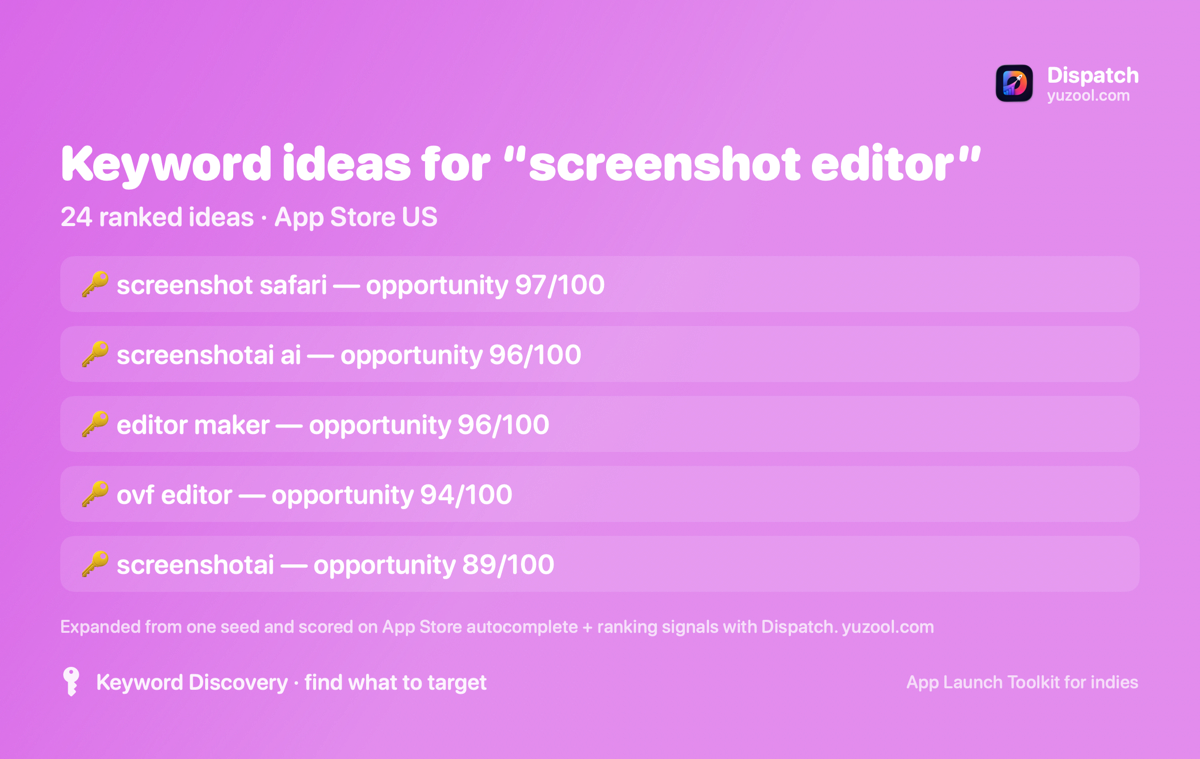
Six of Dispatch's most insight-dense surfaces now have a one-click “Copy shareable card” that generates a branded, watermarked PNG (plus a ready-to-post caption) you can drop straight into X, Reddit, Bluesky or Slack. The data is the content: Cost to compete (the Search Ads verdict), the Niche read from Niche Scout, Niche Compare (“most beatable of these niches”), Keyword Discovery (your top keyword opportunities), AI ASO Audit (your score + top fixes), and Competitor Spy (“what users hate” about a rival). Run one a week and your own teardowns become marketing that points back to your app — every card carries the Dispatch mark.
Site Studio gets serious about SEO
Every site Dispatch generates is now hardened for search and social, automatically:
- Smart App Banner — iOS Safari shows the native “Open in App Store” install bar (parsed from your App Store URL).
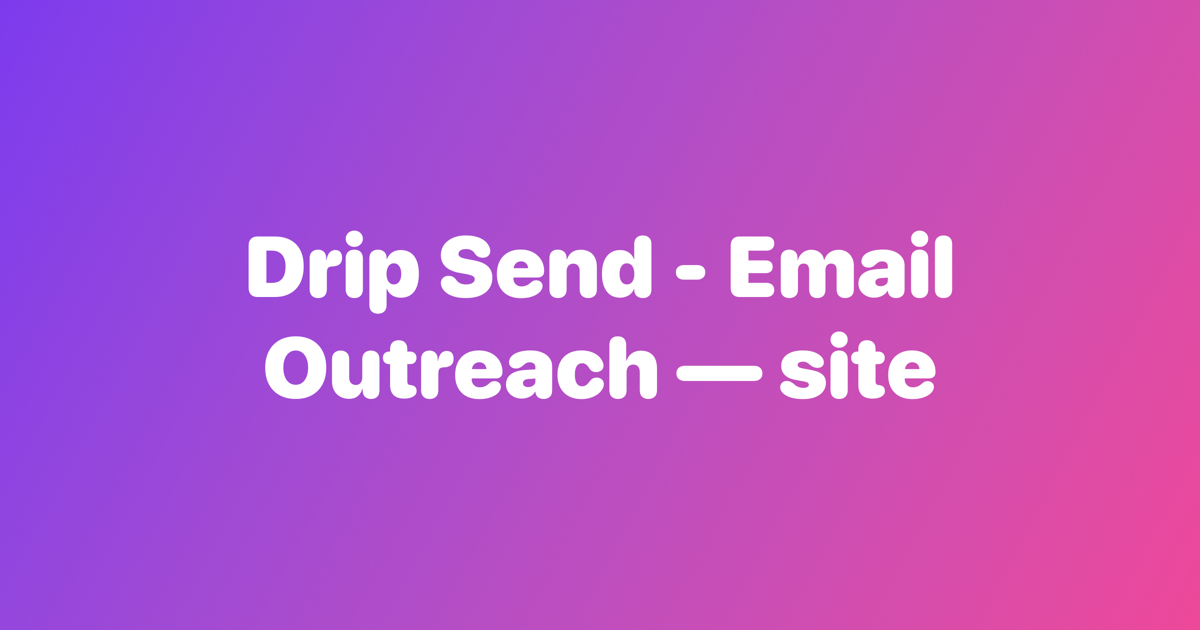
- Auto social image — a branded 1200×630 Open Graph card is rendered when you have no hero graphic, so links unfurl with a real image on X, iMessage and Slack instead of a bare favicon.
- FAQ section + schema — add Q&A in Site Studio and Dispatch renders a tidy collapsible FAQ and emits
FAQPagestructured data so Google can show rich Q&A results. - Richer structured data — individual
Reviewsnippets (alongside the existing aggregate rating) andBreadcrumbListon blog & docs pages. - hreflang alternates across your locale pages, plus an apple-touch-icon for crisp home-screen / pinned-tab icons.
- IndexNow — Dispatch publishes the ownership key on every build; after you deploy, one “Ping IndexNow” gets Bing & Yandex to recrawl within minutes instead of days.
Version 1.5.5 — June 2026
One headline question, answered honestly: can I actually win this niche, and what would it cost me to fight for it on Apple Search Ads?
Cost to compete
New in Ad Insights. After you pull the apps ranking for a term, Dispatch reads the competitive shape of that result — how many strong incumbents (25k+ ratings) and mega-incumbents (500k+) sit in the top 10 — and turns it into a plain-English cost-to-compete estimate: a realistic Apple Search Ads cost-per-tap band for the term, a rough monthly spend range to buy enough taps to matter, and a colour-coded winnability verdict — 🟢 worth a shot, 🟡 fightable but pick your moment, 🔴 a money pit for an indie. So before you sink a budget into a keyword, you know whether it's a fair fight.
It's built from observable signals — incumbent strength, rating-count tiers, current CPT bands — and is labelled exactly that way in the app: an estimate of what it would take you to compete, not a readout of any rival's actual spend, which Apple doesn't expose. Honest by design, like every number in Dispatch.

Version 1.5.4 — June 2026
Two deeper keyword-and-review tools, narrowing the gap with dedicated ASO trackers — without leaving the local-first model.
Keyword Discovery
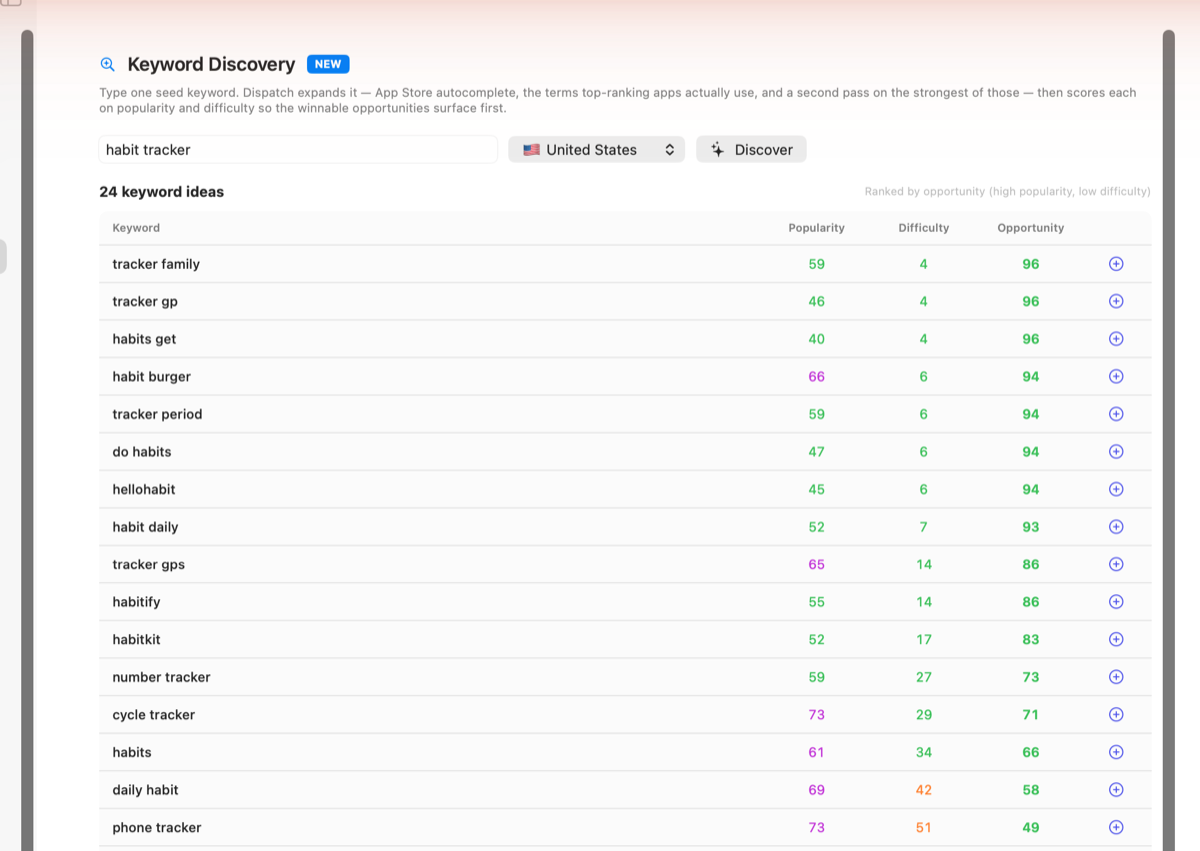
New under ASO Toolkit. Type one seed keyword and Dispatch expands it into a ranked list of keyword ideas you didn't think of — pulled from App Store autocomplete, the terms top-ranking apps actually use, and a second pass on the strongest of those. Each idea is scored on popularity and difficulty, ranked so the winnable, high-traffic ones surface first, and one-click savable into your tracked keywords. This is the "what should I target?" surface that complements Keyword Research's deep-dive on a term you already have.
Worldwide Reviews Radar
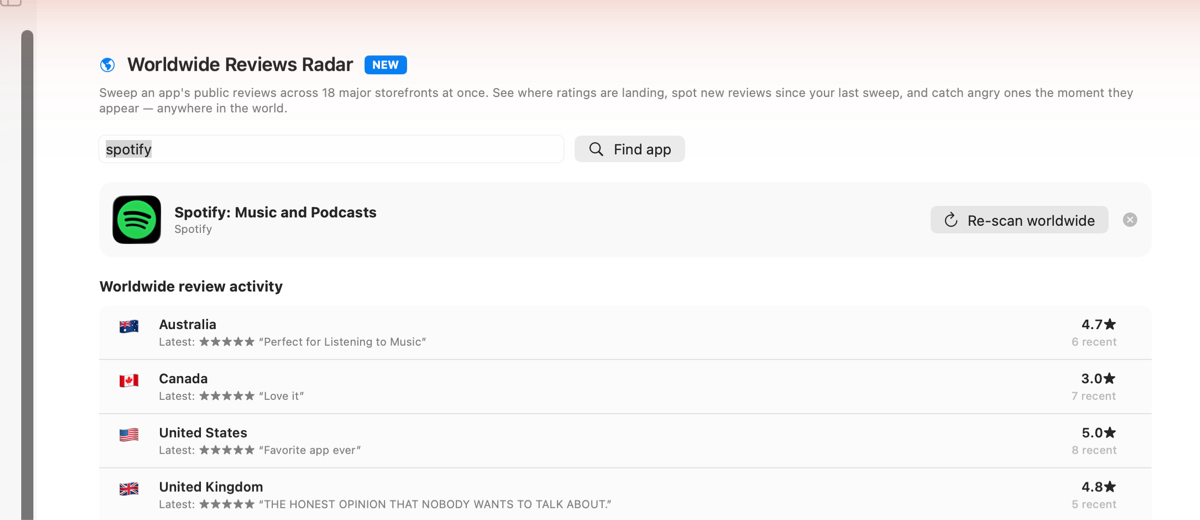
New under ASO Toolkit. Pick any app — yours or a competitor's — and sweep its public reviews across major App Store storefronts at once, so you see where your ratings are landing worldwide in one view instead of checking countries one at a time. Each sweep is remembered, so the next one flags exactly what's new since you last looked — and Dispatch-kun pings you the moment a fresh 1–3★ review lands anywhere, so you can reply before it festers. (Coverage note: it reads Apple's public app pages, which server-render reviews in the major storefronts — typically the English-speaking markets plus several others — so not every storefront returns on every app.)
Send credentials to Dispatch Kun (iOS) by QR
New in Settings → App Store Connect → Mobile setup: show an encrypted setup QR code and a one-time transfer code, then scan it in the Dispatch Kun iOS companion app — no more typing your issuer ID, key ID, vendor number, and a multi-line .p8 private key on a phone keyboard. The key is AES-256-GCM encrypted with a key derived from a random salt plus the transfer code, so a stray photo of the QR is useless without the code shown beside it. Includes a copy-payload fallback; the code expires when you close the window. Nothing leaves your devices.
Buy with Stripe or Polar
The site now offers two checkout options side by side — pay by card via Stripe, or via Polar — your choice, same one-time price.
Version 1.5.2 — June 2026
The "Scout with teeth" release. Scout mode goes from "useful one-off" to "tool you live in when deciding what to ship next," the AI gets honest and grounded, and competitor research stops being something a browser tab can do.
Apple Intelligence status, front and centre
Every AI feature in Dispatch runs on Apple's on-device model — which is off by default and needs a one-time opt-in plus a multi-GB download. Previously, if it was off, a dozen features showed tiny grey "AI unavailable" labels and it was easy to conclude the AI was fake. Now there's one prominent app-wide banner that detects exactly why the model isn't running (not enabled / still downloading / device ineligible), links you straight to the right System Settings pane, and re-checks automatically when you come back — so the whole app lights up the moment you enable it, no relaunch.
Competitor Spy: "What their users hate"
One click pulls any competitor's most recent public App Store reviews and clusters the complaints on-device into bugs they're shipping, features users beg for, pricing gripes, and UX friction — plus what users love so you know what not to break. That's a ready-made list of where you could beat them. The thing a browser tab fundamentally can't give you. (Reuses the same on-device review-mining engine introduced for Niche Scout.)
Keyword Gap (AI) in Keyword Research
New AI-grounded gap analysis: it pulls the listings of the apps that actually rank for your search term and finds the keyword phrases they lean on that your own listing is missing — reading them semantically (multi-word phrases, intent) rather than just counting words, and explaining why each gap matters with a High/Medium/Low priority. Pre-fills your listing from your latest metadata draft, or leave it blank to see everything competitors target. Distinct from the frequency-based Keyword Opportunity tool — this one understands the listings.
Grounded AI — no more invented problems
Tightened the on-device review-clustering prompt so the model can only report issues that actually appear in the reviews. Removed an example from the prompt that the small model was occasionally parroting as a real bug across unrelated apps. Empty categories now stay empty instead of being padded with plausible-sounding fiction. Honest output beats impressive-looking output.
Insight → action everywhere
Research that just sits there is half-useful. Now every insight flows straight into action. In Keyword Gap, each missing keyword has a one-click Save that drops it into your tracked keywords (and from there into rank tracking + the Metadata Editor). In Competitor Spy, the "What their users hate" panel has Copy as feature spec — turns the clustered pain into a Markdown brief you can paste straight into Notion, Linear, or a roadmap doc.
Dispatch-kun, the synthesis brain
Kun no longer just answers single-tab questions — it now reads your latest keyword gaps and competitor review pain alongside your scout history and your own apps' signals. Ask "given my research, what's my best opportunity to build next?" and it weaves them together into a structured recommendation — opportunity, the evidence behind it, and a concrete first step — naming the specific data points it used. Built as a structured generation (not free text), which the on-device model handles far more reliably, and it weights your freshest research most heavily so a gap you just ran beats a stale scout. The cross-tab synthesis no single page can give you.
Winnable vs crowded keyword gaps
Every keyword gap now carries a live Winnable / Moderate / Crowded badge alongside its priority — so you can tell a gap worth chasing from one that's already a bloodbath. Priority tells you how hard competitors lean on the term; winnability tells you how hard the term itself is to rank for. Chase the High-priority, Winnable ones first.
Gaps → Search Ads campaign in one click
The full insight loop now closes: from each Keyword Gap result, pick a monthly budget and hit Plan campaign — Dispatch turns the gap keywords into a ready-to-run Apple Search Ads campaign with realistic 2026 bids and daily-tap allocations that stay inside your budget (it does the taps × bid ≤ daily-budget arithmetic for you). Copy it as CSV and paste into Apple Search Ads. Competitor gap → target keyword → budgeted campaign, all on-device.
Longitudinal competitor tracking — the moat
Competitor Spy's "What their users hate" now remembers. Re-analyse a competitor weeks later and Dispatch shows a "Since your last analysis" strip: which complaints they fixed (your window may be closing), which are new (fresh opportunity), and which are still unaddressed (safe to build against). The themes are fuzzy-matched across runs, so it tracks the meaning of a complaint, not its exact wording. The change history also feeds Kun's synthesis, so a complaint that's persisted for weeks counts as stronger build evidence than a fresh one.
Weekly competitor watch — set and forget
The piece that makes the moat hands-off: once a week, Dispatch quietly re-checks every competitor you've tracked, re-clusters their reviews on-device, and — the moment one ships a fix for something you were positioned to win on — pings you proactively ("your window may be closing") with a local notification, so you're never the last to know. Runs in the background on Apple's own scheduler, gated on Apple Intelligence, toggleable in Settings → Dispatch-kun. Nothing else on the market gives an indie longitudinal review intelligence that compounds while you sleep.
Polish
Fixed the Dispatch-kun avatar so it's a clean, centred portrait of his face again across all moods. Crisper, friendlier, no stray laptop.
Niche Compare
New Niche Compare sidebar tool under Scout. Pick 2–3 saved scouts from history and Dispatch lays them out as a side-by-side scorecard: verdict, avg rating, avg days since update, stale + abandoned %, top-2 audience concentration, install band, paid-revenue floor, avg top-5 beatability. The winner per metric is highlighted green, and an overall pick — the niche that wins the most metrics — is called out at the bottom. Powers the "I have three ideas, which is most beatable?" decision every indie faces. No re-fetching: works entirely from the persisted scout payloads.
Acquisition-target detector
New filter chip on Niche Scout: Filter: buyout candidates. Surfaces the apps in your scan that fit the "buy and revive" profile — stale or abandoned cadence, ≥ 50 ratings (so there's a real audience to buy), solo / indie seller (so a five-figure offer might land). The kind of apps that list on MicroAcquire / Acquire.com for $5k–50k. Repositions Dispatch as "helps you ship apps · helps you decide what to ship next · helps you find apps to buy instead of build", a meaningful differentiator vs every other ASO tool.
Scout-aware Dispatch-kun
The chat panel's data block now includes a RECENT SCOUTS section summarising the latest 3 scout runs — verdict, niche signals, install / revenue bands, top-3 most-beatable apps, and the AI-mined pain headline + top bugs / feature requests if captured. So you can ask Kun "why is RescueTime so beatable?", "summarise the focus-timer pain in one sentence", or "compare the habit-tracker and pomodoro niches" and get answers grounded in your real scout data, with the same anti-hallucination rules as every other Kun reply.
Maintenance signal
The per-app beatability score now combines app age with months since last ship. An 8-year-old app that hasn't shipped in 10 months tells a very different story than a 6-month-old app that hasn't — the first signals "owner moved on after a successful run" (genuinely beatable, they probably won't come back), and is now visible in the score reasons tooltip ("\(value)-year-old app, last shipped \(value) months ago — owner moved on"). Bumps beatability by +10 for mature, dormant apps. Honest about scope: there is no public per-app version-history API; this is the most reliable signal derivable from what Apple does expose.
Charts-aware Niche Scout
If a scanned app happens to be in any App Store Chart you're tracking locally, Dispatch shows a tiny #42 rank badge next to its price in the Scout results. Cross-references the iTunes Search result against your local ChartRankSnapshot history, latest snapshot first. No badge when there's no overlap — silent degradation. Grows more useful the longer you've been tracking charts.
Scout history + scout from chat (1.5.1 carried forward)
Every scout is auto-saved to a "Recent scouts" disclosure section at the top of the Niche Scout page — one click re-opens any past run instantly without re-fetching, with pain themes restored if they were mined. De-dupes against the latest entry within 60 seconds. And "scout the focus-timer niche in Japan" typed to Dispatch-kun deterministically parses the term + country and auto-runs the scan. Both wired in 1.5.1, now feeding Niche Compare too.
Local-only telemetry tier 1
New Settings → Diagnostics tab shows every counter Dispatch keeps about its own usage, grouped by feature area (Dispatch-kun, Scout, workflow features). 15 closed-set events including kun panel opens, action approvals / cancellations, proactive ping firings, scout searches, pain mines, exports, scout-from-kun launches, briefings generated, recipes started, quick switcher opens. Counters are local-only — nothing leaves your Mac unless you click Copy diagnostics JSON and paste into a support email. Reset all counters starts a clean measurement window. This is what makes future product decisions evidence-led instead of vibes-led.
Version 1.5.1 — June 2026
The "Scout mode" release. Dispatch grows a pre-build research lens that repositions the toolkit: before, it started the day you had an app — now it starts before. Same data pipelines, opposite end of the lifecycle. Plus a small but high-impact Dispatch-kun fix so proactive pings are persistent instead of "ping-and-forget."
Niche Scout
New top-level Scout sidebar section with the first tool inside: Niche Scout. Type a niche term ("habit tracker", "expense splitter", "focus timer") and pick a country — Dispatch fetches the top 20 incumbents from the App Store and scores each on a transparent 0–100 beatability rating built from five additive signals: update cadence, rating quality, audience footprint, listing effort, and solo-vs-corporate seller. Every score has a reasons array surfaced via tooltip so you see why "Beat 72" was assigned, never a black box. Cadence flags (Active · Slow · Stale · Abandoned) surface incumbents the original dev has stopped shipping.
Rough financial bands
Per-app and niche-level estimated install ranges + paid-app revenue floors, derived from rating-count × 100–500 industry install ratio × Apple's 70% net. Bands are deliberately wide so they honour the underlying noise — "this niche has ~500k–2.5M lifetime installs across the top 20, paid-app revenue floor ~$80k–$400k" is honest in a way that "$1.3M ARR" never is. Not a substitute for Sensor Tower / data.ai, but enough to filter noise from signal in a few seconds and decide whether to dig further.
On-device review pain miner
One click runs Apple Foundation Models on the most recent public reviews of the top 5 incumbents (1-3★ heavily weighted, 4-5★ retained for praise themes). Output: clustered themes — bugs, feature requests, pricing complaints, confusion, performance issues, praise — plus a headline insight ("37% of recent 1-stars mention sync failures") and one concrete next action. That's a free, ranked feature-spec for the app you haven't built yet.
Niche report export
One-click Markdown export bundles verdict, niche dynamics (avg rating, avg days since update, abandoned share, top-2 concentration, price buckets, install/revenue bands), incumbent table with all scores and financial estimates, and the review-pain themes — into a single file you can paste into a Linear ticket, an Obsidian vault, or a co-founder email.
Dispatch-kun: scout from chat
New runNicheScout action. Say "scout the focus-timer niche in Japan" or "research expense splitters" in chat — Kun deterministically parses the term + country, opens Niche Scout, and auto-runs the scan. No further clicks. Falls back to opening the page with default inputs if parsing fails.
Dispatch-kun: persistent pings
Fix: proactive pings (red dot + tooltip) used to clear the moment you opened the chat panel, leaving no record of what Kun wanted to surface. Now pingAndPersist inserts the ping as a real KunMessage into SwiftData with an inline jump button — so you see "Crash signatures reported overnight — worth a look" in your chat history with an Open Crashes button even if you opened the panel hours later. De-dupes against the latest message so a Daily Briefing refresh with the same reason doesn't double-post.
Version 1.5.0 — June 2026
The "Meet Dispatch-kun" release. A single, opinionated addition: an on-device AI co-pilot that lives in a slide-over chat panel from any page in Dispatch, knows everything the app already tracks about your business, and can do things with one click after you approve. Built across four phases — chat foundation, action proposals, recipe and bulk hand-offs, and external composers — Dispatch-kun is the first interface where you can talk to your ASO toolkit instead of clicking through it.
Dispatch-kun, your on-device co-pilot
Open the chat panel from any page (avatar in the toolbar). Ask anything: "what's my MRR?", "summarize my apps", "how is Drip Send doing?", "are any submissions stuck?". Dispatch-kun reads the same rich data block the Daily Briefing uses — chart positions, MRR, reviews, crashes, competitor moves, keyword ranks, draft metadata, integration status — and answers in plain English. Strict grounding rules: every specific fact in a reply must trace to literal text in the data block, so you get cited numbers, not invented ones. Conversations persist across launches via SwiftData.
12+ approvable actions, never silent
When you give Dispatch-kun a verb-led instruction, it proposes a single action and you approve before anything runs. Shipping kinds: compose a press email pre-filled with your most-recently-edited draft's app name, tagline, App Store URL, and first description paragraph; compose a tweet on X; compose a Mastodon toot; start a Weekly Review / Launch Prep / Health Check recipe (seeds a fresh recipe and starts the persistent runner banner); audit all my apps in bulk; reply to the top unreplied review (jumps to Reviews so you can draft with full context); add a Calendar reminder; open the Shortcuts gallery for user-defined automation; email Yuzool support; open the share sheet. Three layers of action safety: deterministic client-side verb detection (so "draft a press email" never triggers a recipe), keyword verification of the AI's proposal, and a confirmation card on every approval.
Mood-aware avatar with proactive pings
Dispatch-kun's face reflects the state of your business. Crashes reported overnight? Concerned. Stuck submission? Alert. New 5-star review or chart milestone? Celebratory. The avatar flashes a soft red dot in the toolbar when there's something he wants to surface, and the panel opens to a friendly proactive nudge that links to the relevant page. No constant noise — pings are rate-limited and grounded in actual data changes.
Marketing profile integration
Composers pull from the same metadata your apps already have: press emails grab your tagline, App Store URL, and a quote-worthy line from the description; share text references your actual app. No more bracketed placeholders.
Built-in help and on-device privacy
The "⋯" menu on the chat header opens a help sheet listing every command Dispatch-kun understands, every page he can jump to, and how the proactive pings work. Everything runs on Apple Foundation Models — nothing leaves your Mac, no API key, no cloud, no metering. Pro features stay gated even when Dispatch-kun proposes them.
Version 1.4.0 — June 2026
The "Power Mode" release. Four focused additions make Dispatch dramatically faster to use day-to-day without adding more breadth. Existing users get the biggest leverage gain since the dashboard refactor in 1.2.
AI Daily Briefing
New Home dashboard card at the very top: every morning, Dispatch reads everything it knows about your apps — App Store chart positions, MRR, recent reviews, crashes-by-build, competitor activity, keyword rank changes — and on-device Foundation Models writes a 90-second executive summary. Output: a one-sentence headline ("Drip Send dropped from #41 → #58 in Productivity overnight, mostly due to a 1-star review mentioning the iOS 26 crash"), 2-3 sentences of broader context, three prioritised actions for today with the specific data point that triggered each, plus a win to share and a risk to watch this week. Auto-runs once per day on first launch; manual re-run anytime. The "morning newspaper for your app" nobody else has.
Global Quick Switcher (⌘K)
Spotlight-style command palette from anywhere in the app. Press ⌘K: a centred sheet appears with a single search field. Indexes every sidebar tool, every metadata draft, every saved keyword, plus curated quick actions. Fuzzy matches what you type, ranks by title-prefix > title-contains > subseq match. Arrow keys + Enter + Esc — never lift hands off keyboard. Each result shows a small category pill (TOOL / DRAFT / KEYWORD / ACTION) so you know what you're about to jump to. Indispensable once you have it.
Workflows & Bulk (new Admin sidebar tool)
Save common Dispatch sequences as one-click recipes. Each recipe is an ordered list of actions (Open AI ASO Audit, Open Press Kit, Check App Store Charts, Read recent Reviews, etc.). Run a recipe: a sheet walks you through each step with "Open in Dispatch" + "Next →" buttons so you move at your own pace; the runner navigates the sidebar for you between steps. Four starter templates seed instantly: Weekly Review, Launch Prep, Health Check, Pre-Submit. Plus a dedicated Bulk operations section for actions that fan out across every app you have (Audit all, Charts overview, Generate all press kits). The "I click the same 6 buttons every Monday" problem is gone.
Version 1.3.0 — June 2026
The "marketing beyond the App Store" release. Two big-ticket additions — a one-click Press Kit Generator and a coordinated Launch Day console with AI-drafted community-specific posts — turn Dispatch from "ASO toolkit" into "indie marketing OS." Same local-first ethos, all on-device AI, no servers, no telemetry.
Marketing Profile — one source of truth for app URLs + contacts
Stop retyping the same App Store URL, marketing site URL, support email, Twitter handle, and developer name across every tool. Pull from App Store Connect now harvests these from Apple (the canonical https://apps.apple.com/app/id<ID> link, the marketingUrl + supportUrl fields you set in ASC, the seller name, and any mailto: support email gets hoisted into a usable email field) and stores them as a Marketing Profile on each draft. Press Kit, Launch Day, Editorial Nomination press-links field, and Site Studio all prefill from the same fields and write user edits back, so anything you change in one place propagates to every other tool. The "I just made up an email address again because the form was blank" problem is gone.
Press Kit — AI-drafted editorial copy with review-before-export
The press release + about-the-app templates used to ship with placeholder text in [brackets] — fine, but every indie left them blank. Now there's an Editorial copy (AI assist) card above the icon section with a Draft with AI button. On-device Foundation Models reads your draft's metadata and writes:
- Lead sentence — the news-lead announcement that goes at the top of press-release.md
- Why it matters — 1-2 sentences on the user problem, used in the press release
- Differentiators — three specific bullets for "What's unique" (not generic adjectives — the prompt explicitly bans "powerful", "beautiful", "modern")
- Key features — 5-8 user-visible features in
**Name** — valueformat for about-the-app.md - Technology paragraph — calls out which Apple frameworks the app uses (SwiftUI, SwiftData, Foundation Models, etc.)
- Long description — 3-4 paragraphs of journalist-friendly copy
- About the developer — short bio paragraph appropriate to solo dev vs studio
Every field is editable inline before export — what you see in the boxes is exactly what ships in the ZIP. Leave a field blank and the template falls back to the original bracketed placeholder, so the kit is always exportable even before you run the AI.
Testimonials Pipeline — turn 5-star reviews into share cards + Site Studio block + "Loved by N+" CTA
New Promo Studio → Testimonials Pipeline page closes the loop on the existing Reviews data. Pick an app, Dispatch fetches up to 200 reviews via ASC, filters to 5-star quotes, and renders them as a selectable grid. Each card has:
- A checkbox to mark it for publishing
- A Share win button that renders a branded 1200×630 PNG card (via the existing ShareCardKit) with the quote as the headline and "— Sarah, US · ⭐⭐⭐⭐⭐" as the subline, plus a pre-written caption ready for X / Mastodon / Slack
- An Auto-pick top 6 shortcut for the most-quotable longest 5-stars
A Publish to Site Studio button writes the selected testimonials to the linked SiteProject's new testimonialsJSON field — Site Studio reads it on the next site build to render a /testimonials block. The KPI bar surfaces a Loved-by N+ count (50+, 100+, 500+, 1K+) auto-derived from the total 5-star review count, ready for a homepage CTA. Attribution masks every quote to first-name + country per Apple's review reuse terms. Press Kit's testimonials section reads from the same source automatically, so publishing here updates the press kit too.
Launch Day — coordinated cross-channel launch console
New Promo Studio → Launch Day page bundles two related capabilities into one workspace:
1. Launch Day Coordinator — a per-channel checklist + timing guide for 10 launch channels: Product Hunt, Show HN (Hacker News), r/iosapps, r/macapps, r/iosdev, X/Twitter thread, Bluesky, Mastodon, Indie Hackers, and a MacStories press pitch. Each channel carries: a tinted icon + tone subtitle, optimal posting time, a "Open submission page" button, a "Read guidelines" button, and a pre-flight checklist of 5-6 items specific to that community (e.g. for Product Hunt: find a hunter ≥ 100 followers, prepare gallery, line up first-2-hour upvoters, schedule for 12:01am PT; for Show HN: title format "Show HN: X – Y", "I built this because…" opener, mention tech stack, don't shill in comments). Checkbox progress persists between launches per app via @AppStorage, with completion seals when a channel is fully prepped. A "Recommended timeline" card at the top suggests when to fire each channel: T-7d soft pre-announce, T-1d schedule Product Hunt, Day 0 staggered blast, Day 1-3 long tail, Day 7+ iterate.
2. Community Post Drafter — on-device Foundation Models generates a different post per channel, tuned to each community's actual culture. Show HN gets an anti-marketing technical voice opening with "I built this because…" and zero emoji. Product Hunt gets a hook + 3 differentiators with at most 2 emoji total. r/iosdev gets a solo-dev humility tone with an explicit feedback question. Indie Hackers gets a numbers-first milestone post. X gets a thread split by '---' separators. The MacStories pitch is formatted as an email with subject line. A "Developer note" field lets you nudge the AI on tone or call out a specific angle that injects into every channel's draft. Edit inline, copy to clipboard, paste into the platform's submission form. The unwritten contract about what "fits" in each community is the difference between landing on the front page and getting downvoted — Dispatch writes a different post per channel so you don't have to.
Press Kit Generator
New Promo Studio → Press Kit page produces a journalist-ready ZIP in one click. Pick an app, confirm the metadata, choose hero screenshots, and Dispatch packages:
- icons/ — your marketing icon at 32, 48, 64, 128, 256, 512, 1024 pixels
- screenshots/ — up to 8 hero screenshots in original resolution
- README.md — table of contents, quick-facts table, contact info, how-to-use guide
- press-release.md — drop-in announcement template with bracketed sections to fill
- about-the-app.md — long-form description for journalists
- testimonials.md — your top 5-star App Store reviews, attribution masked to first-name + country per Apple's review reuse terms
- embed.html — paste-able HTML badge with icon + screenshot + App Store CTA
- meta.json — JSON-LD
SoftwareApplicationschema so Google renders rich App Store cards in search results, including aggregate rating if reviews are included - contact.txt — single file with press contact, web, App Store URL, Twitter handle, developer name
Every indie needs a press kit; almost none have one. Now it's a 30-second job. Email the ZIP to a journalist as one attachment, drop it into Site Studio's static/ folder for a self-serve press page, or attach it to a Product Hunt submission.
Version 1.2.3 — June 2026
App Store Charts tracking + shareable win cards.
App Store Charts (live + historical)
New ASO Toolkit → App Store Charts page tracks where your apps rank in Apple's Top Free / Top Paid / Top Grossing charts across 19 country storefronts and 25 categories. Data comes from Apple's public RSS feeds — same data the App Store app shows under Charts — so no API keys, no rate limits, just live position. Your apps' positions surface in a dedicated "Your apps in this chart" section with rank badges (🥇🥈🥉 / Top 10 / Top 50 / Top 100) and an inline sparkline of the last 14 days. Daily snapshots persist locally so the trend chart fills in automatically as you use Dispatch over time.
CPP A/B Analyzer — winner-by-conversion verdict
New Promo Studio → CPP A/B Analyzer page closes the loop on the existing Custom Product Pages feature. For every CPP on the selected app, Dispatch pulls Apple's Discovery & Engagement + Commerce reports, segments by CPP ID, and renders a real verdict: impressions, page views, downloads, page-view-to-download conversion %, and lift vs the lowest-converting qualifying variant.
A winner banner at the top shows the variant with the highest conversion rate plus the lift it's running, e.g. "Variant A is winning by 12.3% lift over Variant B — Medium confidence." Confidence escalates with sample size and lift magnitude (Low / Medium / High). Variants need ≥ 500 page views to qualify for the verdict — below that, Dispatch shows "Verdict pending" rather than calling a winner on noise. A trophy badge highlights the winning row in the comparison table; conversion rate cells colour-tint by tier (green ≥5%, blue ≥2%, yellow ≥0.5%). Date range picker covers 7 / 14 / 30 / 60 days; results refresh on change.
Release Diff — auto-diff against the live App Store version
New Launch Hub → Release Diff page pulls your currently-live App Store metadata for a chosen app + locale and diffs it field by field against your Dispatch draft. Name, subtitle, keywords, promotional text, description, What's New — each rendered with before/after side-by-side, strikethrough red on removals, green highlight on additions, and a per-field +N chars / −N chars badge. One click Copy diff as Markdown drops the whole thing into your release tracker or commit message.
The lead feature: AI-drafted Notes for App Review. On-device Foundation Models reads the diff and writes a 3-5 sentence paragraph in the developer's voice that calls out exactly what changed, ready to paste into ASC's "Notes for App Review" field at submission time. This is the field most indies leave blank — and pasting a real summary cuts rejection rates and review queue time noticeably, especially for subscription apps and apps with new privacy collections. A "Copy Review Notes" button + a direct "Open in App Store Connect" link round out the workflow.
Cohorts & LTV — credible subscription lifetime value
New Admin → Cohorts & LTV page pulls the last 30 / 60 / 90 days of App Store Connect's SUBSCRIPTION_EVENT reports and computes the metrics indie subscription devs actually need to make ad budgets: total Starts + Cancels in the window, mean lifetime, ARPU per period, and an estimated LTV (monthly-normalised ARPU × mean lifetime in months) — the proper ceiling for blended CAC.
A retention curve chart plots survival probability at Day 1 / 7 / 14 / 30 / 60 / 90 / 180 / 365 with KPI tiles for the four most important. A "Where churn happens" histogram buckets cancellations by lifetime week so you can spot trial fall-off vs annual-renewal lapse at a glance. An event-breakdown table tallies every Start / Activate / Renew / Reactivate / Pause / Cancel / Refund / Upgrade / Downgrade / Crossgrade row Apple reports. Methodology callout is honest: Apple's report doesn't expose per-subscriber IDs (privacy), but the Days Before Canceling field gives a credible lifetime distribution at the population level — exactly what real LTV tools use. Off by default in Settings → Sidebar since most apps don't sell subscriptions.
Review Insights — on-device theme clustering
A new card on the Reviews page runs Apple's Foundation Models over every review in your selected window and clusters them into six themes: bugs / crashes, feature requests, praise, confusion, pricing, and performance. The AI groups similar complaints — twelve users reporting the same iOS 26 crash become one item, not twelve.
The card leads with a headline pattern ("37% of recent 1-stars mention the same iOS 26 crash on launch") and ends with a next action ("Ship a hotfix this week for the launch crash on iOS 26"). Between them, a sentiment trend line shows daily average rating across the window, plus a star distribution histogram. Everything runs on-device — no review text leaves your Mac.
One-click Apple Search Ads API key
The ASA onboarding wall is finally gone. Previously you had to drop into Terminal, run two openssl commands to generate an EC P-256 key pair, manually cat the public file and copy-paste it into ASA — a hard stop for non-technical indies. Now the Apple Search Ads credentials card has a Generate key pair for me button: one click opens a folder picker (defaulting to ~/Documents/Dispatch-ASA-Keys/), generates the keys locally via Apple's CryptoKit framework, writes both asa-private.pem + asa-public.pem with proper owner-only permissions, pre-loads the private key into Dispatch, and copies the public PEM to your clipboard ready to paste into ASA's upload field. End-to-end ASA setup goes from ~20 minutes of Terminal-fear to about 3 clicks. The Terminal path stays documented in Help for power users who prefer it.
The Help → App Store Connect API Key and Help → Apple Search Ads sections are also now illustrated — four inline screenshots show exactly where the Reports / Users and Access / API tabs live in App Store Connect, and where in ASA Account Settings to paste the public key and copy the Client ID / Team ID / Key ID / Org ID. Plus the canonical idmsa.apple.com sign-in URL.
Help guide: dual workflows for new vs live apps
The "Recommended Workflow" doc is now Recommended Workflows (plural) with two paths. Flow A (the existing one) walks new-app builders from code-complete to submission. Flow B is brand new and aimed at indies whose app is already live on the App Store — five phases covering connect + baseline (15 min), research with Competitor Spy + Keyword Opportunity + Ad Insights (1 session), decide with AI ASO Audit + Localization Grid + Search Preview (1 session), act via Metadata Editor + Push to ASC + Custom Product Pages + ASA planner (1 session), then measure + repeat weekly via Charts + MRR + Reviews + Competitor Activity.
Shareable win cards
Every chart-rank, MRR milestone, and AI ASO Audit score now has a Share win button that renders a polished 1200×630 PNG card branded with the Dispatch logo (Open Graph / Twitter dimensions, so they preview perfectly on any social platform). Three actions on the menu: copy a pre-written caption with rank context + Dispatch link, copy the image to clipboard, or save the PNG. The caption auto-tunes the medal emoji to the milestone — 🥇 for #1, 🚀 for top 10, 🔥 for top 50, 📈 above $1K MRR, 🚀 above $10K MRR. Makes "indie just hit #41 in Productivity" a one-click brag.
Version 1.2.2 — June 2026
Dashboard customisation point release.
Customisable dashboard
New Settings → Dashboard tab with one toggle per card on Home — Your apps, Next steps coach, Since-last-visit strip, Subscriptions & MRR, Downloads graph, Smart suggestion of the day, Forecast, Status grid, Quick actions, Recent reviews. Hide the ones you don't use to keep Home focused on the metrics you actually care about. Same pattern as the sidebar customiser shipped in 1.2.1: live updates, persists between launches, "Reset to defaults" one click away. The greeting header is always visible — there's nothing to hide there.
Version 1.2.1 — May 2026
Point release adding crash-by-build visibility, a uniquely Apple-aware Simulator companion panel, Custom Product Pages, a bulk localization grid, Editorial Nomination drafting, per-territory Price Multipliers, Ad Insights, customisable sidebar, and a tighter dashboard.
Customisable sidebar
New Settings → Sidebar tab with one toggle per tool — hide the ones you don't use to keep the sidebar focused. Each row shows the tool's icon, name, and a one-line description of what it does. Toggles take effect live, persist between launches, and a "Reset to defaults" button is one click away. Eight advanced tools (Custom Product Pages, Localization Grid, In-App Events, Simulator Tools, Crashes, Conversion Funnel, Promo Codes, AI Changelog) plus the three new ones below are off by default so first-launch isn't overwhelming. Power users flip on what they need.
Editorial Nomination drafting
A new Promo Studio → Editorial Nomination page renders Apple's Featuring Nomination form exactly as ASC requires — release date, one-sentence hook, what's-new summary, differentiators, marketing plans, supported devices, localised languages, press / preview links. One click runs on-device AI over your draft's metadata to fill the hook + what's-new + differentiators + marketing-plans sections in a few seconds; you review and edit. Copy-to-clipboard button packages everything ready to paste, and an "Open ASC nomination form" link drops you straight into the live submission page.
Price Multipliers — proportional subscription pricing
A new ASO Toolkit → Price Multipliers page computes per-territory subscription prices proportionally, so you don't leave money on the table in rich markets or price yourself out of poor ones. Three strategies: PPP (World Bank Purchasing Power Parity — the rigorous default), Big Mac Index (The Economist), Netflix Standard pricing (battle-tested at scale). Optional VAT layer keeps your net proceeds constant after Apple deducts local sales tax. 37 territories covering >85% of global App Store revenue, each with currency, multiplier, computed local price, USD equivalent, and approximate Apple tier match. CSV export ready to paste into ASC's Subscription Pricing matrix.
Ad Insights — competitive search-term analysis
A new ASO Toolkit → Ad Insights page shows the top organic apps for any keyword across 14 country storefronts — useful before bidding in Apple Search Ads. Higher organic rank correlates with paid bid pressure (the top 3 almost always run ads to defend), so the page tints each result by ad-likelihood: ranks 1–3 (likely expensive), 4–10 (mixed), 11+ (long-tail, often affordable). A direct link to apps.apple.com/{cc}/search?term= lets you eyeball the actual paid slot — Apple renders Search Ads on the public page, so you see exactly who's paying for top placement right now.
Custom Product Pages (CPP) management
A new ASO Toolkit → Custom Product Pages page lists every CPP attached to every app on your account, with state pills (Draft / In review / Live / Rejected), locale counts, and the share URL with the ?ppid= parameter baked in for ad campaigns and A/B tests. Click ⧉ to copy the URL, ↗ to jump to the page in App Store Connect, 🗑 to delete. The header bar lets you create a fresh CPP in one click — Dispatch handles the POST to /v1/customProductPages so you don't have to log into ASC just to spin up a new experiment. Pairs naturally with Site Studio: drop the ppid URL into your marketing pages and Apple Search Ads campaigns to track attribution and tailor the listing per audience. Closes the gap with Helm and ASO.dev.
Bulk Localization Grid
A new ASO Toolkit → Localization Grid page renders every locale × every metadata field (Name · Subtitle · Keywords · Promo · Description · What's New) for a draft in one scrollable matrix. Edit any cell in place — changes save instantly to the draft. Live per-cell character counter that turns orange at 85% of Apple's limit and red when over. The keywords column highlights cells where you're repeating words already in name or subtitle (Apple auto-indexes those, so they waste your 100-char budget) — wasted-word count surfaces in a summary stat too. Bottom toolbar lets you add any of Apple's 39 supported locales from a flag-prefixed picker. Much faster than tabbing through the standard one-locale-at-a-time editor when you're auditing weak markets or running a cross-locale keyword sweep. Pairs with the existing on-device Foundation Models translator for the actual copy.
Simulator Companion (new sidebar tool — Launch Hub)
A dedicated panel that drives any booted iOS Simulator from inside Dispatch — no Kickstart, no Xcode menus, no shell. Auto-discovers every booted device on your Mac via xcrun simctl list devices booted -j and exposes seven sections:
- Push notifications — pick the target bundle from installed-apps list or enter manually, edit title / body / badge / sound, or paste raw APNs JSON. Sent via
simctl push. - Deep links — open https, custom schemes, or Universal Links in the simulator with one click. Quick-preset chips for Home / Settings / Profile.
- Status bar overrides — pin the time, battery level + state, Wi-Fi bars, cellular bars and operator label for pristine screenshots. One-tap "Apple-style preset" sets 9:41 / 100% / Dispatch / full bars.
- Location — quick-preset coordinates for SF / NYC / London / Tokyo / Sydney, or custom lat/lon. Clear returns the sim to your Mac's location.
- Appearance & A11y — toggle dark mode, dynamic-type size from XS through AX 5, Increase Contrast and Reduce Motion. All via
simctl ui/simctl spawn defaults write. - Language & locale — preset chips for EN, FR, DE, JA, ZH-Hans, AR plus custom codes. Patches
AppleLanguagesandAppleLocaleinside the booted device. - Capture — one-click PNG screenshot or H.264 video recording, with native save panel and "Reveal in Finder" affordance.
Everything runs through Apple's supported xcrun simctl CLI — no private APIs, no entitlements, works on any Mac with Xcode installed. Designed to sit alongside Xcode's Simulator window, not replace it.
Crashes — promoted to its own Admin page
The crashes-by-build feature added earlier in 1.2.1 has graduated from a dashboard card to its own dedicated Admin → Crashes sidebar page. Same pipeline (ASC Diagnostics API, CRASH_DIAGNOSTIC filter, three latest builds per app) but now with a summary KPI bar — total crashes, affected builds, top signature weight, apps tracked — plus a methodology callout and a togglable "Notify on spikes" switch. Frees up dashboard real estate for the downloads graph + revenue tiles.
Crashes per build with spike alerts
New Crashes page in the Admin sidebar pulls App Store Connect's Diagnostics API (/v1/builds/{id}/diagnosticSignatures, CRASH_DIAGNOSTIC) for the latest builds across every app you own. Each row shows the build version, total crash weight (the same count ASC's Vitals UI ranks signatures by), and the upload date. Click any row to expand the top stack-sample signatures so you can spot a regression without leaving Dispatch. Dispatch records each build's last-seen weight and fires a local notification when it grows >50% and ≥5 absolute between refreshes.
Version 1.2 — May 2026
The "ship from inside Dispatch" release. App Store Connect operations that previously required the ASC web UI are now in-app — plus a redesigned Home dashboard, a guided new-user coach, and full subscription revenue tracking.
Subscriptions & MRR tracking
A new Subscriptions section on the dashboard pulls Apple's daily SUBSCRIPTION sales report and surfaces what indies actually live and die by: estimated MRR (normalised across yearly / monthly / weekly periods), active paying subscribers, active free-trial pipeline, and an at-risk count covering billing retry + grace period. Per-product table lists every subscription with active count, trial count, and estimated monthly revenue, sortable and expandable. Median-of-countries proceeds calculation neutralises FX outliers. Auto-hides for non-subscription apps so download-only devs see a clean dashboard. Most indies make their money on subs, not one-time purchases.
Home dashboard — "Your apps" grid
The first thing you see on Home is now a card grid of your actual apps, not just sidebar categories. Each card shows the live marketing icon (3-tier resolution: cached → linked Icon Lab project → iTunes Lookup fallback by bundle ID), the app name + subtitle + bundle ID, and four quick-action chips — Audit · Preview · Edit · Gaps — that jump straight to the matching tool with that draft pre-selected. A trailing "Pull another app" tile is always visible. Collapsible to give the download graph prime real estate once you're past onboarding. Fixes the most common new-user confusion: "where are my apps?".
"Next steps for your apps" coach
A guided panel below Your Apps that runs ASO heuristics across every draft and surfaces a prioritised to-do list. Each row explains what to do in plain English (e.g. "You're using only 12/30 characters of your Title budget"), why it matters ("Title is the single biggest ASO ranking factor"), and a CTA button that jumps to the right tool with the right draft pre-selected. Three priority tiers — HIGH IMPACT / WORTH DOING / POLISH. Heuristics cover empty/short title, subtitle, keywords field, description, missing What's New, never-audited drafts, no tracked keywords, and no screenshots. A dismissible "How Dispatch helps you do ASO" explainer at the top walks new users through the research → decide → act loop with clickable steps. Solves the "I'm new to ASO, what do I even do?" feedback head-on.
Multi-territory In-App Event scheduler
The In-App Events Schedule tab now lets you publish to 44 App Store territories in one shot. Quick-select presets (English-speaking, Europe, Asia-Pacific, Latin America), an optional timezone-staggered publish toggle (each market sees the event launch in their local prime time), and a single PATCH writes all schedules at once. Flag emoji + territory names visible at a glance.
AI-suggested in-app event copy
One-tap AI assist inside each event locale row. Foundation Models generates a name (≤30 chars), short description (≤50), and long description (≤120) tuned to the event badge (Promotion, Special Event, Major Update, New Season, Live Event), the locale's language, and the purpose / purchase requirement context. Char-count clamping is defensive — no rejected submissions.
Pull from App Store Connect — now discoverable everywhere
A compact Pull from App Store Connect button now lives next to every draft picker (Metadata Editor, AI ASO Audit, Search Preview, Keyword Opportunity), and every empty state leads with Pull as the primary action instead of "Create blank draft". Removed the misleading auto-created "Draft 1" that made new users think the picker should populate from their ASC apps. Marketing icons + bundle IDs are now cached on the draft itself so the Home grid renders them instantly and offline.
Collapsible sidebar sections
ASO Toolkit, Promo Studio, Launch Hub, and Admin can each be collapsed independently to free up vertical real estate — your choices persist across launches. Home sits at the very top with no category wrapper so it reads as the primary destination rather than one item under "Overview".
In-App Events — end to end
Plan, localize, illustrate, schedule, and submit App Store in-app events without leaving Dispatch. Four-tab detail sheet covers identity (badge / priority / audience / purchase requirement / deep link), per-locale text (event name + short + long description with live char counters), card + detail image upload (1080×1080 + 1920×1080) via the same reservation+upload+commit protocol as App Store screenshots, and per-territory schedule with publish / event-start / event-end timestamps. Submit for review flips state to READY_FOR_REVIEW; Archive button on PUBLISHED events. Apple typically reviews first events in 1–3 business days.
Duplicate Keyword Detection
An inline panel in the Metadata Editor flags wasted-character issues across every locale's fields. Three severities: red "Wasted" (a word in the keywords field is already in your name or subtitle — auto-indexed by Apple, so it's burning budget), orange "Duplicate" (a word repeated inside the keywords field), yellow "Filler" (generic ASO puffery like "app", "best", "free", "premium"). A live "NNN / 100" counter turns red when the field is over Apple's hard limit, with a giant red block warning that submission will be rejected. Also surfaces approximate "wasted characters" so you know how much budget you can reclaim.
App Store Search Preview
A new sidebar tool that renders the actual App Store search-result tile for your draft: search bar with your search term, icon, name, subtitle, blue GET button, three screenshots — pixel-faithful to what users see. Iterate name + subtitle + icon + screenshots visually without re-submitting to App Store Connect to test variants. Save-as-image and native macOS share sheet export with the Dispatch watermark.
7-day free trial
Direct-download trial DMG of the full app. Runs every feature for 7 days; after expiry a hard paywall asks if you want to purchase. A few power features (Push to App Store Connect, Apple Search Ads campaign planner, Site Studio export, In-App Event submission, Export Pack) are Pro-locked even during the trial.
Polish + smaller wins
- Settings → About tab — version, bundle ID, submission readiness checklist (App Store Connect API key loaded, ASA connected, App Sandbox, Hardened Runtime, Privacy Manifest)
- 14-day no-questions refund on top of the 7-day trial — effectively 21 days to evaluate Dispatch with zero risk
10 major new features. Subscription revenue tracking. Guided onboarding. 1 new distribution model. Still $39 one-time. Still local-first. Still on-device AI.
Version 1.1 — May 2026
The "competitive parity + power-tools" release. Five major new features land alongside dozens of small polish improvements.
AI ASO Audit
Run a full audit of your listing in one click. On-device Foundation Models grade your draft 0–100 and write a structured report with a verdict, 3–5 quick wins, keyword gaps, your differentiators, risks, and a 30-day positioning strategy. Export as Markdown, PDF, PNG (with watermark), or share via the native macOS share sheet.
Keyword Opportunity Finder
Mines every tracked competitor's description for terms your draft doesn't mention. Scores each by competitor breadth + frequency + length + phrase bonus. Filters 80+ stopwords and marketing fluff out of the box. One click to append the winners to your draft's keywords field, or save them for rank tracking.
Plan a Campaign — Apple Search Ads
AI-powered ASA planner. Give it your app, category, and monthly budget; get back 8–12 keyword suggestions with difficulty ratings, recommended max CPT bids, estimated daily taps, and a tailored strategy. New What if? slider lets you drag the budget between $5–$1,000/month and watch keyword coverage scale instantly without re-running the AI. Honest greedy budget allocator means the numbers actually match what you'd see in ASA.
Conversion Funnel
Pulls App Store Connect Analytics Reports — Impressions → Product Page Views → Downloads — and renders the funnel with conversion rates at each stage. Daily trend chart, share-ready PNG card with overall conversion %, CSV export. One-time setup per app (Apple requires it).
Multi-country rank tracking
Save any keyword across up to 32 App Store countries at once with a single sheet. The new daily auto-refresh scheduler picks them all up — no manual refresh needed. Menu bar badges any keyword that moves ±3 positions or crosses in/out of the top 10 overnight.
Polish + smaller wins
- Apple Search Ads OAuth — proper Org ID lookup with friendly org-name fallback
- Daily rank refresh scheduler via NSBackgroundActivityScheduler, ~24h cadence, ±6h tolerance, ultra-low QoS
- Catch-up on launch — if your laptop was closed and the last run was >24h ago, Dispatch fires once when you reopen
- Local notifications for rank changes with summary text
- Historical rank charts — every saved keyword with 2+ snapshots now has an expandable chart popover with inverted Y axis (#1 at top), date X axis, and trend delta tile
- Computed Popularity Index — 5–100 popularity score per keyword from log-scaled rating-count of top results, total breadth, and title-hit density. No ASA credentials required.
- Translate related terms to English — on-device translation of any locale's related-term tags
- Locale-aware AI review replies — Foundation Models drafts the reply in the reviewer's language (25+ App Store territories mapped: French, German, Japanese, Korean, Arabic, etc.). New "Translate to FRA" one-click button to convert an English draft
- Competitor Spy — tracked apps surface in the left pane when no search is active
- Pull from App Store Connect — new "Also create a Site project" toggle that materializes a Site linked to the imported draft + icon + screenshots in one click
- Site Studio — portfolio multi-app landings, blog, documentation, optional secondary CTA per page, analytics embed, full JSON-LD + sitemap + robots.txt SEO, optional Home link in footer
- Slug dedup at build time so duplicate post/page titles don't overwrite each other
- Submission readiness tab in Settings showing version, bundle ID, entitlements status, and ASC + ASA connection state
5 new major features. 25+ smaller improvements. Still $39 one-time. Still local-first. Still on-device AI.
Version 1.0 — May 2026
Welcome to the first public release of Dispatch.
- ASO Toolkit: keyword research, metadata editor with on-device AI translation to 30+ locales, competitor compare, screenshot OCR
- Pull from App Store Connect: import your live listing in seconds — metadata, marketing icon, screenshots, app previews
- Promo Studio: Screenshot Studio, Icon Lab with Image Playground, Promo Graphics, Site Studio with portfolio, blog, docs and full SEO
- Launch Hub: pre-flight checklist, TestFlight panel, submissions tracker, Export Pack, notarization tracker, promo code batches
- Live Dashboard + menu bar with today's downloads, 7-day trend and per-app breakdown
- Native, local-first, on-device AI — your data stays on your Mac
Connect your App Store Connect API key in Settings and start shipping.