Before a GLP-1 follow-up, gather five things: your shot dates and doses since the last visit, the symptoms you had and on which days, your weight trend, a rough picture of eating and drinking, and a short list of questions. GLP-1 Companion keeps the first four as you go, so preparing takes a few minutes of scrolling. The app organizes your notes. Decisions about dose and treatment are your prescriber's.
The five things worth bringing
| What | Why it gets asked | Where it is in the app |
|---|---|---|
| Shot dates and doses | To confirm you have been taking it as prescribed and how long you have been on each strength | Shots, under History |
| Symptoms by day | To judge how you are tolerating the current dose | Journal |
| Weight trend | To see direction and pace, not single readings | Progress |
| Eating and drinking | Low intake explains a lot of fatigue and constipation | Today and Journal (protein, water) |
| Your questions | They are easy to forget once you are in the room | Your notes, or the printable sheet below |
A ten-minute routine the evening before
- Open Shots and scroll the history. Note the date of your most recent injection and when your dose last changed.
- Open the Journal. Look for symptoms that repeat on the same days after a shot, and for any that lasted more than a few days.
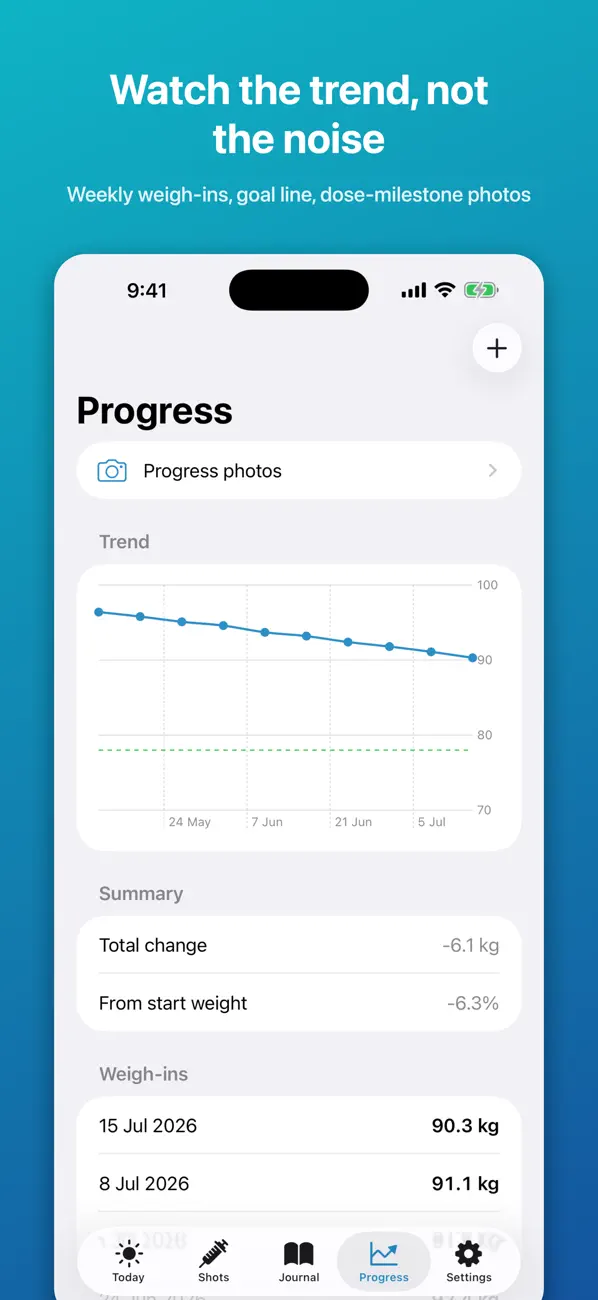
- Open Progress. Read off the total change and the change since your last visit.
- Write three questions. Any more and the important one gets lost. The list further down this page can help you pick.
- Put it on one page. The appointment notes builder and the provider visit sheet are free and printable.
Making the weight conversation easier
Daily weight moves around for reasons that have nothing to do with the medicine. The Progress screen plots weigh-ins as a trend line with your goal marked, and shows total change and percentage from your starting weight. That lets the conversation be about direction over several weeks.
If you weigh on a smart scale that writes to Apple Health, the app can read those entries when you allow it, so you do not need to type them in. Weight is not the only measure worth mentioning; Beyond the scale has a short review of other changes people notice.
Describing symptoms so they are useful
Clinicians usually want to know when a symptom started, how long it lasted, how bad it was and whether it stopped you eating, drinking or working. The Journal gives you the dates. Add a few words where it matters: "nausea Thu and Fri after each shot, ate about half", "constipation most of week two". The side-effect journal guide has more examples.
Questions worth asking
These are neutral prompts, not advice. Pick the two or three that match your situation.
- Is my current dose still the right one, and when would we review it?
- Which symptoms should I report between appointments instead of waiting?
- What should I do if I miss a dose or take one late?
- Am I eating and drinking enough for my situation, and should I have a protein target?
- Are any of my other medicines or supplements affected?
- What is the plan if this dose stops working or the side effects do not settle?
- How long am I likely to stay on this medicine, and what happens when I stop?
Write the answers down in the appointment. Instructions given verbally are easy to half-remember, and a note in that day's entry keeps them with the rest of your record.
Sharing the record
You can simply hand over your phone and scroll. For a telehealth visit, or a clinic that wants something on file, Pro exports your shots, daily logs and weigh-ins as a CSV file that opens in any spreadsheet. The free version shows the last 30 days in the app, which covers a monthly review; longer gaps between appointments are where full history helps.
Free version and Pro
| Free | Pro (one-time purchase) |
|---|---|
| Log shots with date, dose and injection site | Full history beyond the most recent 30 days |
| Daily protein, water, food-noise and symptom notes | CSV export of your own records |
| Weigh-ins and a trend chart | Weekly comparison and shot-day insights |
| A first weekly meal plan | More meal plans and a grocery list |
Common questions
What will my doctor ask at a GLP-1 follow-up?
It varies, but common questions cover whether you have taken every dose, any side effects, changes in weight and appetite, and how you are eating and drinking. Having dates and numbers ready makes each of those quick.
Can the app recommend whether to change my dose?
No. It shows your own records. Dose decisions are made by your prescriber.
Can I print my records?
Pro exports a CSV file you can print from a spreadsheet app. The free appointment notes builder makes a printable one-page summary that you fill in yourself.
How much history does the free version keep?
Your entries are kept, and the free version shows the most recent 30 days. Pro shows everything.
Is it suitable for telehealth providers?
Yes. Read from the record during the call, or send the exported CSV if your provider asks for it.
GLP-1 Companion is a personal tracking tool. It is not medical advice, diagnosis or treatment, and it is not affiliated with any medicine manufacturer. Brand names belong to their owners. Always follow your prescriber and the leaflet that came with your medicine.
Build the record now, so the appointment is easy later: Download GLP-1 Companion.