Setup guide · 5 min
Connect Gmail without sharing your password
A plain-English walkthrough of OAuth, App Passwords, two-step verification, and what Suzume can actually access.
Read the Gmail guide → Now available for Mac + iPhone
Suzume Mail is a private Mac email client that reads like a conversation, not a filing cabinet. Chat-style threads, on-device summaries and IMAP/SMTP — pay once, no subscription.
Every other mail app shows replies as collapsed quotes inside quotes inside quotes. Suzume shows the same thread as chat bubbles — your messages on the right, theirs on the left.
No more hunting for who said what. The whole conversation reads at a glance, the same way your phone handles texts.
Real screens from the app — see the smart inbox, conversation threads, AI writing suggestions, and bulk actions.
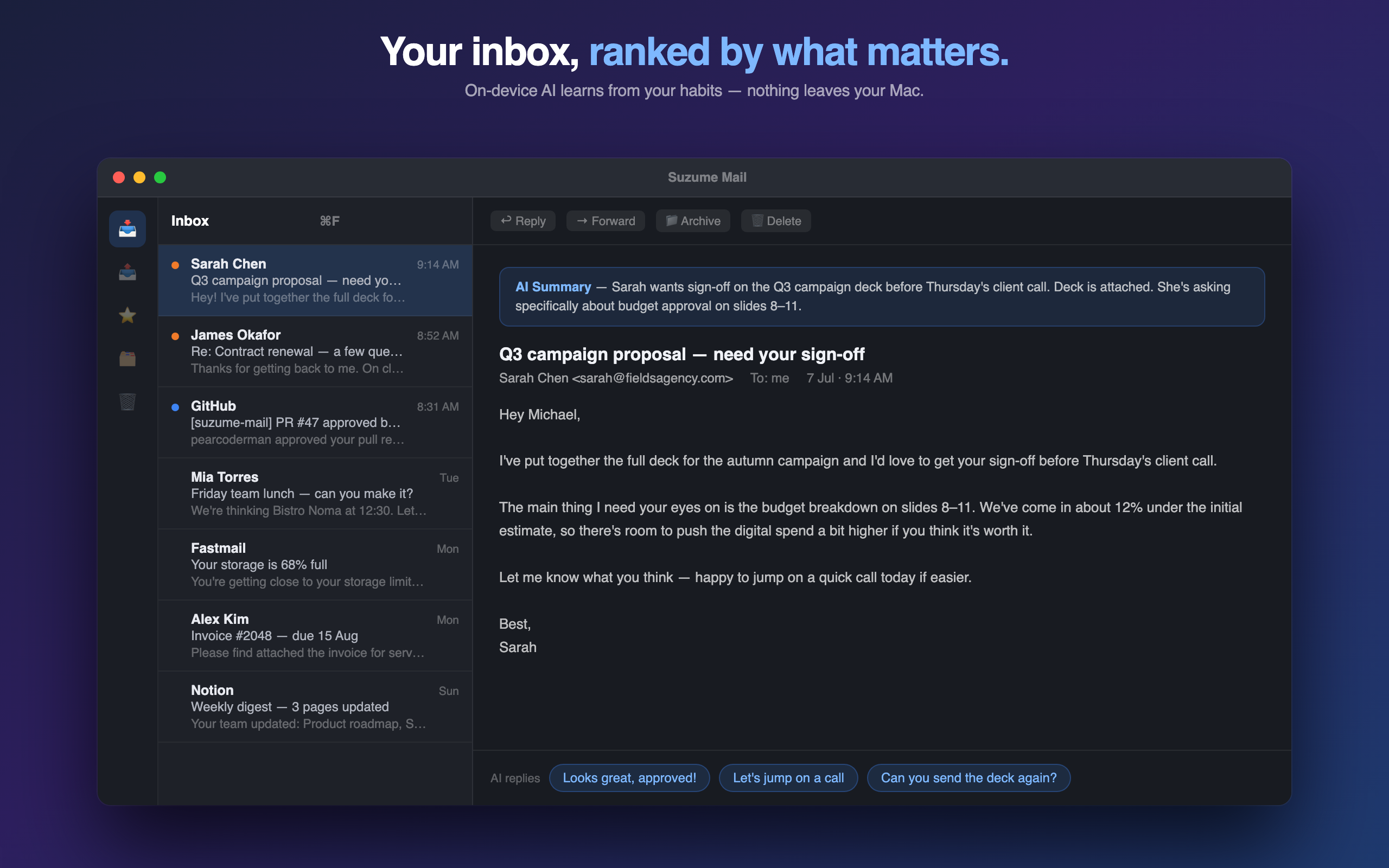
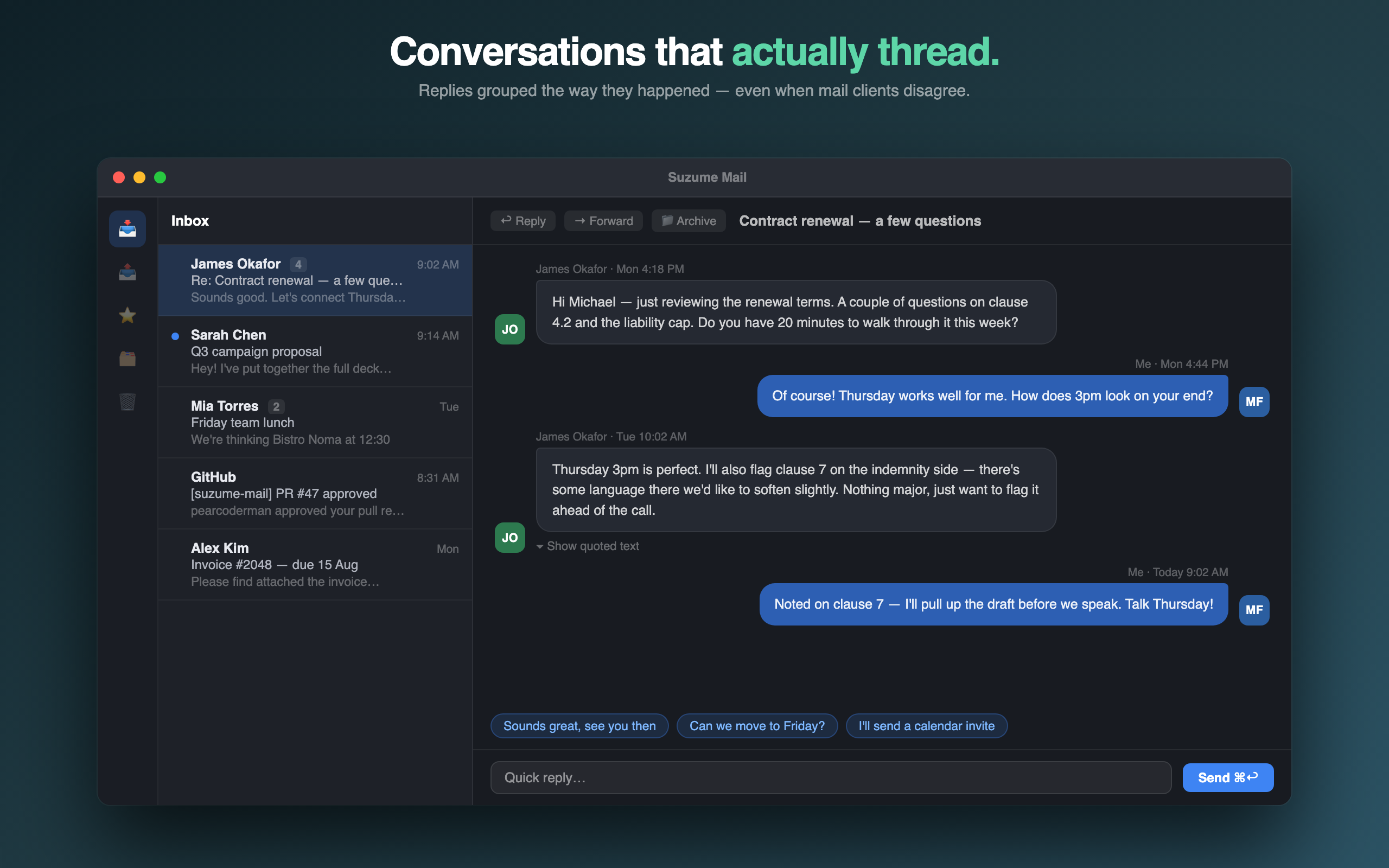
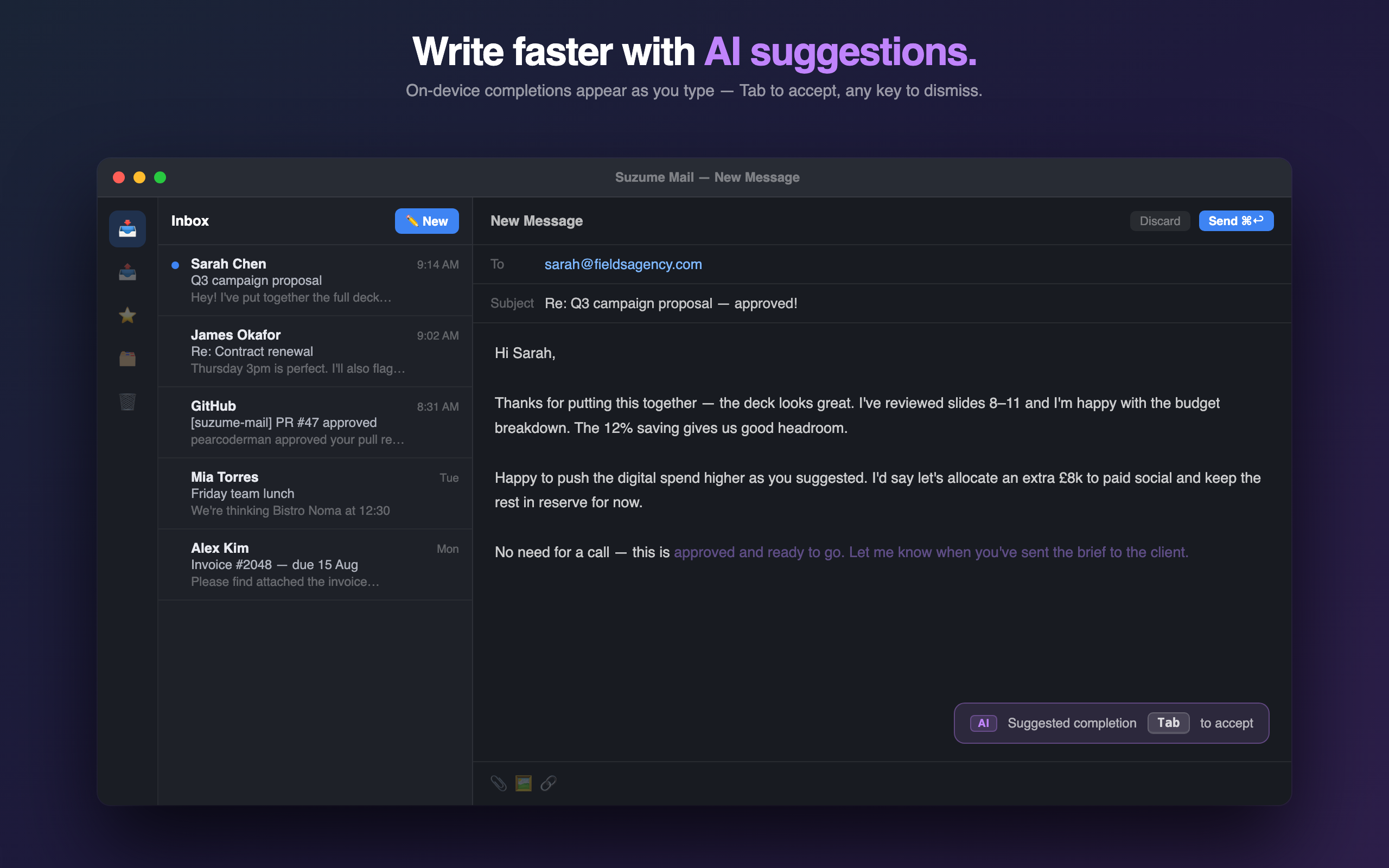
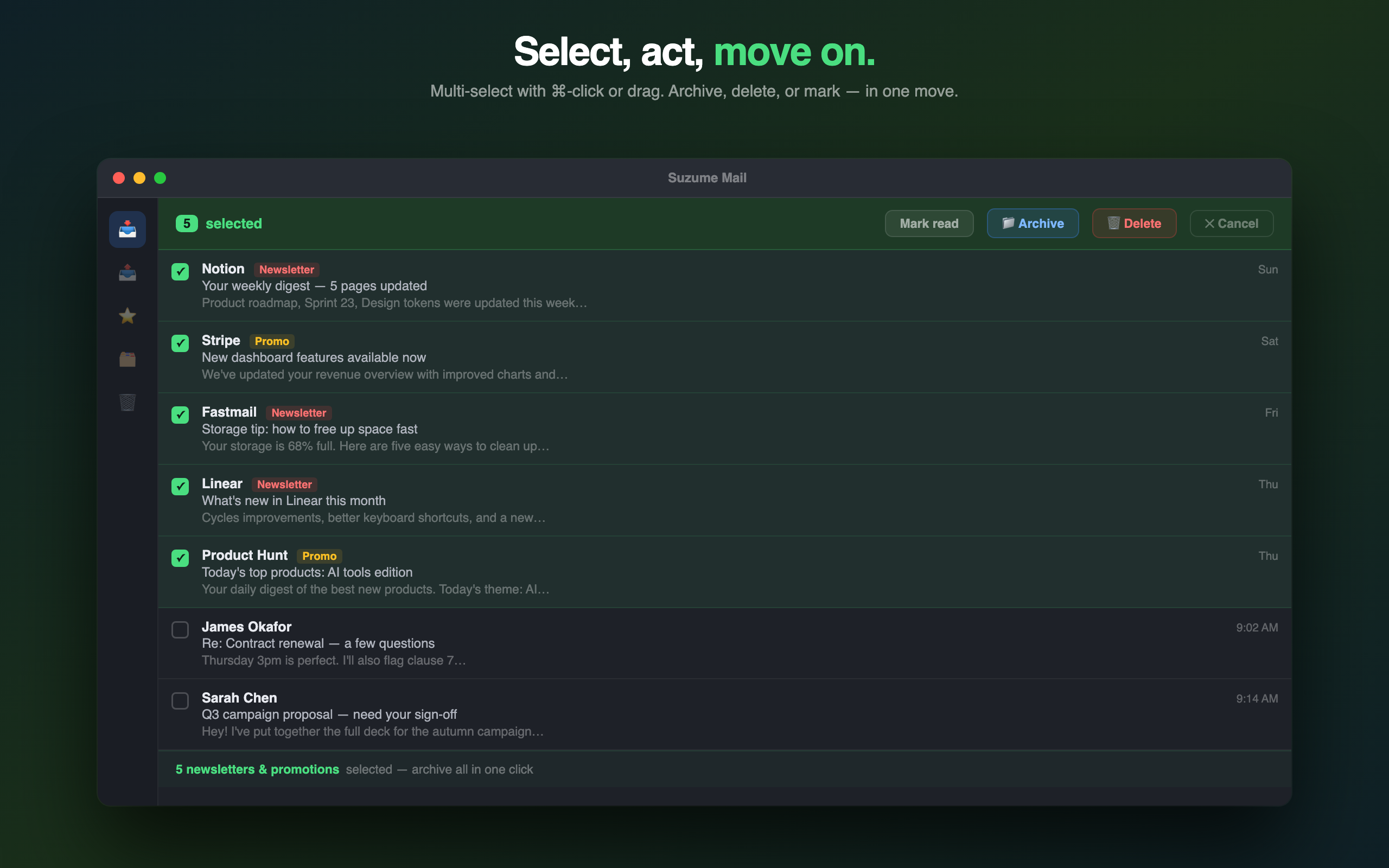
Not a roadmap slide — this is what you get the moment you open it.
Summaries, smart replies, and writing suggestions powered by Apple Intelligence — no server, no API key, no data leaving your Mac.
iCloud, Gmail, Outlook, or your own server — proper IDLE push, threading, and folder sync, not a webview wrapper.
Fire off a reply, catch the typo, pull it back before it ever leaves your Mac.
One-tap reply suggestions drafted on-device, right in the reading pane — accept, edit, or ignore.
Replies appear as chat bubbles, not nested quotes. Your messages on the right, theirs on the left — the same rhythm as iMessage, without leaving your inbox.
Fully localized in English, German, Japanese, Spanish, and French.
Crown any sender as VIP — their messages get a golden badge and a dedicated filter so they never get buried in inbox noise.
Auto-sort, star, archive, or trash incoming messages by sender, subject, or recipient — rules run silently on every sync.
Switching from another client? Drag in .eml or .mbox files and Suzume Mail imports them straight to your inbox over IMAP.
Unread messages are ranked by how likely they are to matter — based on your open, reply, and star history. Learns on-device, nothing shared.
⌘-click or shift-click to select multiple messages, then archive or delete them all at once. Accidentally did too many? Undo puts them right back.
Every other serious Mac mail app charges you forever. Suzume charges you once.
| Suzume Mail | Spark Mail | Canary Mail | |
|---|---|---|---|
| Pricing | $29 once, forever | $120–$240 per year | $36–$100 per year |
| AI processing | On-device only | Cloud-based | Cloud-based |
| Notarized for direct download | ✓ | App Store only | App Store only |
| Future updates | Included | Included with sub | Included with sub |
Spark/Canary pricing reflects public rates at time of writing — check their sites for current numbers.
A quick check before you switch your email workflow.
| Best for | Mac users who want private, chat-style email threads without renting another inbox subscription. |
| Not for | Shared team inboxes, helpdesk queues, enterprise admin policies or company-wide email governance. |
| Replaces | A heavy personal inbox, subscription email clients and long nested threads that make simple replies feel slow. |
| Price | $29 one-time purchase through Polar, with updates included. |
| Privacy | Direct IMAP/SMTP connection, credentials in Keychain, local cache, and no Yuzool mail server in the middle. |
Read the Mac email client guide if you want the workflow version before buying.
Small, quick, and never far from where it's needed — that's the whole design brief. Not another bloated inbox dashboard with a sidebar full of features you'll never touch. Just mail, handled fast.
Built solo, shipped notarized, priced like software instead of a subscription. No VC roadmap, no "growth team" deciding your inbox needs a social feed. Just an app that gets out of your way.
Built independently · Notarized by Apple · Updated regularly
No telemetry, no tracking domains, no third-party AI calls. Suzume Mail runs sandboxed, by design.
Practical, printable guides for cleaner inboxes, safer Gmail setup, and a calmer move away from subscription email.
A plain-English walkthrough of OAuth, App Passwords, two-step verification, and what Suzume can actually access.
Read the Gmail guide →Use this before switching apps: account access, folders, drafts, attachments, privacy, and the five tests that catch surprises.
Get the checklist →A quick guide to separating real local processing from vague AI marketing, with questions worth asking any mail app.
Read the privacy guide →The $99 early bundle includes Suzume Mail, Palm, Rank, Dispatch, Relay, Drip Send, Cloak, Cadence, future bundle apps and included updates. Bought separately, the current eight apps cost $267.99.
Buy Suzume Mail through the Mac App Store or iPhone App Store. It is a one-time purchase with no subscription, and Apple manages installation and updates.
Yes — when you open a thread, replies appear as chat bubbles, not nested quotes. Your messages sit on the right, everyone else's on the left, with avatars and timestamps. Quoted text is collapsed by default so the conversation stays clean. It's the same rhythm as iMessage, just for email.
Yes — Suzume Mail speaks IMAP/SMTP directly, including OAuth sign-in for Gmail and Outlook, plus iCloud, Fastmail, and any standard IMAP/SMTP provider.
No. Suzume Mail is a one-time App Store purchase. There is no recurring billing.
The App Store is now the recommended purchase route because Apple manages installation, updates and purchase restoration in one place. Existing Polar customers can keep using their direct copy.
No. Suzume Mail talks directly to your mail provider over IMAP/SMTP. Nothing passes through our servers — there are no servers in that path at all.
Email me within 14 days of purchase and you'll get a full refund — no form, no "tell us why," no hoops.
Yes — Suzume Mail is notarized and signed by Apple, the same security check the App Store itself requires. Your Mac will verify it automatically on first launch, no warnings.
Yes. You can create rules that automatically mark messages as read, star, archive, or trash them when they arrive — based on sender, subject, or recipient. Rules are managed in Settings and run on every sync. Custom folder routing is on the roadmap.
Yes — Suzume Mail adds a menu bar icon showing your unread count. Click it to open the app, compose a new message, or mark everything as read without switching windows.
Suzume Mail requires macOS 14 Sonoma or later. Core features — IMAP/SMTP, threading, rules, VIP senders, multi-select — work on any supported Mac. AI features (summaries, quick replies, writing suggestions, smart inbox sorting) require macOS 26 and an Apple Silicon Mac with Apple Intelligence enabled.
Suzume Mail is built and maintained by a single developer — Michael Frankland. No team, no VC money, no growth roadmap. Updates ship when something is worth shipping, not on a quarterly schedule. If you hit a bug or have a question, you're emailing the person who wrote the code.
Updates ship regularly. Here's what's landed recently.
Suzume Mail for Mac — quick to set up, quick to use, quick to get out of your way.
Get Suzume Mail — $29