Suzume Mail
Why email replies are easier to read like text messages
A reply is a small piece of a conversation. Showing it like one makes email faster to scan, easier to understand, and much less tiring.
July 13, 2026 · Michael at Yuzool
Most email replies are simple. Someone asks a question. You answer it. They clarify one detail. A decision is made.
Yet a traditional mail client can make that exchange look like a document archive. Every reply arrives with the earlier conversation copied underneath it, often followed by signatures, legal footers, forwarded headers, and several levels of indentation. The actual new sentence may occupy five percent of what the app puts on screen.
Text messages solved this presentation problem years ago. Each contribution has a direction, an author, a time, and a clear place in the sequence. You do not need to decode the formatting before understanding the conversation.
Direction does a surprising amount of work
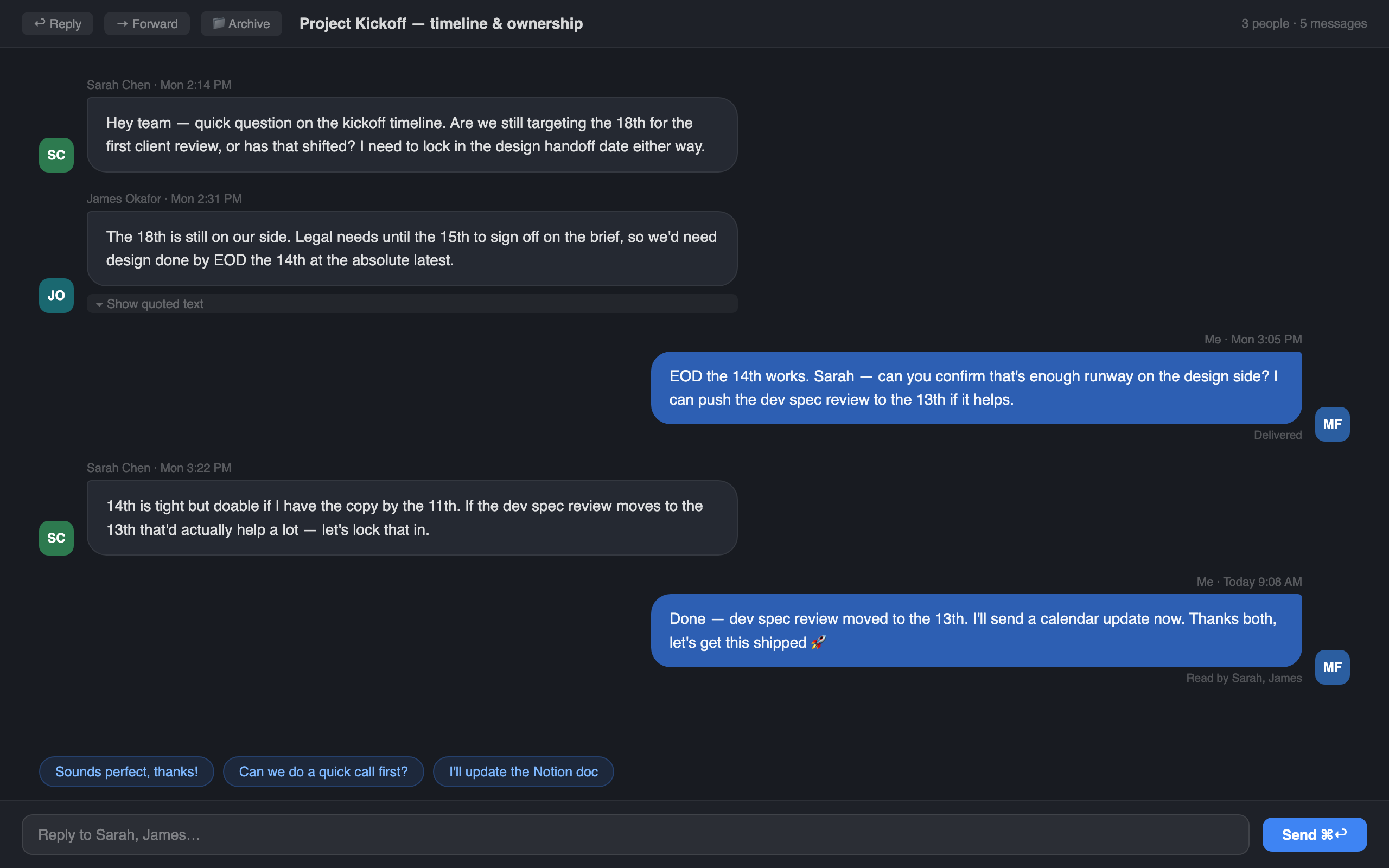
In a message-style layout, your replies sit on one side and everyone else's sit on the other. That simple spatial rule removes a repeated question from the reading process: who said this?
Colour, avatars, timestamps, and spacing reinforce the answer, but direction carries most of it. Your eye can move down the exchange and understand its shape before reading every word. You can see where the question became a decision and where someone added a new condition.
This is especially useful when you reopen a thread after a day or two. You are not reading from the beginning. You are trying to recover context quickly enough to make the next decision.
Quoted text is useful, but it should not lead
Email includes quoted history for good reasons. Messages cross providers, devices, and clients. The history travels with the reply and remains available even when threading metadata is incomplete.
The mistake is treating that transport history as the main reading interface. Most of the time, it repeats messages the app has already placed in the thread. Showing it all by default creates a conversation where every line carries its own photocopy of everything that came before.
Suzume collapses quoted text by default. It is still there when a strange reply, forwarded section, or missing message makes it necessary. It simply stops competing with the part you are trying to read now.
Scanning is not shallow reading
People sometimes treat scanning as an inferior way to read. In work email, scanning is often the correct first step. Before reading closely, you need to locate the question, the answer, and the point where the situation changed.
A well-designed thread lets you scan the structure and then focus on the important message. A badly designed one makes you read formatting noise just to find the important message.
This matters more as a thread grows. A two-message exchange is easy in almost any client. A twelve-message thread involving three people, revised dates, and several quoted replies is where spatial clarity starts paying for itself.
Text-message familiarity reduces effort
There is another advantage: the pattern is already learned. Most people understand message bubbles without instructions. Incoming and outgoing messages look different. New contributions appear in sequence. The reply box sits at the end.
Suzume borrows that familiar rhythm without trying to turn email into instant messaging. Email can remain asynchronous, universal, and deliberate. It simply becomes easier to read once it arrives.
That distinction is important. The goal is not to add presence indicators, channels, reactions, and another place that demands an immediate response. The goal is to let a slower medium use a clearer interface.
Better context makes replying easier
Writing the reply is often not the hard part. Reconstructing what you are replying to is. Once the question, constraint, and latest decision are visible, the response tends to become shorter and more confident.
That is also where small on-device AI features can help without taking over. A summary can restore context. Suggested quick replies can cover an obvious acknowledgement. A writing suggestion can tighten a sentence. The person still decides what to send.
In Suzume, those features are secondary to the thread itself. A clever reply button cannot rescue a conversation that is difficult to understand.
A small interface change, repeated every day
Chat-style threads are not a giant reinvention of email. They are a small improvement applied to one of the most repeated actions on a Mac: opening a thread and working out what happened.
That repetition is why the design matters. Saving a few seconds and a little mental effort once is negligible. Saving it across every project thread, support reply, invoice question, client decision, and family email changes how heavy the inbox feels.
Email replies are easier as text messages because the interface finally presents them for what they are: one person saying something, another person responding, and a conversation moving forward.