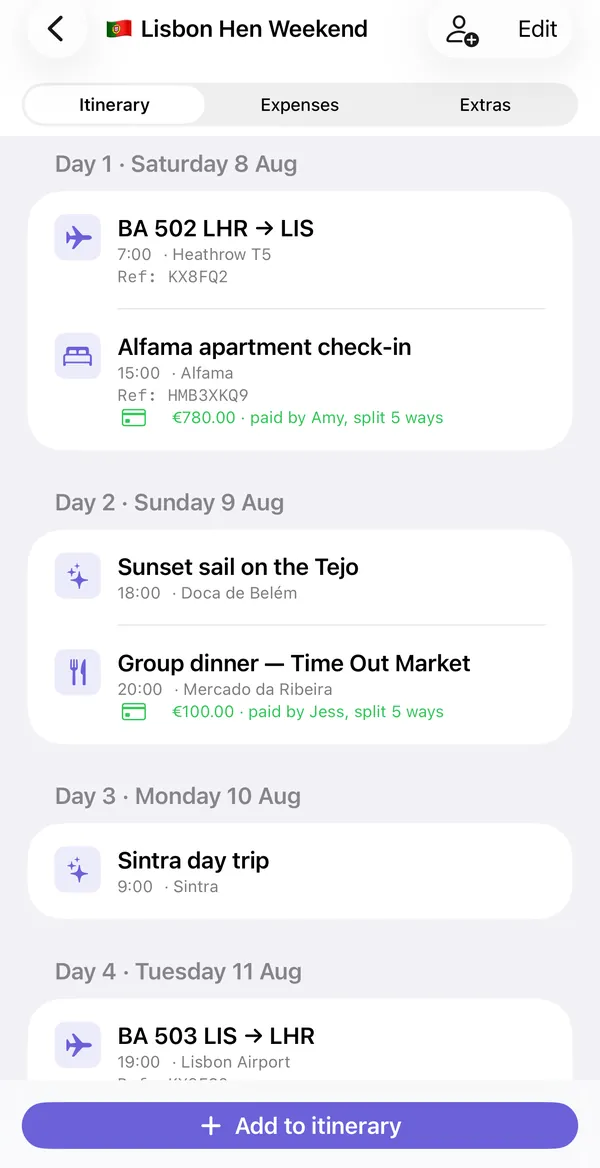
A shared itinerary app keeps one copy of the trip plan that every traveler can open. In Troupe, the itinerary is organized by day, and each item is a flight, stay, activity, meal or transport with its time, place, booking reference and notes. You invite the group with a link, changes sync through iCloud, and each item can be added to your own Calendar. It works on iPhone and iPad with no sign-up.
What a shared itinerary needs to hold
A plan that only lists activities is not enough once you are actually traveling. The details people need at 6am in an airport are different:
| Item type | Details worth recording |
|---|---|
| Flight | Flight number, route, departure time, terminal, booking reference |
| Stay | Address or area, check-in time, confirmation number, door code in the notes |
| Activity | Start time, meeting point, whether it is booked or just an idea |
| Food and drink | Reservation time, name it is under, how many seats |
| Transport | Pick-up time and place, hire-car reference, train times |
Troupe has those five item types. Every item has a title, a date and time, a location, a confirmation reference and free notes. In the day view a flight reads "BA 502 LHR → LIS, 7:00, Heathrow T5, Ref: KX8FQ2", which is exactly what you need at the bag drop.
How sharing works
- The organizer creates the trip and taps the invite button.
- iOS creates a share link. Send it by Messages, WhatsApp, AirDrop or email.
- Each person taps the link and the trip opens in Troupe on their iPhone.
- From then on, anything added or changed appears for everyone.
There are no Troupe accounts. Sharing uses Apple's iCloud sharing, the same mechanism as a shared Note, so each person needs an iPhone or iPad signed in to iCloud. The organizer chooses whether invitees can edit or only view.
Different arrival times, and other real-life mess
Groups rarely travel as one unit. Two people fly in Friday morning, three on Friday night, one drives. Add each arrival as its own flight or transport item with the person's name in the title: "Jess and Priya, EZY 8432, lands 21:40". Everyone can then see who is where, and whoever is collecting from the airport has the flight number.
For friends joining from different time zones, enter times as local time at the place the item happens. A dinner in Lisbon at 20:00 is 20:00, wherever you flew from.
Ideas that are not decided yet
An itinerary gets cluttered when maybes are mixed in with bookings. Troupe keeps undecided options in a separate "Places to consider" list in the Extras tab. Anyone can add a place with a link and a note, the group votes, and "Add to itinerary" promotes the winner to a real plan item. The itinerary stays a list of things that are happening.
Costs on the plan
An expense can be linked to an itinerary item. The apartment check-in then shows "€780.00, paid by Amy, split 5 ways" underneath it, and the group dinner shows its deposit. People stop asking what a charge was for, because it is attached to the thing it paid for. The expense splitter guide explains the money side.
During the trip, and without signal
The Today tab shows the current day's items so you are not scrolling a week-long plan to find tonight's booking. The Map tab shows the trip's places with walking or driving directions. The trip is stored on your phone, so it opens without a connection, and changes sync when you are back online. For a backup, export the whole trip as a PDF or as an offline page you can save to Files.
If you want a starting point, the free itinerary template and trip planning templates are on this site, and there is a live demo itinerary to look at.
What it does not do
- iPhone and iPad only. There is no Android or web version, so everyone in the group needs an Apple device to join the shared trip.
- It syncs through iCloud. There are no Troupe accounts and no Troupe server. Each person needs to be signed in to iCloud.
- It does not book anything. You add flights, stays and activities yourself; Troupe organizes them.
- It does not move money. It works out who owes whom and can open a payment link. The transfer happens in your banking or payment app.
Troupe also does not import bookings from email automatically. You type or paste the details in. For a comparison with an app that does scan your inbox, see Troupe vs TripIt.
Free version and Pro
| Free | Troupe Pro |
|---|---|
| One trip | Unlimited trips |
| Up to 4 people | Any group size |
| Itinerary, expenses, packing list and documents | Everything in free, without the limits |
| Everyone you invite joins free | Only the organizer needs Pro |
Pro is a monthly subscription or a one-time lifetime purchase. Only the person who creates the trip pays; the people they invite never do. Check the App Store for current prices.
Common questions
Can everyone edit the itinerary?
The organizer chooses. Invitees can be given edit access or view-only access when the trip is shared.
Does it sync with Apple Calendar?
Each itinerary item can be added to your iPhone's Calendar as an event. It is a one-way add, per item.
Can I share it with someone on Android?
Not as a live trip. Troupe is iPhone and iPad only. You can send an Android user the exported PDF.
Does it pull in my flight confirmations automatically?
No. You enter flight numbers, times and references yourself.
How many people can share one itinerary?
Up to four on the free version. With Pro the organizer can invite a group of any size, and nobody else pays.
Troupe is for iPhone and iPad. Trips sync through your own iCloud, with no accounts, ads or tracking. Other apps named on this page are trademarks of their owners.
Give the whole group the same plan: Get Troupe on the App Store.