Troupe is a group trip planner for iPhone and iPad. You create a trip, invite people with a link from Messages or WhatsApp, and everyone sees the same day-by-day itinerary, expenses, packing list and documents. Expenses attach to the plan, balances update as they are added, and "Who pays whom" shows the fewest transfers to settle up. It syncs through iCloud with no accounts. One trip for up to four people is free.
What goes wrong on group trips
Almost every group trip runs on three tools at once. There is a spreadsheet or notes file with the plan, a group chat where the decisions actually happen, and an expense app or a pile of bank transfers for the money. Each one is fine alone. The trouble is the joins: the dinner booking is in the chat but not the plan, the deposit is in the expense app with no note of what it was for, and nobody is sure which version of the itinerary is current.
A group trip planner earns its place by removing those joins.
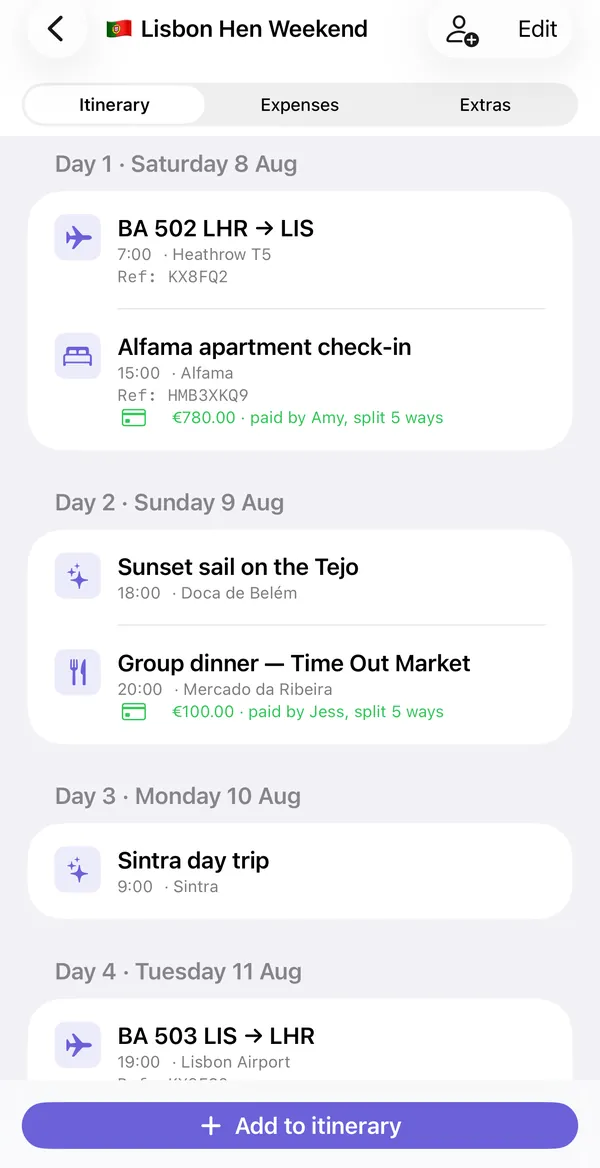
What Troupe keeps in one trip
| Tab | What it holds |
|---|---|
| Itinerary | Day-by-day plan. Flights, stays, activities, food and transport, each with a time, place, booking reference and notes |
| Expenses | Every cost, who paid, who it is split between, running balances, and "Who pays whom" |
| Extras | Packing list with assignees, document photos, places to consider with votes, and a log of recent changes |
| Map | The trip's places, with walking or driving directions |
| Today | What is happening today, during the trip |
The part that makes it different from using two apps is the link between plan and money. An expense can be attached to an itinerary item, so the apartment check-in on day one shows "€780.00, paid by Amy, split 5 ways" directly underneath.
Setting up a trip
- Create the trip. Name, destination, dates and currency. You can start from a template: city break, road trip, family trip, beach trip, hen or stag weekend, ski trip, or concert and festival.
- Add the people. Each person gets a name and an emoji. Add a payment link for anyone who wants to be paid back that way.
- Invite them. Send the share link by Messages or WhatsApp. They tap it and the trip opens on their iPhone. No sign-up.
- Add what is booked. Flights and the stay first, with confirmation references. Then activities as they are agreed.
- Log costs as they happen. Whoever pays adds the expense. Balances update for the whole group.
Any itinerary item can also be added to your iPhone's Calendar, so flights and check-ins show up alongside everything else.
Deciding things as a group
The Extras tab has a "Places to consider" list. Anyone can add a restaurant, a bar or an activity with a link and a note, and the group can vote. When something wins, "Add to itinerary" turns it into a plan item. That keeps the undecided ideas out of the itinerary and out of a chat thread that scrolls away. The guide to planning without group-chat chaos covers this in more detail.
Money without the awkward part
Each expense records who paid and who shares it. Splits can be equal, by percentage or by custom amounts, and you choose who is included, so the two people who skipped the boat trip are not charged for it. The balances list shows each person as owed or owing. "Who pays whom" then reduces everything to the smallest number of transfers. See the expense splitter guide and how to split trip costs fairly.
What it does not do
- iPhone and iPad only. There is no Android or web version, so everyone in the group needs an Apple device to join the shared trip.
- It syncs through iCloud. There are no Troupe accounts and no Troupe server. Each person needs to be signed in to iCloud.
- It does not book anything. You add flights, stays and activities yourself; Troupe organizes them.
- It does not move money. It works out who owes whom and can open a payment link. The transfer happens in your banking or payment app.
Free version and Pro
| Free | Troupe Pro |
|---|---|
| One trip | Unlimited trips |
| Up to 4 people | Any group size |
| Itinerary, expenses, packing list and documents | Everything in free, without the limits |
| Everyone you invite joins free | Only the organizer needs Pro |
Pro is a monthly subscription or a one-time lifetime purchase. Only the person who creates the trip pays; the people they invite never do. Check the App Store for current prices.
Common questions
Does everyone in the group need to pay?
No. Only the organizer needs Pro, and only for more than one trip or more than four people. Everyone invited joins free.
Do my friends need an account?
No. Troupe has no accounts. The trip is shared through iCloud, so each person needs an iPhone or iPad signed in to iCloud.
Does it work on Android?
No. Troupe is for iPhone and iPad only. If part of your group uses Android, they will not be able to join the shared trip.
Can I use it offline?
The trip is stored on your device, so you can open it without a connection. Changes sync through iCloud when you are back online. You can also export the trip as a PDF or an offline page.
Is there advertising or tracking?
No. There are no ads, no analytics and no tracking. Trip data stays in the group's own iCloud.
Troupe is for iPhone and iPad. Trips sync through your own iCloud, with no accounts, ads or tracking. Other apps named on this page are trademarks of their owners.
Put the plan and the money in one shared trip: Get Troupe on the App Store.