Boothly is a free iPhone app that takes three photos and turns them into a retro photo strip. For a wedding, print a QR code on table cards or a sign. Guests scan it, the Boothly App Clip opens without an App Store download, they shoot three frames and save or share the strip. Or set up one iPhone or iPad in Event Mode as a fixed booth, which keeps every strip together on that device.
Rented booth or phone booth?
| Rented booth | iPhone booth with Boothly | |
|---|---|---|
| Cost | Often several hundred for an evening; ask for local quotes | A one-time Pro purchase for Event Mode, plus a sign, props and any paper |
| Prints on the night | Usually yes, included | Yes with your own AirPrint photo printer (version 1.3), or print later |
| Where it happens | One corner of the room | Anywhere: tables, dance floor, garden |
| Staff | Often an attendant | None. Guests tap to start |
| All photos in one place afterwards | Usually a gallery from the company | Yes in Event Mode on one device; guests' own phones need collecting |
| Space and power | Needs floor space and a socket | A stand and a charger for a fixed booth; nothing for guests' phones |
If you want prints handled for you with an attendant, rent a booth. If you want the fun and the pictures on a small budget or in a small venue, and are happy to bring a printer yourself or print afterwards, an iPhone or iPad booth is a good answer.
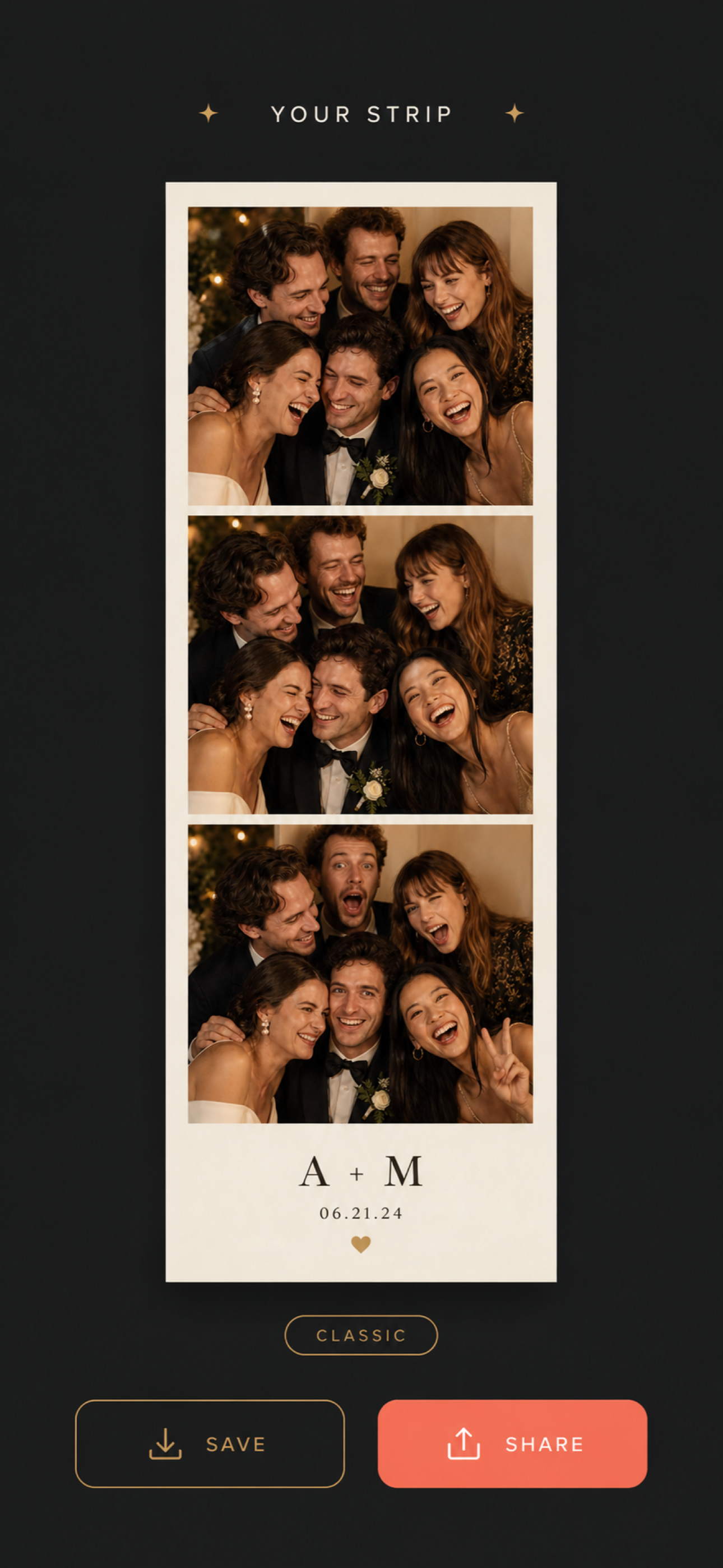
A fixed booth with Event Mode
Event Mode turns one iPhone or iPad into a proper booth. You enter the event name, date, booth style, an optional message and initials, and choose 2, 3 or 4 photos per group. Guests tap to start, Boothly counts them through the photos, shows the strip and resets for the next group. Every strip and individual photo is kept together in an Event Library on that device.
For a wedding, put an iPad on a stand near the dance floor with a charger, use your initials and date on the strip, and turn on Guided Access in iOS Settings so guests stay inside Boothly. At the end of the night, the whole event is in one place.
Printing, new in version 1.3. Boothly prints complete strips on 4×6-inch photo paper through AirPrint, or makes a print-ready PDF to send to a print shop. In Event Mode you can select strips to print together or print the whole event gallery, and the booth waits while a group prints, saves or shares before welcoming the next one. Boothly Pro adds two copies per sheet with a cutting guide, so one stays with the guest and one goes in the guestbook. You need an AirPrint printer on the same Wi-Fi network.
Setting it up, step by step
- Download Boothly and make a test strip a few weeks before, so you know the flow.
- Print the sign. Use the free guestbook sign, with the Boothly QR code from the Boothly page, and a line of instruction: scan, shoot three, send us your strip.
- Choose a spot with good light. Near a window before dusk, or under warm, even lighting. Avoid a bright window behind people.
- Add a backdrop if you like: a plain wall, a curtain, a flower arch you already have.
- Put signs on tables too. The advantage of phones is that the booth travels.
- Ask someone to start it. A bridesmaid or usher making the first few strips gets everyone else going.
Three free printables help with the set-up, with no sign-up: the photo booth setup checklist, 12 photo prompt cards and a photo-strip guestbook sign.
Collecting strips from guests' phones
Strips made in Event Mode are already together. For strips guests shoot on their own phones, decide before the day how to collect them and print it on the sign:
- A shared album. Create a shared album in Photos and put its link on the sign. Works well for guests on iPhone.
- A group chat or email address. "Send your strips to..." is simple and works for everyone.
- A hashtag if you are happy for strips to be public. Boothly's Story export makes a 9:16 image for Instagram or TikTok Stories.
- AirDrop to one person. Nominate a friend to gather them during the evening.
A photo-strip guestbook
Print the strips, on the night with an AirPrint printer or afterwards from the Event Library or a print-ready PDF, and mount them in an album with space beside each for a note. For notes on the night, leave cards on the tables and match them to strips later. It takes an evening and it is the guestbook people actually look through.
Choosing a look
Boothly has three strip styles. Classic warms everything to a cream, sepia tone. Midnight is high-contrast black and white. Rose gives a warm pink tint. For an evening reception with mixed lighting, Midnight is forgiving. For a daytime or garden wedding, Classic or Rose suits the light.
What to know before relying on it
- Nothing is uploaded. Boothly has no account and no cloud. Event Mode keeps an event's strips together on the booth device; strips shot on guests' own phones stay on those phones until they send them to you.
- Apple devices only. Boothly runs on iPhone and iPad, and App Clips are an iPhone feature. Guests with Android phones can join a group at the booth.
- Printing needs your own printer. From version 1.3 Boothly prints strips on 4×6-inch paper with AirPrint or exports a print-ready PDF. There is no built-in printer as in a rented booth, so bring an AirPrint photo printer and paper if you want prints on the night.
- The App Clip is the short version. It shoots a strip to save or share. The cork board archive and Event Mode are in the full app.
- Free to download, no subscription. From version 1.3, new users need the one-time Boothly Pro purchase to start an event; people who already had Event Mode keep it. Pro also unlocks two-per-sheet printing and extra looks.
Prompts that get better pictures
- Three generations in one strip
- Your table, squeezed in
- Serious, silly, sillier
- Recreate how you met the couple
- Best dance move, frozen
The prompt cards in the free kit have twelve of these ready to print.
Common questions
Do guests need to download an app?
No. The App Clip opens from a QR code without visiting the App Store. Guests can get the full app afterwards if they want to keep an archive of their strips.
Is Boothly free?
It is free to download with no subscription. Event Mode for new users and two-per-sheet printing are part of Boothly Pro, a one-time purchase.
Can it print strips?
Yes, from version 1.3: on 4×6-inch photo paper with an AirPrint printer, or as a print-ready PDF.
Does it work without Wi-Fi?
The full app works on the phone with no account or upload. Loading the App Clip for the first time needs a connection.
Can we get all the photos afterwards?
Yes for a booth run in Event Mode: they are in the Event Library on that device. Strips from guests' own phones have to be sent to you, since Boothly does not upload anything.
Will it work for a small wedding?
Yes. It suits small weddings especially well, where a rented booth would be out of proportion.
Make a test strip before the big day: Get Boothly free.