An App Store launch plan has five stages: check the niche is worth entering, prepare the listing (name, subtitle, keywords, screenshots, description), run a pre-submission check against common rejection causes, do a focused launch week, and review the numbers after seven days. Most of the result is decided before you press Submit.
1. Before you build: is the niche worth it?
- Search your main term and study the top twenty apps.
- How many were updated in the last six months? Abandoned incumbents are an opening.
- Read their one- to three-star reviews. Repeated complaints are your feature list.
- Is anyone paying? Look at pricing and in-app purchases.
- Can you say in one sentence why someone would switch to yours?
The longer version is in researching an app niche before building.
2. Four weeks out: the listing
| Item | Check |
|---|---|
| Name (30) | Brand plus the most important search term |
| Subtitle (30) | The benefit, with a second term, readable by a person |
| Keywords (100) | No repeats, no spaces, no competitor names |
| First screenshot | Says what the app does in under five words |
| Screenshots 2 and 3 | The two strongest reasons to download |
| Description | First three lines carry the pitch; no prices or other platforms mentioned |
| Privacy details and support URL | Accurate, and the URL loads |
| Localisations | At least the storefronts you expect sales from |
Most people see only the icon, name, subtitle and first two or three screenshots in search results. Use the screenshot message planner to decide what each frame says, and the keyword research guide for the text fields.
3. One week out: avoid the avoidable rejection
- A working demo account or demo mode in the review notes if the app needs sign-in.
- No placeholder text, test data or broken links anywhere.
- No mention of other platforms, and no prices in the description.
- In-app purchases submitted with the build, with a visible restore button.
- Purpose strings for every permission, explaining the real reason.
- Screenshots that show the actual app.
- Subscription terms, privacy policy and terms of use linked where required.
Review times vary. Submit at least a week before any date you have announced, and do not announce a date until you are approved.
4. Launch week
- Day 1: release, then tell the people already waiting: your list, your followers, communities where you are a real member.
- Days 1 to 3: reply to every review and every support email. Early ratings matter disproportionately.
- Day 2: check crash reports and fix anything serious at once.
- Days 3 to 5: write up what you built and why, wherever your audience reads.
- All week: ask happy users for a rating at a good moment inside the app, using Apple's rating prompt.
5. Day seven: the review
| Number | What it tells you |
|---|---|
| Impressions | Whether you are being found at all. Low means a keyword problem |
| Page views to downloads | Whether the listing persuades. Low means a screenshot or pitch problem |
| Downloads to paid | Whether the product and paywall work |
| Keyword ranks | Which terms to keep and which to replace |
| Reviews and crashes | What to fix first |
Pick one bottleneck and change one thing. Then measure again in two weeks.
Doing this in Dispatch
- Niche Scout scores the top incumbents for a term and country and clusters what users complain about.
- Keyword research, rank tracking and metadata editing for the listing.
- Screenshot Studio for the screenshot set.
- Pre-Flight scans your listing for common rejection causes, each linked to the relevant guideline.
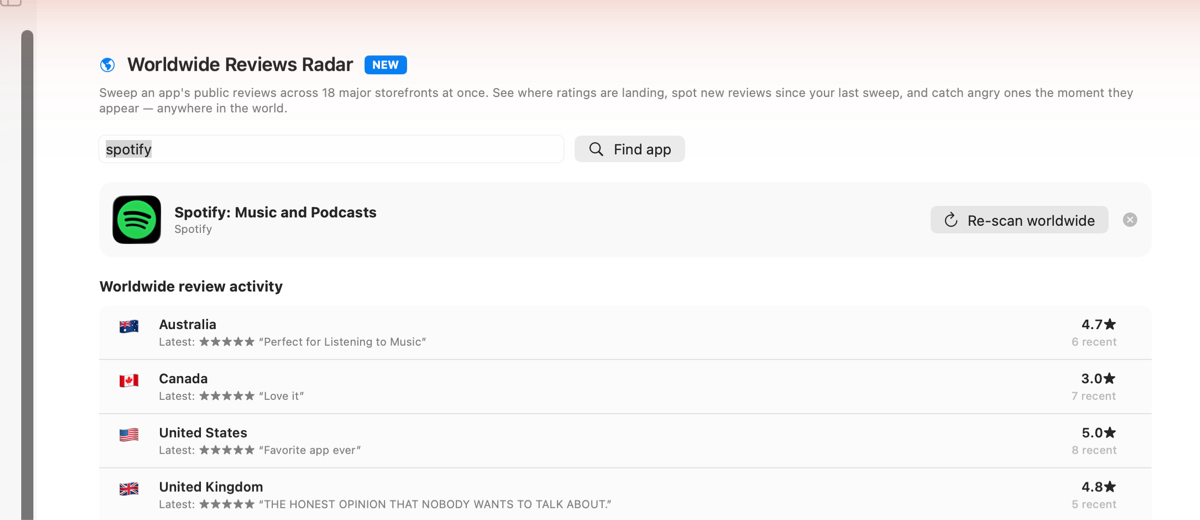
- Reviews Radar sweeps reviews across storefronts and flags new low ratings.
- Dispatch Kun on iPhone shows sales, reviews and submission status away from your Mac.
Pre-Flight catches common problems. It cannot guarantee approval; Apple's reviewers decide.
Free tools on this site, no sign-up: the metadata character counter, the duplicate keyword checker, the App Store search preview and a live listing audit.
Price and requirements
Dispatch is a Mac app for indie Apple developers, sold as a one-time purchase: $29.99 on the Mac App Store, or $39 direct for the research edition with deeper competitor analysis and review mining. It needs macOS 26 or later on Apple silicon. Projects stay on your Mac and the AI features run on-device. Start here if you are unsure which edition fits.
Common questions
How long does App Review take?
Often a day or two, sometimes longer. Allow at least a week.
Should I launch on a particular day?
It matters far less than having the listing right and people ready to tell.
Do I need a marketing budget?
No, but you need a place where potential users already are and a reason for them to care.
Can a tool prevent rejection?
It can catch common causes. It cannot guarantee approval.
What if the launch is quiet?
Most are. Work the numbers in the day-seven review and iterate; many apps find their audience on version 1.3, not 1.0.
Plan the launch on your Mac: Get Dispatch for Mac.