Where Notes or a spreadsheet is strong
The Notes app comes with every iPhone, and spreadsheets such as Numbers, Excel or Google Sheets are free or already on many people's devices. There is nothing to learn. You type the date, the dose your prescriber set and the site, and you are done.
A spreadsheet is also flexible. You can add any column you like, sort and filter, draw your own charts and share the file with a family member. Many apps that sync through a cloud account will let you open the same note or sheet on a phone, tablet and computer, which a single-phone tracker cannot match.
If you are good at keeping habits, that may be all you need. There is no reason to install another app for the sake of it, and a plain list is easy to print and take to an appointment.
The weak spots are the ones you only notice later. A note has no structure, so entries drift: one week you write the site, the next you forget. Searching months of free text for a pattern is slow, and nothing nudges you on shot day unless you set that up somewhere else.
Where GLP-1 Companion is different
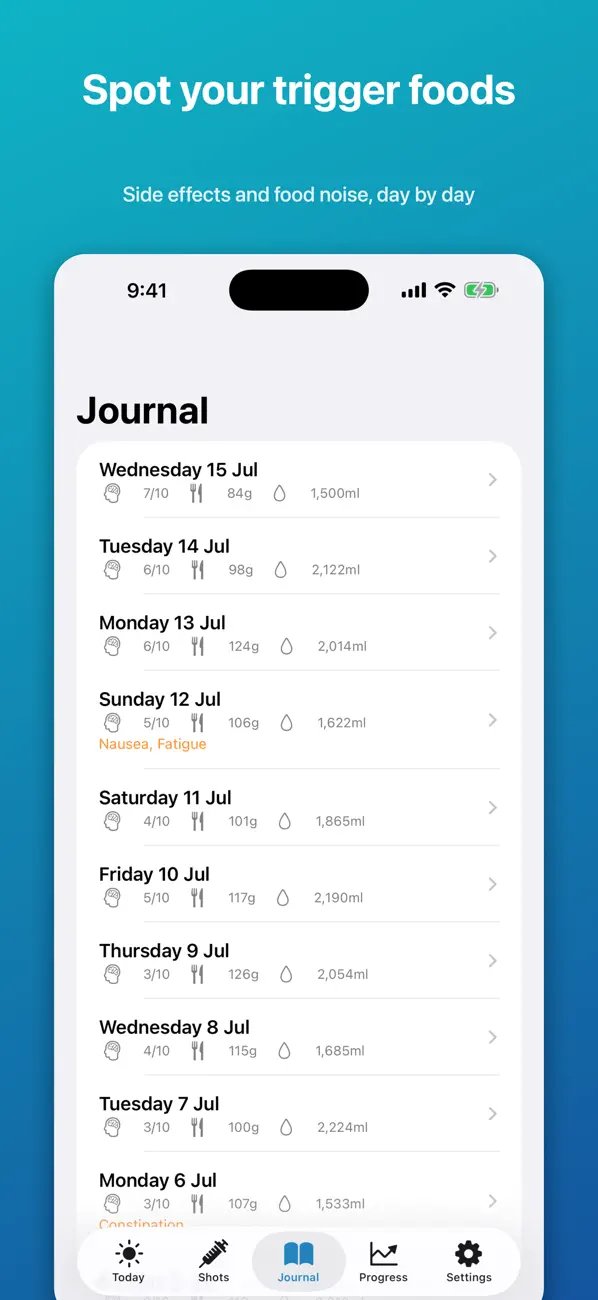
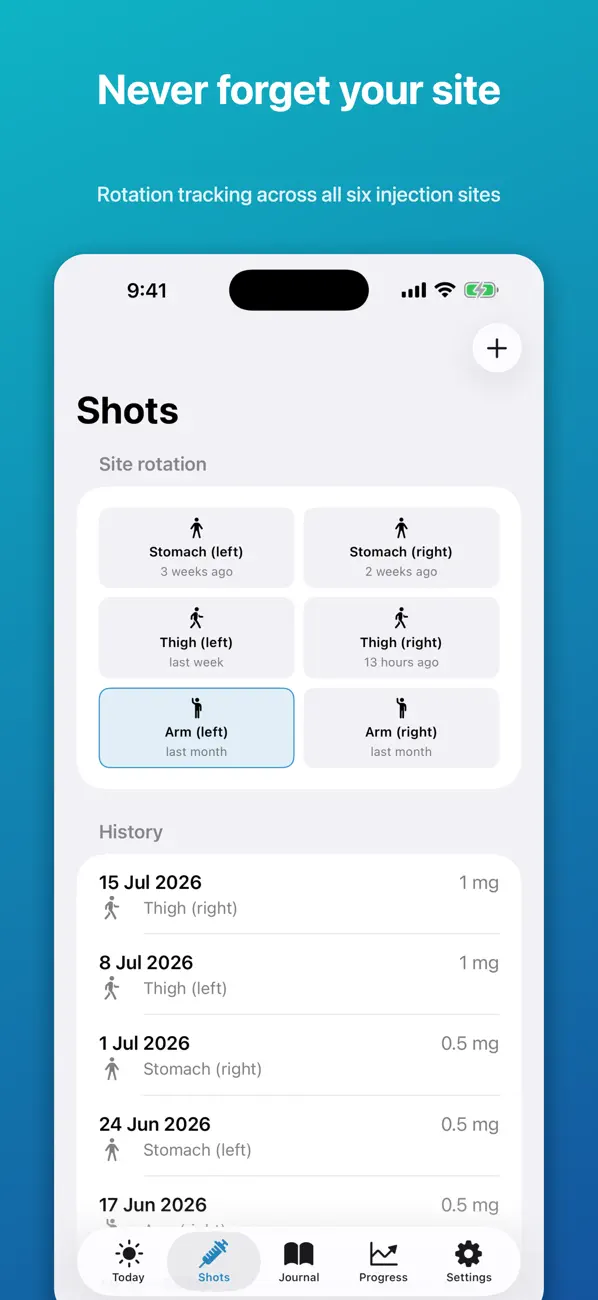
GLP-1 Companion does the same recording with less typing, and adds the parts a note cannot do on its own. It reminds you on shot day, shows when each of six injection sites was last used, and keeps a daily journal with symptom tags, trigger foods and a 0 to 10 food-noise score. Protein and water are quick taps on the Today screen. Weekly weigh-ins sit in the same place.
It also helps with food on low-appetite days, with 28 protein-first recipes, a seven-day meal planner and an automatic grocery list. There is no account, and the App Store listing says everything stays on your iPhone, with export to a spreadsheet file if you want a copy. The free version keeps 30 days of history; Pro, a single $14.99 purchase, adds full history, a doctor report PDF, a weekly report and more.
Side by side
Reminders
A note does not remind you. You would set a separate Reminders or Calendar alert. GLP-1 Companion has shot-day reminders built in.
Injection sites
In a note you scroll back to find the last site. GLP-1 Companion shows when each of six sites was last used.
Daily notes
A spreadsheet can hold anything if you design the columns. GLP-1 Companion has the journal, protein, water and food-noise fields ready.
Cost and sync
Notes and many spreadsheets are free and can sync across devices. GLP-1 Companion is free to start, Pro is $14.99 once, and records stay on one iPhone.
How I would decide
Look at the last month of your log, wherever it is. If every shot is there and you never had to wonder which site you used, your system works. Keep it.
If there are gaps, or you found yourself scrolling back to check a site, or you wanted to tell your clinician how a particular week went and could not find it, that is the effort a tracker removes. The value is not in fancy charts. It is in having shot day, site and how you felt in one place without extra work.
Also consider where you want the data to live. A cloud note or sheet syncs everywhere, which is convenient; GLP-1 Companion keeps records on the phone with no account, which some people prefer for health notes. Pick the trade-off that suits you.
When to choose GLP-1 Companion
Choose GLP-1 Companion if you want reminders and site history handled for you, if you log symptoms, protein and water most days, or if you want meal ideas for days when nothing sounds good. It suits people who would rather tap than type.
It is also useful before appointments. Pro turns what you logged into a doctor report PDF, so you can show your own notes instead of trying to remember them.
When Notes or a spreadsheet is enough
Stick with Notes or a spreadsheet if you only record a few fields, you are consistent without prompts, you want the same file on several devices, or you like building your own layout. A free printable log works well too.
Whichever you use, it is a record. Follow your prescriber's instructions for your medication and bring questions to them.
Verdict: a note or spreadsheet is a perfectly good shot log if you keep it up. GLP-1 Companion is worth trying when you want reminders, site history and daily notes to take less effort.
At a glance
| Notes or a spreadsheet | GLP-1 Companion | |
|---|---|---|
| Cost | Usually free | Free; Pro $14.99 one-time |
| Setup | Design your own layout | Ready-made fields |
| Shot-day reminder | Set one separately | Built in |
| Site rotation | Scroll back to check | Last use of each of six sites shown |
| Symptoms and food noise | Free text or your own columns | Journal with tags and a 0 to 10 score |
| Sync | Often across devices via a cloud account | On one iPhone, no account; spreadsheet export |
| Appointment summary | Print or share the file | Doctor report PDF (Pro) |
A simple note or sheet layout
- Date and time of the shot.
- Medication and the dose your prescriber set.
- Injection site (for example, stomach left or thigh right).
- Anything you noticed that day, in your own words.
- Questions for your next appointment.
Prefer paper? Print the free GLP-1 shot log or the weekly reflection sheet.
Questions people ask
Can I move my notes into GLP-1 Companion?
The listing does not mention importing. Most people start logging from their next shot and keep the old note for reference.
Can I get my data back out?
Yes. The App Store listing says you can export your data to a spreadsheet file.
Does the app tell me if something is wrong?
No. It records what you enter and shows it back to you. It does not interpret symptoms or give medical advice; contact your prescriber or a clinician with any concerns.