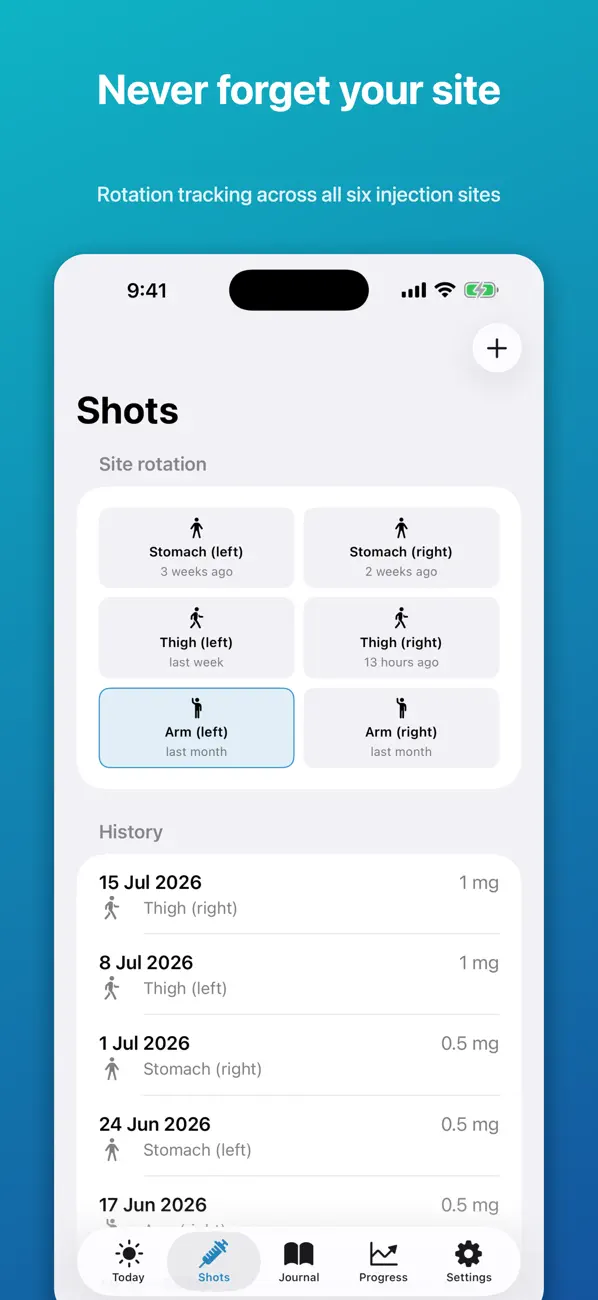
An injection-site rotation log records where each shot went so you can pick a different place next time. GLP-1 Companion tracks six sites (stomach, thigh and arm, each left and right) and labels every one with how long ago it was used. You log the site when you log the shot, and the grid updates itself. Follow the site instructions in your own leaflet; the app only shows your history.
Why people keep a rotation log
The patient instructions for weekly GLP-1 pens such as Ozempic, Wegovy, Mounjaro and Zepbound describe injecting under the skin of the abdomen, thigh or upper arm, and changing the site with each injection. With a daily injection you build a habit quickly. With a weekly one, the previous shot is always a week old, and most people default to the same comfortable spot.
A log removes the guesswork. It also gives you something concrete to show a nurse or pharmacist if a site is sore, red or lumpy and you want to ask about it.
How the six-site grid works
The Shots screen in GLP-1 Companion opens with a grid of six tiles:
| Area | Left | Right |
|---|---|---|
| Stomach | Stomach (left) | Stomach (right) |
| Thigh | Thigh (left) | Thigh (right) |
| Arm | Arm (left) | Arm (right) |
Under each name is a plain-language age: "3 weeks ago", "last week", "13 hours ago". When you add a shot you tap the site you used, and that tile resets. The site that has rested longest is easy to spot, and the choice remains yours.
Below the grid is the history: every shot with its date, site and dose, newest first. A typical run reads "15 Jul, thigh (right), 1 mg; 8 Jul, thigh (left), 1 mg; 1 Jul, stomach (right), 0.5 mg".
A simple rotation routine
- Log the shot straight away. Do it while the pen is still in your hand. It takes a few seconds and is the only step that matters.
- Look at the grid before the next one. On shot day, open Shots first. The tile ages tell you where you have been.
- Keep to the areas your leaflet lists. If your nurse suggested a pattern, such as moving clockwise around the abdomen, write it in that week's notes so it stays with the record.
- Tag a reaction if you get one. "Injection site reaction" is one of the symptom tags in the Journal, so it sits against the date and the site.
When a site reacts
Redness, itching or a small lump at an injection site is something to mention to your pharmacist or prescriber, especially if it does not settle. A log makes that conversation quicker: you can say which site, which date, which dose and how many days it lasted. The app will not tell you whether a reaction is normal. It gives you an accurate account to bring to someone who can.
The side-effect journal guide has examples of short, factual notes.
Paper and printable options
If you would rather keep the record on the fridge, the free printable GLP-1 shot log has space for the date, dose and site of each injection. The injection-week planner adds a simple view of the days around your shot. Both work alongside the app or without it.
Free version and Pro
| Free | Pro (one-time purchase) |
|---|---|
| Log shots with date, dose and injection site | Full history beyond the most recent 30 days |
| Daily protein, water, food-noise and symptom notes | CSV export of your own records |
| Weigh-ins and a trend chart | Weekly comparison and shot-day insights |
| A first weekly meal plan | More meal plans and a grocery list |
Site logging and the rotation grid are part of the free version. Pro keeps history older than 30 days visible and adds CSV export, which is useful if you want a complete site record for a clinic visit.
Common questions
How many injection sites should I rotate between?
Your leaflet and prescriber decide that. The app offers six: stomach, thigh and upper arm on each side. You can use as many or as few of those as you have been advised to.
Does the app choose the next site for me?
No. It shows how long ago each site was used. You pick, following the instructions for your medicine.
Can I record the exact spot, not just the area?
Each shot is logged against one of the six sites. For finer detail, such as "two fingers left of the navel", add it to that day's notes.
Is the rotation grid free?
Yes. Logging shots with a site and seeing the grid are in the free version. The free version shows the most recent 30 days of history; Pro shows all of it.
GLP-1 Companion is a personal tracking tool. It is not medical advice, diagnosis or treatment, and it is not affiliated with any medicine manufacturer. Brand names belong to their owners. Always follow your prescriber and the leaflet that came with your medicine.
See where every shot went, with dates: Download GLP-1 Companion.