What Hazel does well
Hazel is focused and mature. If your main job is watching folders and moving, renaming or deleting files based on rules, Hazel may be exactly the tool you need.
Why someone might choose Relay instead
Many workflows start with a file but do not end there. A screenshot may need OCR and a note. A PDF may need renaming and filing. An email may need extracting, summarizing and turning into a reminder. Relay is designed for that wider chain.
Good Relay workflows
Screenshot cleanup
Watch a screenshots folder, rename new captures, file them by project and summarize the context into a note.
Client intake
Process downloaded files, extract useful fields, create reminders and prepare a short summary before you reply.
Weekly admin
Run a scheduled workflow to collect notes, reminders and calendar context into a preparation checklist.
Verdict: keep Hazel in mind for pure folder rules. Use Relay when the folder rule needs to become a fuller Mac workflow.
Hazel and Relay side by side
| Hazel | Relay | |
|---|---|---|
| Core idea | Rules that watch folders and act on matching files | Visual workflows with triggers, conditions and actions |
| Triggers | Folder contents | Folders, screenshots, hotkeys, schedules, mail |
| How you build | Rule editor with conditions | Chat with an AI builder, or drag onto a canvas |
| AI steps | Not its focus | On-device text transforms |
| Track record | Long-established and widely trusted | Newer, from an independent developer |
Hazel has years of refinement in file handling and a large library of user-shared rules. If your needs are purely folder-based and you already have rules that work, there is little reason to move. Check Noodlesoft's site for Hazel's current features and price.
When Relay is the better fit
- You want things to start from a hotkey, a schedule or incoming mail, not only from a folder.
- You would rather describe a workflow in words than build conditions.
- You want a text step in the middle: summarise, rewrite, extract.
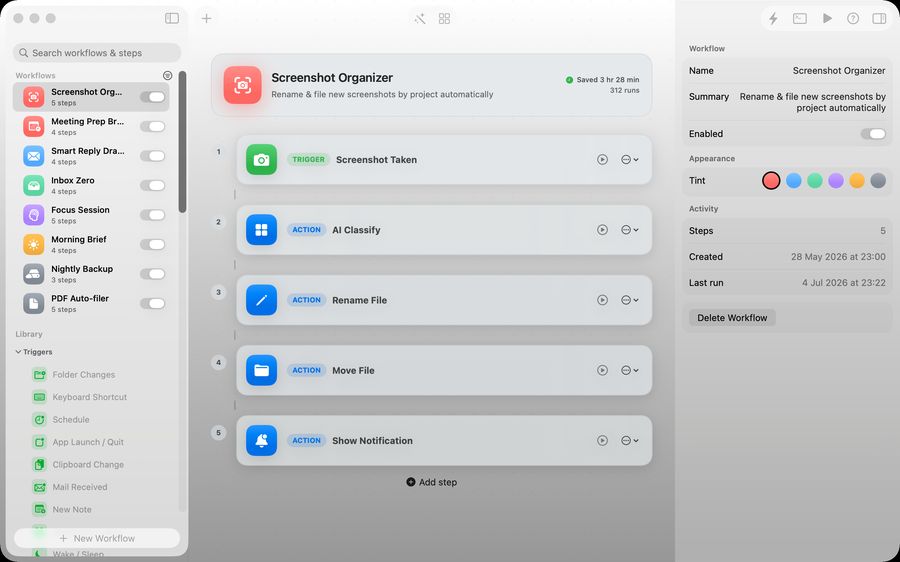
A file workflow in Relay
- Trigger: a new screenshot is saved.
- Rename with a template such as date and name.
- Move to a dated folder.
- Notify.
Where Relay fits
Relay is a Mac app for visual automations. You build a workflow by describing it in chat or dragging triggers, conditions and actions onto a canvas. Triggers include folders, screenshots, hotkeys, schedules and mail. Workflows are stored in a JSON file on your Mac, AI steps run on-device, and there is no account or subscription: you buy it once. It does not connect web services to each other the way a cloud automation platform does.
Moving a folder rule across
If you are trying Relay alongside existing folder rules, pick one simple rule, such as filing PDFs from Downloads. Rebuild it in Relay with a notify step only, compare what it would have done for a few days, then switch on the move. Turn the old rule off only once you trust the new one, so two tools are never acting on the same file.
Keeping automations maintainable
- Name each workflow for what it does, not when you made it.
- One job per workflow. Two short ones are easier to fix than one long one.
- Review them every few months and delete what you no longer need.
Questions people ask
Can I use Hazel and Relay together?
Yes. They do not conflict as long as two rules are not fighting over the same files.
Does Relay need an account?
No. Workflows are stored locally in a JSON file.
Will it move files without asking?
Only as your workflow says. Test on copies first and start with a notify step so you can see what it would do.
Is Relay a subscription?
No. It is a one-time purchase.