Where Apple Shortcuts is strong
Shortcuts is free, built into Apple platforms and very capable for chaining supported actions. If your workflow already fits the actions Apple provides, it can be the right answer.
Where Relay is different
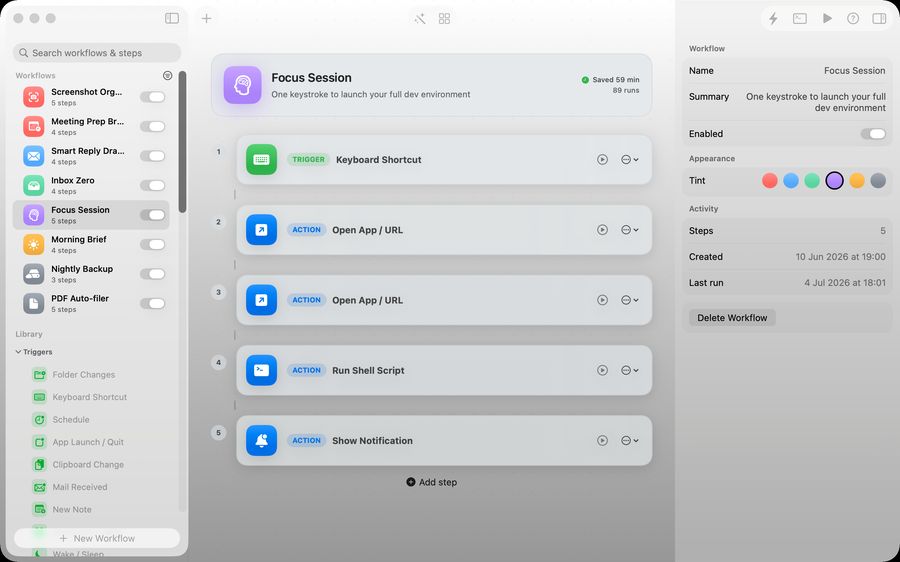
Relay is built specifically around desktop Mac workflow building. The canvas, templates, quick run flow and folder-aware triggers are designed for the sort of repeated jobs that pile up in Finder, Mail and client work.
When to choose Shortcuts
Choose Shortcuts when you want free built-in automation, especially if the task is already covered by Apple actions and you do not need a richer visual workflow editor.
When to choose Relay
Choose Relay when the work touches Finder, Mail, screenshots, notes, schedules, repeated quick runs or AI steps, and you want the workflow to stay visible and local on your Mac.
Verdict: Relay is not trying to replace every Shortcut. It is built for the Mac workflows that deserve a clearer canvas.
The practical differences
| Apple Shortcuts | Relay | |
|---|---|---|
| Price | Free, built in | One-time purchase |
| Devices | Mac, iPhone, iPad, Watch | Mac only |
| Triggers on Mac | Run manually, from the menu bar, hotkeys, or via other tools | Folders, screenshots, hotkeys, schedules and mail built in |
| Building | Block editor | Chat-based builder or canvas |
| Visibility while running | Limited | Trigger, steps and state shown in one window |
| App integrations | Very broad, through app actions | A focused set of Mac actions |
Shortcuts is free, works across Apple devices and reaches into far more apps. If a shortcut already does the job, keep it.
Where people hit limits with Shortcuts on Mac
- Running something automatically when a file appears or at a set time takes extra set-up.
- Long shortcuts are hard to read and debug.
- It is easy to lose track of what ran and why.
Using both
They are not exclusive. Keep Shortcuts for cross-device actions and anything tied to a specific app's actions, and use Relay for Mac-side automations that should fire on their own: filing, renaming, scheduled briefs, mail triage.
Where Relay fits
Relay is a Mac app for visual automations. You build a workflow by describing it in chat or dragging triggers, conditions and actions onto a canvas. Triggers include folders, screenshots, hotkeys, schedules and mail. Workflows are stored in a JSON file on your Mac, AI steps run on-device, and there is no account or subscription: you buy it once. It does not connect web services to each other the way a cloud automation platform does.
A quick way to decide
- Needs to run on iPhone or Watch: Shortcuts.
- Uses a specific app's built-in actions: Shortcuts.
- Should fire by itself when a file appears, mail arrives or a time comes round on the Mac: Relay.
- Needs a text-transform step that stays on the device: Relay.
- You want to see every step and its state while it runs: Relay.
If you are unsure, build the same small automation in both and keep whichever you understood a week later. The one you can still read is the one you will maintain.
Questions people ask
Is Shortcuts enough for most people?
For manual, tap-to-run actions, often yes.
Can Relay run my existing shortcuts?
Check the current feature list on the Relay page; this guide does not assume it.
Does Relay work on iPhone?
No. It is a Mac app.
Which is easier to learn?
Shortcuts has more to learn because it does more. Relay's chat builder lets you describe what you want and adjust the result.