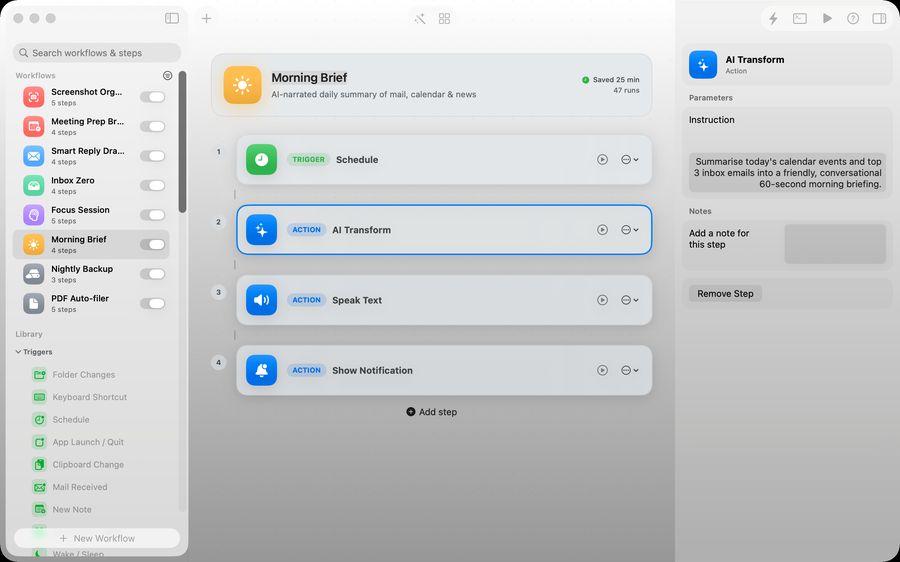
The problem Relay is built around
Most Mac automation starts small. You want screenshots renamed, downloads filed, email text summarized, meeting notes captured or a recurring checklist prepared. Then the job grows across Finder, Mail, Notes, Calendar, Reminders and a few bits of AI.
Relay gives those jobs a canvas. You can drag steps together, use templates, or ask the AI builder to create a first version of the workflow and then inspect it before you run it.
Good fit
Freelancers, indie developers, researchers, consultants and Mac power users with repeated personal workflows.
Poor fit
Large team process automation, cloud integrations that need hosted workers, or developer-only scripting pipelines.
What makes Relay useful
Triggers that match real Mac work
Start workflows from folder changes, hotkeys, schedules, app launches and manual quick runs.
Actions that cross app boundaries
Work with files, text, screenshots, Mail, Notes, Reminders, Calendar and web requests from one workflow.
On-device AI where it belongs
Use Apple Intelligence for summarizing, extracting, classifying and fixing workflow steps without making cloud AI the default path.
A visible system you can trust
Relay is deliberately inspectable. You can see what will run, edit the steps and keep workflows as local files.
Data, price and support
Relay is built by Michael at Yuzool as independent Mac software. It is designed around local-first workflows, direct email support, clear policies and a one-time purchase model.
Automations worth building first
| Workflow | Trigger | Steps |
|---|---|---|
| Screenshot organiser | New screenshot saved | Rename, move to dated folder, notify |
| Receipt filer | PDF arrives in Downloads | Rename with date, move to a receipts folder |
| Morning brief | Schedule, weekdays | Gather text, summarise on-device, speak or notify |
| Inbox triage | New mail | Extract text, draft a reply for review |
| Voice memo clean-up | New audio file in a folder | Rename, move, notify |
| Quick launch | Hotkey | Open the apps and folders for a project |
How to decide what to automate
- You do it at least weekly.
- The steps are the same each time.
- A mistake is cheap to undo.
- It takes longer than a minute by hand.
Start with one. Run it for a week, check what it did, then add the next. Automations that move or rename files should be tested on copies first.
Compared with cloud automation
Services such as Zapier connect web apps to each other and run on their servers, usually by subscription. Relay automates what happens on your Mac and keeps everything local. Many people need both, for different jobs.
Where Relay fits
Relay is a Mac app for visual automations. You build a workflow by describing it in chat or dragging triggers, conditions and actions onto a canvas. Triggers include folders, screenshots, hotkeys, schedules and mail. Workflows are stored in a JSON file on your Mac, AI steps run on-device, and there is no account or subscription: you buy it once. It does not connect web services to each other the way a cloud automation platform does.
Reading a workflow before it runs
The point of a visual tool is that you can see what will happen. Before switching a workflow on, read it top to bottom: what starts it, what each step changes, and where files end up. In Relay the trigger, steps and inspector sit in one window, so this takes seconds. If you cannot predict the result from reading it, simplify it.
When not to automate
Leave jobs that need judgement each time, anything touching money or other people without a review step, and tasks you do twice a year. A draft-for-review step is a good compromise: the automation prepares, you approve.
Questions people ask
Do I need to know how to code?
No. You describe the workflow or drag steps onto a canvas.
Is automation safe for my files?
Treat any automation that moves, renames or deletes as you would a script: test on copies, and keep backups.
Does the AI step send text to a server?
No. Relay uses Apple's on-device intelligence.
How do I run a workflow quickly?
Quick Run opens a launcher with a keyboard shortcut where you can search saved workflows.