Where Outlook is strong
Outlook is the email and calendar app many workplaces standardise on, and on a Mac it fits that world well. Meetings, availability, shared calendars and RSVPs all live in the same app as your mail. If your company uses Microsoft 365, Outlook is usually the client IT supports, and some organisations require it.
It is not only for work accounts. As of November 2026, the Mac App Store listing describes Outlook as free with personal email accounts and compatible with Microsoft 365, Outlook.com (including Hotmail and MSN), Gmail, Yahoo Mail, iCloud, IMAP and POP. The free version shows ads; the listing says a premium subscription removes them, and Microsoft 365 Personal and Family plans are offered as in-app purchases.
Outlook also runs on Windows, iPhone, iPad, Android and the web, so it follows you anywhere. If you switch between a Windows PC at work and a Mac at home, that consistency is valuable.
Where Suzume is different
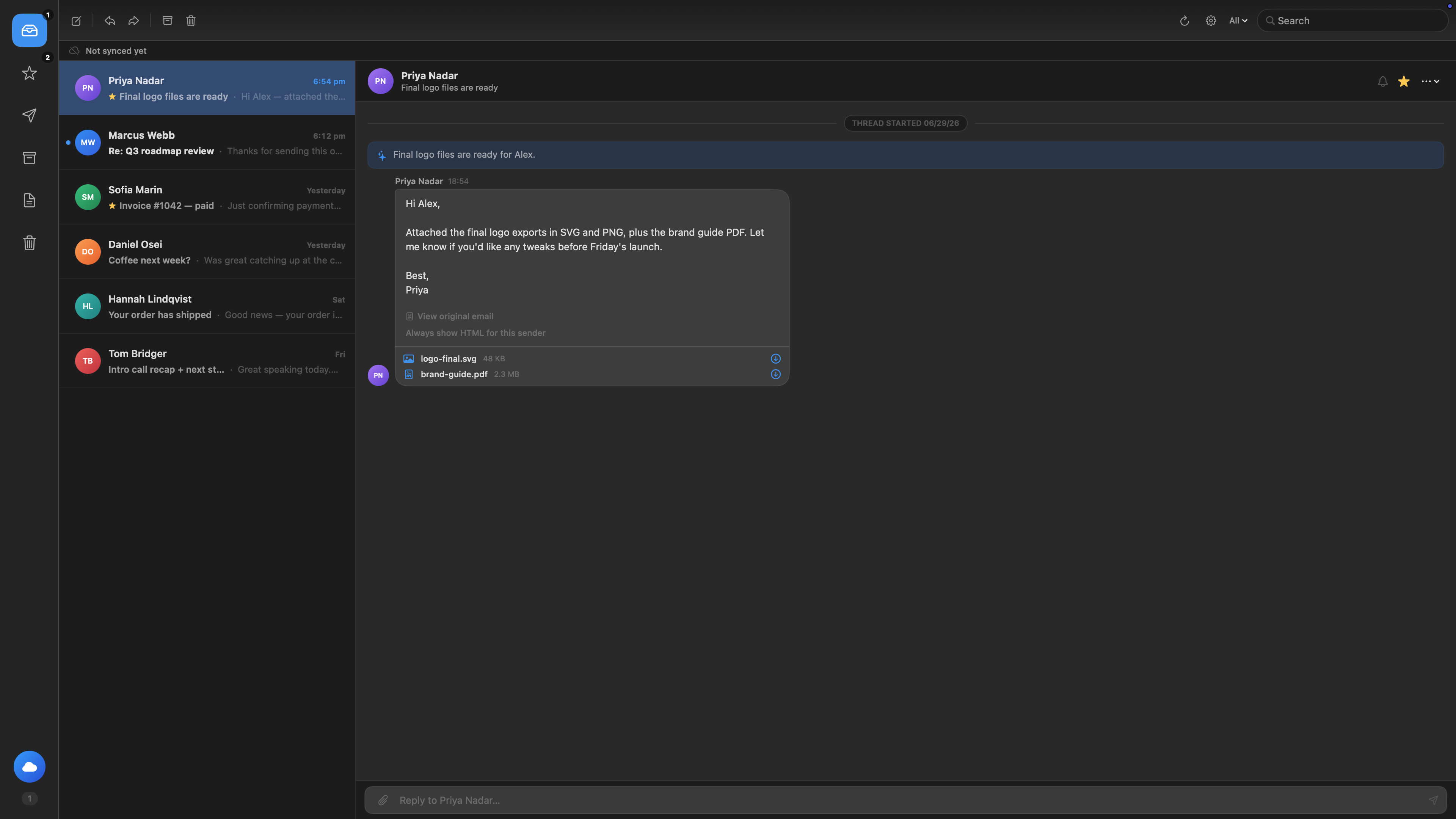
Suzume Mail is an email app only, made by one developer for Mac and iPhone (the App Store listing also covers Apple Watch). Its main idea is the reading view: a thread opens as chat bubbles, with your messages on one side, other people's on the other and quoted text folded away. For long personal threads, that can be much easier to follow than a stack of replies.
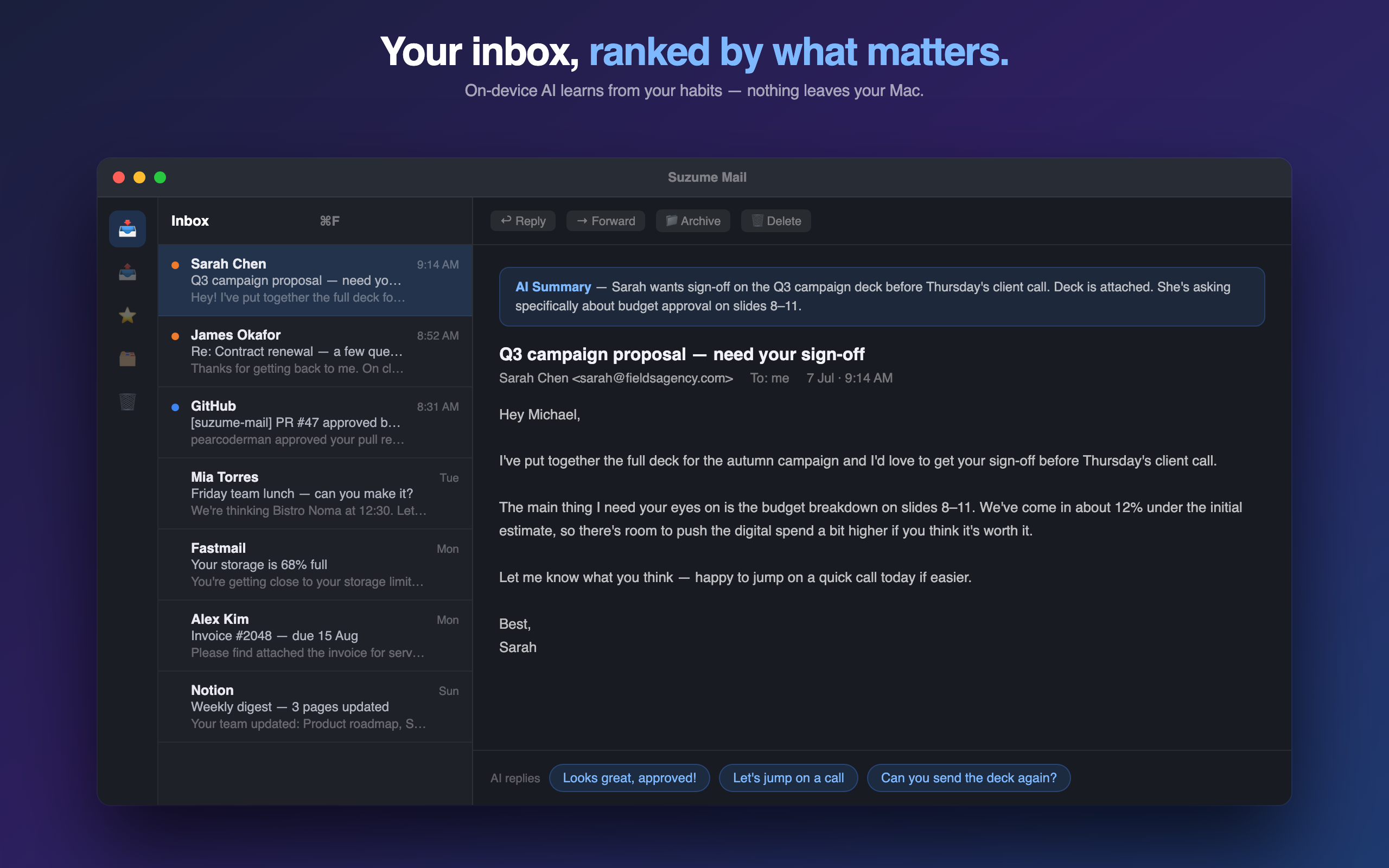
It connects directly to your provider over IMAP and SMTP, including OAuth sign-in for Gmail and Outlook.com accounts, iCloud, Fastmail and other standard providers. There are no ads, the App Store privacy label says no data is collected, credentials live in the Keychain and the local cache is encrypted. Its AI features (summaries, quick replies, writing suggestions and smart inbox ranking) run on the device through Apple Intelligence on Macs with macOS 26 and Apple silicon.
Suzume is free to download with a 14-day trial, and then one $19.99 unlock covers all your devices, with no subscription.
Feature comparison
Calendar
Outlook has a full calendar with scheduling and sharing. Suzume is an email app and does not include a calendar.
Work accounts
Outlook is built around Microsoft 365. Suzume is not designed for company admin policies or shared team inboxes.
Reading
Suzume shows threads as conversations. Outlook uses a traditional reading pane with conversation grouping.
Cost
Outlook is free with ads for personal accounts. Suzume is $19.99 once, with no ads.
How I would decide
First, separate work mail from personal mail. If your work account is on Microsoft 365, Outlook will almost always be the better tool for it, because of the calendar, the admin side and what your colleagues use. That does not decide your personal mail, though. Plenty of people keep Outlook for work and use a different app for everything else.
For personal mail, ask what bothers you. If it is ads, clutter or long threads you cannot follow, Suzume addresses those directly. If it is that you need your calendar next to your inbox, Outlook already does that and Suzume does not.
Also check your Mac. As of November 2026 the Outlook listing requires macOS 15 or later. Suzume needs macOS 14 or later, though its AI features need macOS 26 and Apple silicon.
When to choose Suzume
Choose Suzume if you want a personal inbox without ads, prefer to pay once, and like the idea of email reading like a chat. It suits freelancers, consultants and anyone juggling a few IMAP accounts who wants rules, VIP senders, snooze, follow-up reminders and Undo Send in a small native app.
It also suits people who would rather keep AI processing on their own Mac than in a cloud service.
When Outlook is the better pick
Choose Outlook if your organisation uses Microsoft 365, if you schedule a lot of meetings, or if you need the same app on Windows and Android. It is also reasonable if you already pay for Microsoft 365 for Word and Excel, since the premium Outlook experience comes with it.
There is no need to pick only one. Outlook for work and Suzume for personal mail is a perfectly sensible setup.
Verdict: Outlook is the right tool for Microsoft 365 work and calendar-heavy days. Suzume is the focused, ad-free alternative for personal mail on Apple devices, read as conversations and paid for once.
At a glance
| Suzume Mail | Outlook for Mac | |
|---|---|---|
| Price (as of November 2026) | Free download, 14-day trial, $19.99 one-time unlock for all devices | Free with personal accounts (with ads); premium via Microsoft 365 subscription |
| Platforms | Mac, iPhone, Apple Watch | Mac, Windows, iPhone, iPad, Android, web |
| Calendar | No | Yes |
| Thread view | Chat-style bubbles | Traditional reading pane |
| Ads | None | On the free version |
| Minimum macOS | macOS 14 (AI needs macOS 26) | macOS 15 |
Running both
- Keep your work account in Outlook.
- Add your personal accounts to Suzume during the free trial.
- Use both for a week and see which inbox you open more willingly.
- Nothing is migrated: your mail stays on your provider either way.
The switching checklist covers folders, drafts and attachments.
Questions people ask
Can Suzume open my Outlook.com account?
Yes. Suzume supports OAuth sign-in for Outlook accounts as well as Gmail, iCloud, Fastmail and other IMAP/SMTP providers.
Does Suzume work with my company's Microsoft 365 policies?
Suzume is not built for company-wide email governance or admin policies. If your IT team requires Outlook, use Outlook for that account.
Can I bring old mail across?
Mail on your server appears automatically. Suzume can also import .eml and .mbox files.