A travel expense splitter records each shared cost, who paid it and who it covers, then works out what everyone owes. In Troupe, anyone in the trip can add an expense, split it equally, by percentage or by custom amounts, and attach a receipt photo. Balances update for the whole group, and "Who pays whom" reduces the debts to the fewest transfers. There is no cap on the number of expenses.
How an expense is recorded
Adding an expense takes a title, an amount and three choices:
- Paid by. The person whose card or cash covered it.
- Split between. Toggle each person in or out. Four of five went to the show, so four are selected.
- Split method. Equal, percentage, or custom amounts.
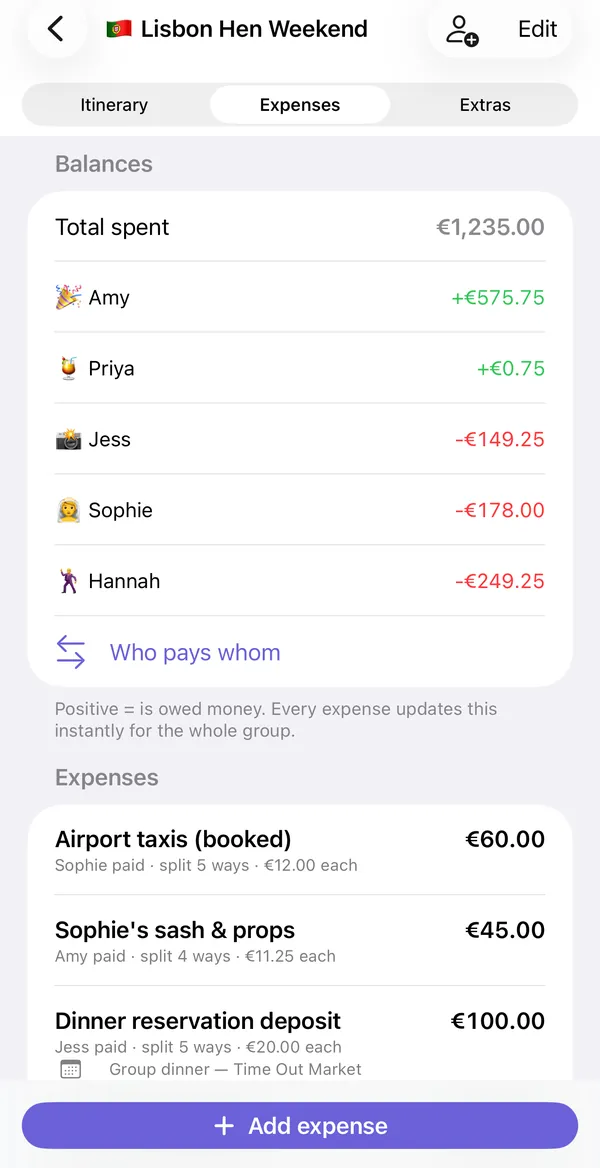
Optional extras are a date, notes, a photo of the receipt, the currency, and a link to an itinerary item, so the cost sits under the booking it paid for. In the list each expense reads like a sentence: "Airport taxis (booked), Sophie paid, split 5 ways, €12.00 each".
Three ways to split
| Method | Use it when | Example |
|---|---|---|
| Equal | Everyone shared it the same | Taxi from the airport, five ways |
| Percentage | Shares follow a rule | A couple takes 40% of the apartment for the bigger room |
| Custom amounts | People owe specific sums | A restaurant bill where two people had the tasting menu |
Because you pick who is included on every expense, you rarely need a custom split just to leave someone out.
Rentals, budgets and late joiners
Three situations cause most arguments. A shared rental is fairest split by nights and rooms: someone who arrives a day late or takes the sofa pays less, and a custom split records exactly that. Budgets go better when the group agrees a rough spend per person before anything is booked, and keeps optional extras (the boat trip, the tasting menu) as separate expenses that only the people who joined share. When a friend joins halfway through, add them to the trip and include them only in the expenses from the day they arrive; earlier costs stay with the people who were there.
Balances and "Who pays whom"
The top of the Expenses tab shows the total spent and one line per person. A positive figure in green means the group owes them. A negative figure in red means they owe the group. These change the moment anyone adds or edits an expense.
Raw balances do not tell you what to do, though. If Amy is owed €575 and three people owe different amounts, someone has to work out the payments. "Who pays whom" does that and minimizes the number of transfers. Five people with a tangle of small debts usually settle in three or four payments instead of ten.
Settling up
- Open "Who pays whom". You see a list such as "Hannah owes Amy €249.25".
- Pay. If the person being paid has added a payment link to their profile, a Pay button opens it. Otherwise use whatever your group normally uses.
- Mark it paid. Expenses can be marked settled, with the date recorded.
- Share the summary. "Share settlement summary" sends the list to the group chat as text.
If you are not ready to chase people on the journey home, "Remind me tomorrow" sets a nudge. The trip closeout checklist covers the rest of wrapping up.
Why not just use a general bill-splitting app?
General splitters such as Splitwise and Tricount are good at the arithmetic, and some support far more currencies and platforms than Troupe does. What they do not have is the trip. In Troupe the €100 dinner deposit is linked to "Group dinner, Time Out Market" on day two, so nobody asks what it was for three weeks later. If your group is all on iPhone and the expenses belong to one trip, having both together is simpler. If you need Android support or ongoing household bills, a general splitter is the better fit. There is a fuller comparison on the Troupe vs Splitwise page.
Limits to know about
- iPhone and iPad only. There is no Android or web version, so everyone in the group needs an Apple device to join the shared trip.
- It syncs through iCloud. There are no Troupe accounts and no Troupe server. Each person needs to be signed in to iCloud.
- It does not book anything. You add flights, stays and activities yourself; Troupe organizes them.
- It does not move money. It works out who owes whom and can open a payment link. The transfer happens in your banking or payment app.
Trips use one of seven currencies: USD, EUR, GBP, JPY, AUD, CAD or CHF. If you want to check the maths before downloading anything, the free cost split calculator runs in a browser.
Free version and Pro
| Free | Troupe Pro |
|---|---|
| One trip | Unlimited trips |
| Up to 4 people | Any group size |
| Itinerary, expenses, packing list and documents | Everything in free, without the limits |
| Everyone you invite joins free | Only the organizer needs Pro |
Pro is a monthly subscription or a one-time lifetime purchase. Only the person who creates the trip pays; the people they invite never do. Check the App Store for current prices.
Common questions
Is there a limit on how many expenses I can add?
No. There is no daily or total expense cap in the free version or in Pro. The free limits are one trip and four people.
Can I split a bill unevenly?
Yes. Use percentage or custom amounts, and choose which people are included in each expense.
Does Troupe transfer the money?
No. It calculates who owes whom and can open a person's payment link. The payment itself happens in your own banking or payment app.
Can everyone add expenses, or only the organizer?
Anyone who joins the shared trip with edit access can add and edit expenses, and the balances update for the whole group. The organizer chooses the access level when sharing.
Can I keep receipts?
Yes. Each expense can hold a photo of the receipt.
Troupe is for iPhone and iPad. Trips sync through your own iCloud, with no accounts, ads or tracking. Other apps named on this page are trademarks of their owners.
Track costs from the first booking and skip the end-of-trip maths: Get Troupe on the App Store.