Free Quick Design template
Café Instagram post template
The post has a big coffee photo, a headline, a line about the offer, the price and your opening time and address. Put in your own photo and offer and post it; it works for a bakery or a bar just as well.
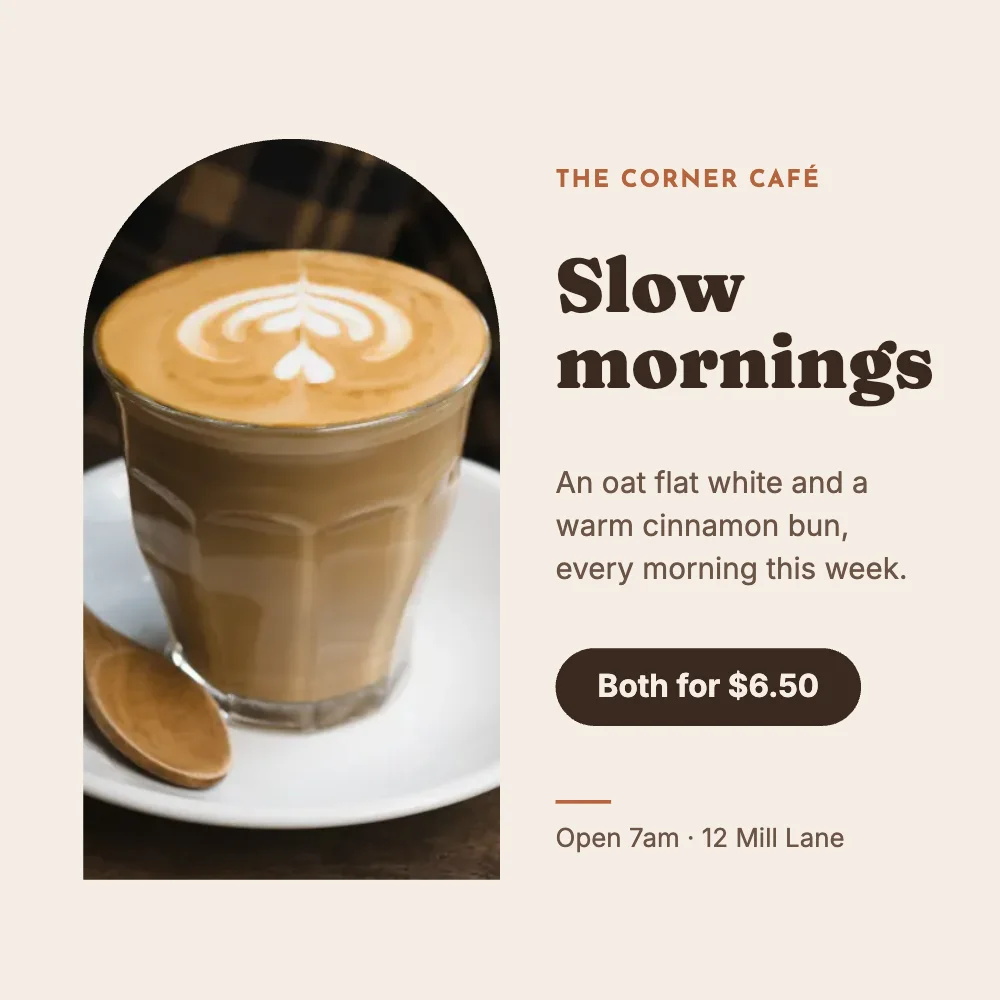
What’s in it
- Size: square, 1080 × 1080 pixels: the size Instagram shows in the feed, and it works on Facebook, Threads and LinkedIn too.
- Fonts: Josefin Sans, Fraunces, Inter.
- Photo: CC0, yours to keep or swap.
- Animated in an MP4 or GIF.
How to make it
- Use this template.
- Swap in a photo of your own coffee or food, then change the offer, the price and your café’s name, hours and address.
- Download a PNG, JPG, MP4 or GIF.
Tips
- Your own photo, taken by a window in daylight, beats any stock picture of coffee.
- Post offers with a price and a time (“every morning this week”): they bring people in more than “come and visit”.
- Keep a few versions in Your designs and change only the offer each week.
Questions
Can I search for a photo?
Yes. The Photos tab searches free photos (CC0 and public domain, from Openverse) that need no credit, or add your own.
Can I put my logo on it?
Yes. Add it as a photo, or keep it in the brand kit (Quick Design Pro) with your colours and fonts.