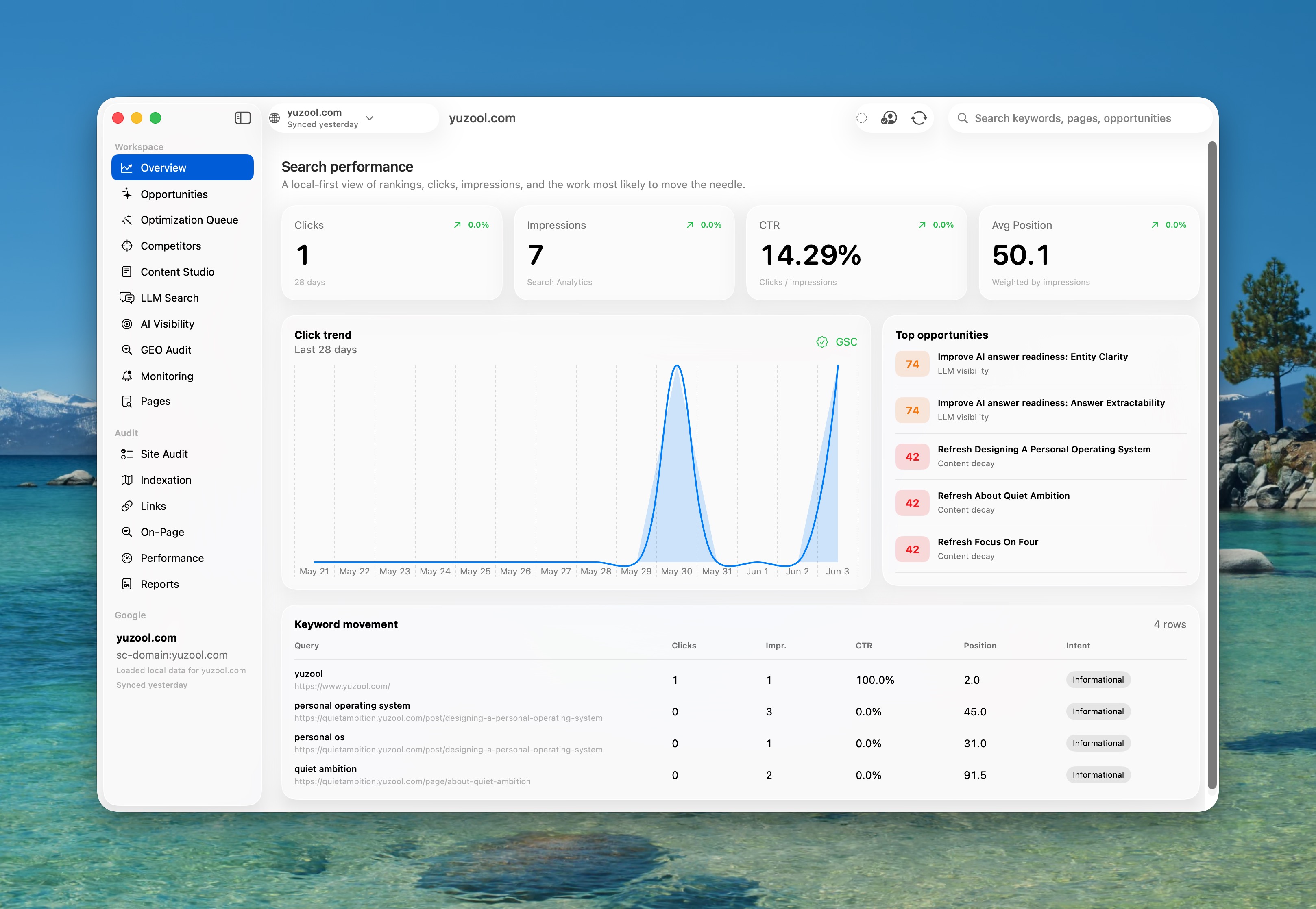
Use Search Console impressions, clicks and CTR to surface a specific opportunity—not a generic site score.
Example: a page is seen often, but fewer searchers click through.
Rank for Mac · $39 once
SEO software for Mac, built around Search Console.
For solo site owners, indie makers, and small SEO teams using Google Search Console. Find a worthwhile page fix, review it, then measure the result.
Already know this is for you? Buy Rank directly. If you want to compare the app with the $49 human audit first, use Start here.
One-time purchase, no subscription
No cloud crawlers — runs on your Mac
Tracks whether each change worked
Best after your site has started collecting Search Console impressions. Google authorization is revocable, tokens stay in Keychain, and synced performance data is cached on your Mac.
$39
One payment. Find opportunities, fix pages, publish changes, and measure whether they worked — all from your Mac.
The Rank loop
Spot an opportunity. Review a fix. Measure the result.
Rank keeps the evidence, the change and its follow-up together—so SEO work moves from a Search Console signal to a result you can inspect.
See the page context and proposed change. Edit and approve it before Rank publishes or exports anything.
Example: refine a title and description to better match the page.Keep the baseline beside the work, then review Search Console checkpoints at 7, 14 and 28 days.
Keep, revisit or mark the result inconclusive—without claiming causation.Yuzool’s live case study
See the real work before the success story.
I am using Rank to grow Yuzool from a small July traffic baseline. Follow the Search Console evidence, the changes I choose, and the honest 7-, 14-, and 28-day results.
This is first-party build-in-public evidence, not an independent customer result. Customer outcomes or testimonials will only be added with permission and verifiable context.
See the workflow before you choose.
A short product walkthrough is more useful than another feature list. Watch how Search Console data becomes a reviewed SEO task.
▶
Watch the whole walkthrough
See the full product tour, screenshots, first-session workflow and the honest boundaries of what Rank does.
New in Rank 1.5: Rank Advisor.
Ask Rank questions about the selected site and get evidence-backed answers from your local Search Console, crawl, timeline, experiment, AI visibility and publishing data.
Talk to your SEO workspaceAsk what changed, what matters, why traffic moved, or what to fix next.
Evidence-backed answersAdvisor replies with clicks, impressions, issues, alerts, experiments and change history attached.
Reviewable action cardsOpen the right workspace, approve top queued fixes, start experiments, sync data, or run a fresh crawl.
Local-first by designRank Advisor uses local Rank data and does not add another external AI API in version 1.5.
SEO Change TimelineSee publishing, crawls, Search Console snapshots, experiments, and alerts in one durable history.
Metadata ExperimentsCompare original and proposed title or description variants using measured CTR movement.
Daily BriefingOpen Rank to the changes and regressions that deserve attention, without another noisy digest.
Opportunity ForecastsEstimate clicks and add optional GA4 or Tinylytics signals before starting work.
Content Decay CalendarSchedule refresh work around declining pages and the approximate clicks currently at risk.
Template IntelligenceSpot one repeated URL template causing the same SEO problem across many crawled pages.
Client ModeCollect approvals, open a read-only presentation window, and export a branded HTML report.
AI Referral AnalyticsClassify ChatGPT, Perplexity, Gemini, Copilot, and Claude visits through optional GA4 or Tinylytics data.
Talk to your SEO workspaceAsk Rank what changed, what matters, and what to fix next.
Site audit crawlerTechnical SEO checks run locally from your Mac.
Timeline + experimentsRemember what changed and measure metadata variants against real CTR.
Proof of ImpactForecast the opportunity, publish the fix, then measure what actually moved.
Ask Rank what to do next.
Rank Advisor is a private SEO assistant inside the Mac app. It can read the selected site's Rank workspace, explain what it sees, and turn the answer into actions you can review.
It is designed for practical questions, not vague dashboards: why traffic moved, which CTR leaks deserve experiments, which crawl issues have real business impact, and what to tell a client this week.
Example things to ask.
What should I work on next for this site?
Why did traffic change and what should I check?
Find my best CTR opportunities.
Which crawl issues matter most?
What can improve AI search visibility?
Write a client-ready weekly summary.
Which title or meta tests should I run?
What changed since the last crawl?
Which approved fixes are ready to publish?
Where are my biggest indexation risks?
What pages are decaying this month?
What should I do for ChatGPT or Perplexity visibility?
Learn the Rank workflow.
Practical guides for turning Search Console, local audits, and AI visibility signals into SEO changes you can actually ship.
Use the conversion hub if you want the shortest path.
Buy path: start-here first, then the guides only if you need context.
◎
See Rank used on Yuzool
Follow the real workflow from a Search Console signal to one controlled SEO change, with a public baseline and measured follow-up.
▶
Watch the demo
See how Rank connects Search Console, audits locally, opens Rank Advisor, prepares fixes, and measures impact.
📉
Find low-CTR pages
Use Search Console impressions, CTR, and query intent to find pages worth rewriting or testing.
🔔
Monitor regressions
Catch ranking, CTR, click, crawl, and indexation drops before they become long-term traffic losses.
✦
Run a GEO audit
Check entity clarity, answer readiness, trust signals, structured data, and AI citation opportunities.
🖥
Choose a desktop workflow
Compare browser reports, spreadsheets, cloud suites, and a native Search Console app for Mac.
▣
Optimize Elementor pages
Use GSC data to improve WordPress Elementor pages safely without breaking layout content.
📝
Update content from GSC
Turn queries, decay, CTR leaks, and near-page-one signals into focused refreshes and briefs.
What you can do in the first 20 minutes.
Rank is easiest to understand as a weekly decision tool: connect the data, find one page worth improving, make a controlled change, and keep the context for the next review.
- Connect Google Search Console and choose the site you actually want to grow.
- Find pages with impressions but weak CTR, slipping clicks, or content decay.
- Run a local crawl to check titles, descriptions, canonicals, headings, links, and indexation signals.
- Pick one high-confidence improvement instead of drowning in generic SEO tasks.
- Record the change so you can measure the result after 7, 14, and 28 days.
Good fit if...
- You already check Search Console but struggle to decide what to do next.
- You run a small site, app business, client portfolio, or indie product site.
- You want SEO work to have a memory, not just another browser tab.
- You prefer one-time Mac software over another monthly dashboard.
Not a good fit if you need an enterprise rank tracker, a large crawling cloud, or a team reporting suite with seats and permissions.
Stop guessing. See what changed, why it matters, and what to fix next.
Most SEO tools tell you what happened. Rank turns your Search Console and crawl data into a focused repair and content queue.
✦
Rank Advisor
Ask plain-English SEO questions and get local, evidence-backed answers with action cards that open the right workspace or prepare the next reviewed step.
📈
SEO opportunity detection
Find keywords close to page 1, high-impression low-CTR queries, pages worth refreshing, content decay, traffic drops, emerging trends, and quick wins.
🔎
Deep local site audit
Crawl your site for metadata, headings, canonicals, sitemap gaps, robots rules, redirects, broken links, duplicate content, and internal-link weaknesses.
✨
SEO + AGO / GEO
Improve entity clarity, topical authority, citation potential, AI answer readiness, content extractability, trust signals, and LLM visibility opportunities.
🧭
Optimization Queue
Prioritize title rewrites, meta descriptions, schema, alt text, content refreshes, internal links, and crawl fixes by likely business impact.
↗
Publishing integrations
Publish approved fixes to WordPress, Webflow, Shopify product SEO, or local HTML, and create portable Framer handoff packages.
✓
Proof of Impact
Record changes, capture Search Console and crawl baselines, and measure 7, 14, and 28-day outcomes with estimated additional clicks.
⌛
SEO Change Timeline
Follow a page's publishing, crawl, ranking, experiment, and alert history in one chronological local record.
🧪
Title + meta experiments
Capture an original and proposed variant, then classify comparable Search Console CTR movement when enough impressions arrive.
☀️
Daily native briefing
See the three most important overnight changes from Rank's locally recorded events, with a quiet caught-up state when nothing is urgent.
◒
Opportunity forecasting
Estimate additional clicks before starting. Add optional GA4 data for conversions and revenue, or Tinylytics for page views and Kudos.
🗓️
Content Decay Calendar
Turn declining page signals into an ordered refresh calendar with risk scores and approximate clicks at risk.
▦
Template Intelligence
Group repeated URL patterns and expose issue signatures that may originate from one shared CMS or storefront template.
👤
Client Mode
Record approvals, present progress in a distraction-free window, and export a portable branded HTML report.
↪
AI referral analytics
Use optional GA4 or Tinylytics connections to classify visits from ChatGPT, Perplexity, Gemini, Copilot, and Claude.
◫
Analytics outcome priority
Connect GA4 for conversions and revenue, or Tinylytics for lightweight views and Kudos that can lift commercially important queue items.
📝
Content Studio
Turn opportunities into article ideas, briefs, outlines, titles, meta descriptions, FAQs, and refresh suggestions with review-ready export flows.
🏷️
Brand Footprint
Find recommendation pages, competitor mentions, listicles, comparison sources, outreach targets, and places AI systems may learn who to cite.
📊
Portfolio + Compare Mode
Pin multiple Search Console properties, compare performance over time, and quickly see which sites are gaining or slipping.
🔔
Native regression alerts
Watch specific queries and pages with Sensitive, Balanced, or Calm alert presets, then get macOS notifications when important metrics fall.
🖼️
Shareable progress cards
Create Rank-branded PNG cards for traffic wins, audit progress, CTR opportunities, and AI visibility snapshots.
▤
Reports and implementation exports
Export audit comparisons, metadata CSVs, internal-link snippets, JSON-LD, implementation notes, and content briefs for clients or collaborators.
⌁
Private, local-first workflow
Keep Search Console, GA4, Tinylytics, WordPress, Webflow, and Shopify credentials in Keychain while performance, crawl, and change history stay on your Mac.
Built for the new search reality.
Search is changing. Rank helps optimize your site not only for Google rankings, but also for discovery in AI-powered search engines, LLMs, agents, and answer engines.
- Portfolio and Compare Mode for multi-site owners and agencies.
- Native macOS regression alerts for watched queries and pages.
- AI Visibility prompt tracking for ChatGPT, Claude, Perplexity, Gemini, and AI Overviews.
- GEO Audit checks for answer readiness, schema coverage, trust signals, and llms.txt.
- Competitor sitemap analysis and recommendation page ideas.
- CMS-ready export bundles for titles, descriptions, internal links, JSON-LD, and briefs.
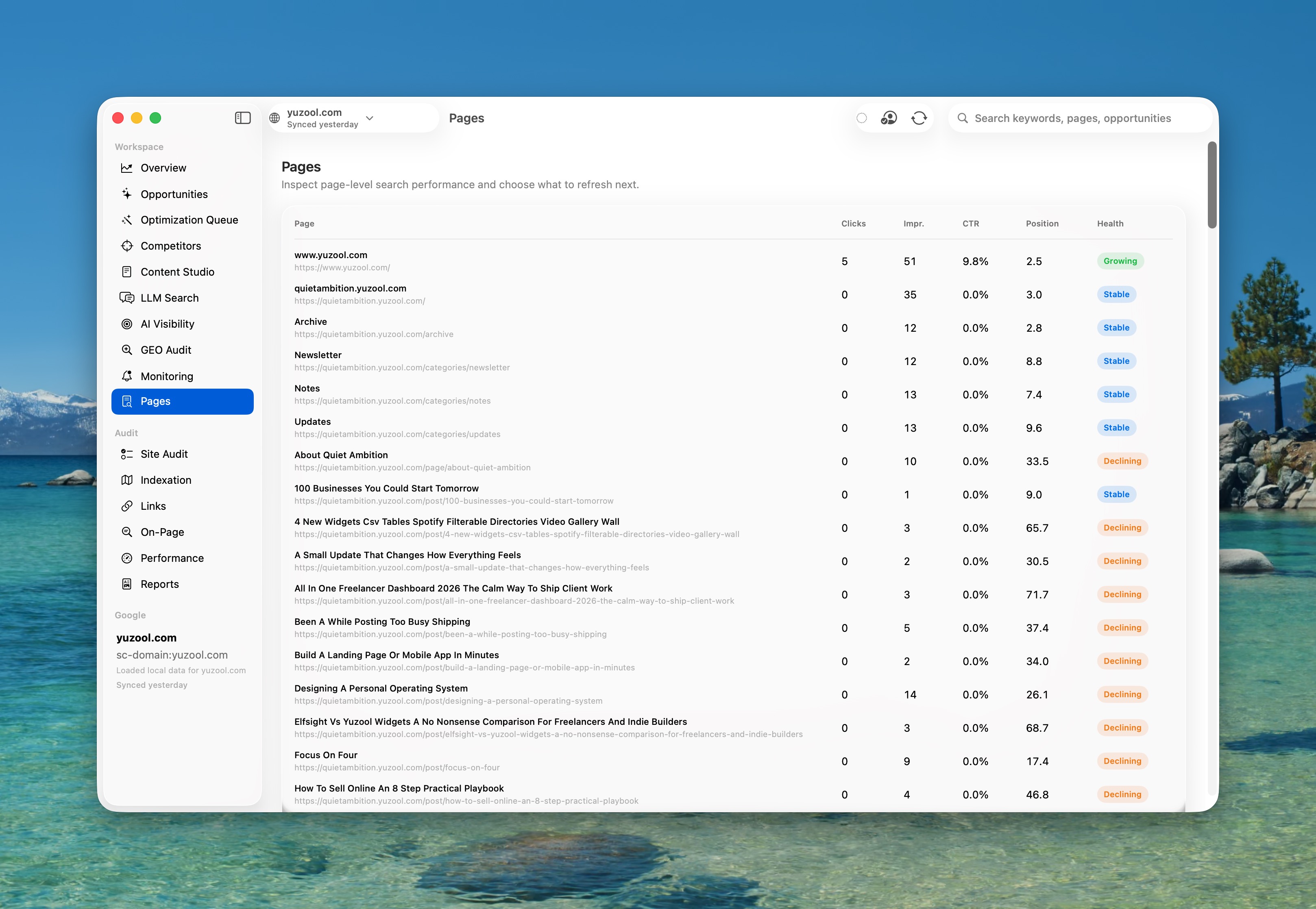
A beautiful native macOS workspace.
SwiftUI, secure Google authentication, local-first storage, and a focused interface for people who want useful SEO work done quickly.
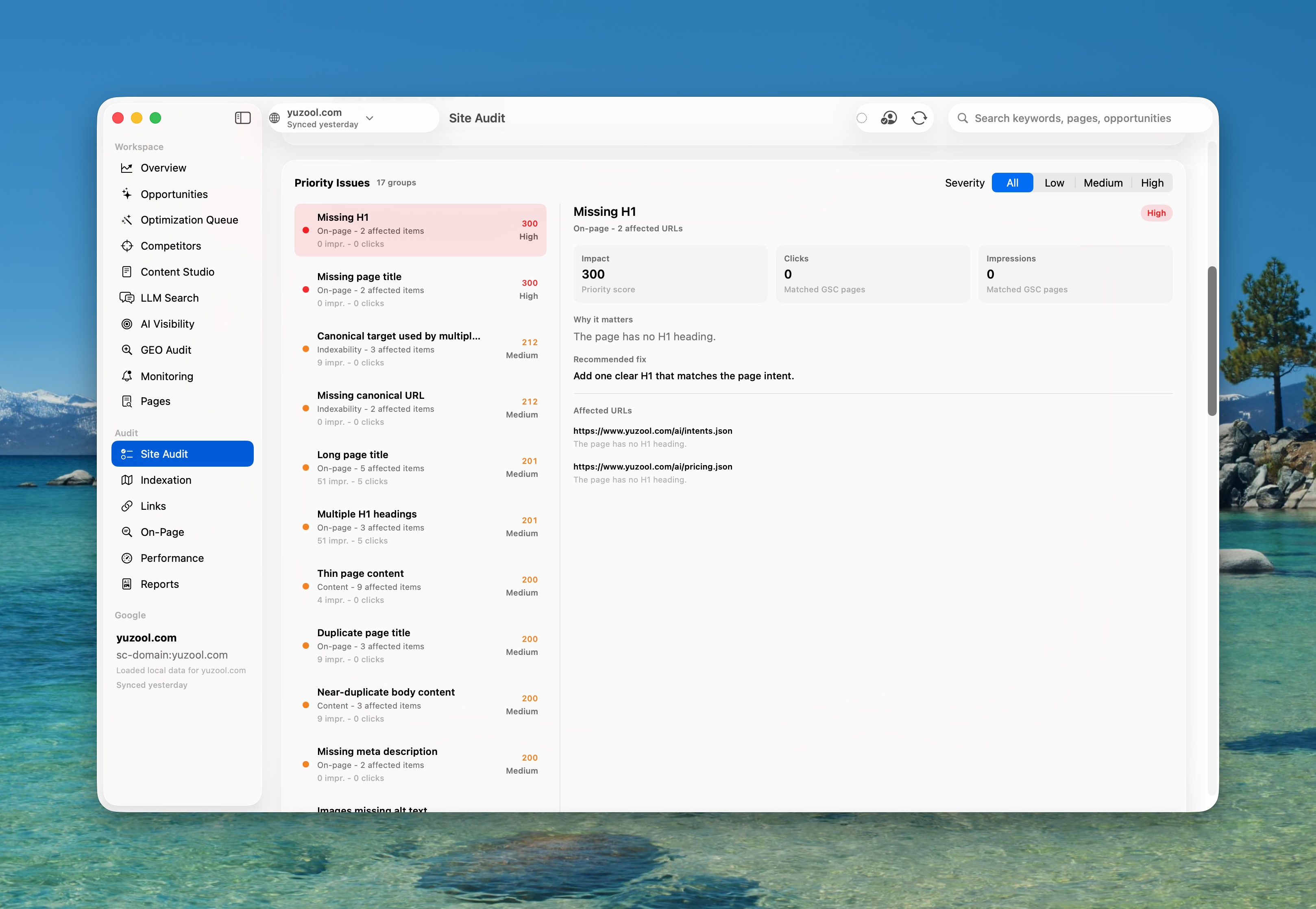
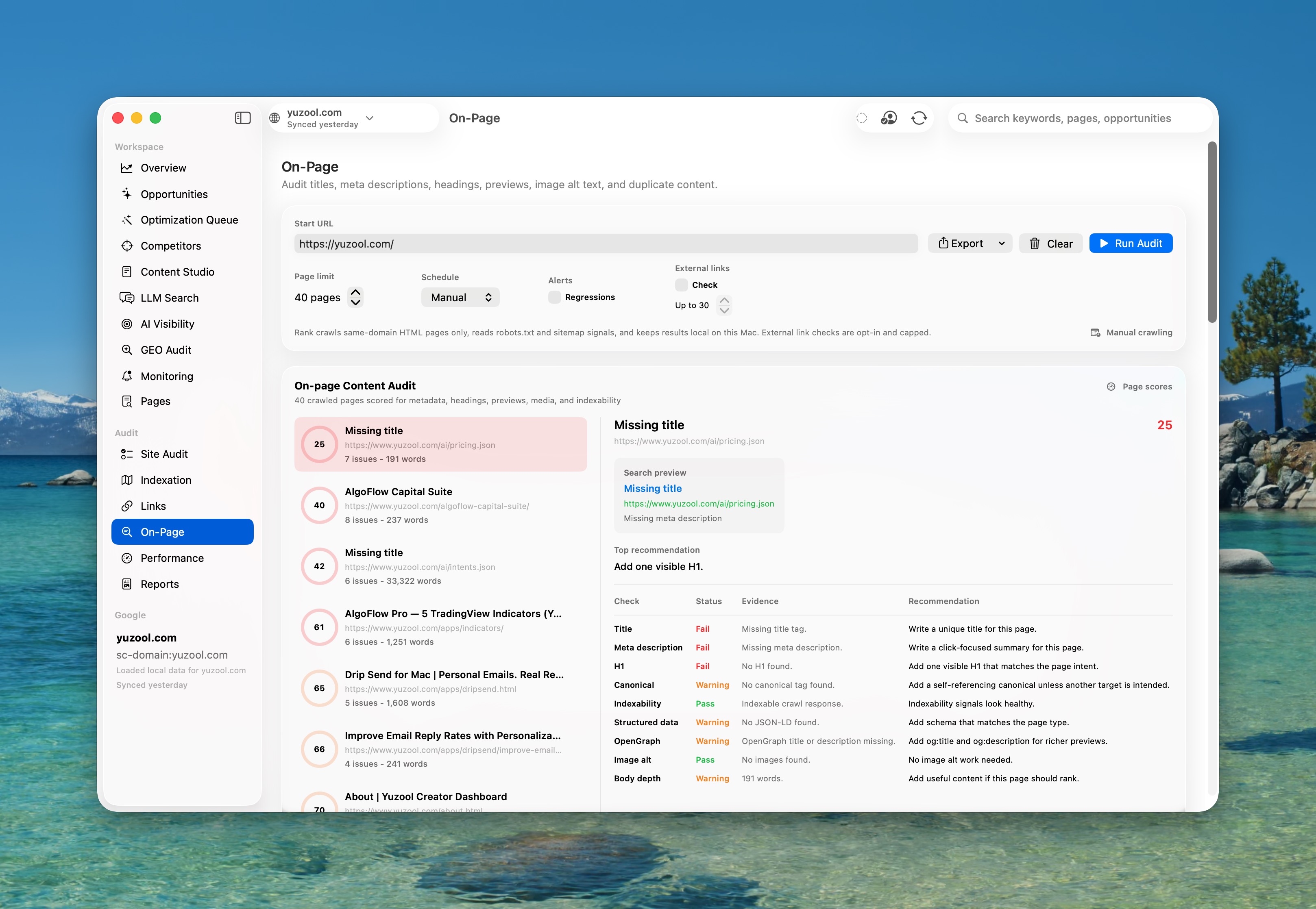
Analyze. Approve. Publish.
Rank closes the loop from finding an SEO problem to publishing it, remembering it, and measuring the outcome. Choose approved work, review the exact operation, then follow its impact through Proof of Impact and the SEO Change Timeline.
- Connect WordPress using a dedicated Application Password stored in Keychain.
- Connect Webflow with a scoped site token and update page SEO and OpenGraph fields.
- Connect Shopify with an Admin API token and update matched product SEO titles and descriptions.
- Export approved work as a credential-free Framer JSON and Markdown handoff package.
- Match Search Console and crawl URLs to editable WordPress pages and posts.
- Update local HTML titles, metadata, OpenGraph, schema, and approved content snippets.
- Create a timestamped backup before Rank writes to any local HTML file.
- Protect Elementor layouts and clearly flag changes that need manual implementation.
Version history
Rank is moving toward the native Mac command center for portfolio SEO, site audits, Google Search Console, and AI search visibility.
Version 1.5 — Rank Advisor and Tinylytics
Local SEO assistant
Ask Rank what changed, what to fix, why traffic moved, which CTR leaks to test, and what to tell a client this week.
Evidence-backed answers
Advisor responses use the selected site's local Search Console, crawl, Optimization Queue, timeline, alert, AI visibility, GEO, experiment and publishing context.
Action cards
Open the right workspace, sync Search Console, run a fresh audit, approve top queued fixes, start metadata experiments, pin a portfolio site, or create AI prompt sets from an answer.
No new external AI API
Rank Advisor runs from local Rank data in version 1.5 and prepares reviewable actions without silently publishing live changes.
Tinylytics integration
Connect a read-only Tinylytics API key to bring page views, unique views, Kudos, and AI referral sources into Rank Intelligence, Proof of Impact, and Optimization Queue priority.
Version 1.4.5 — Timeline, experiments, forecasting, and Client Mode
SEO Change Timeline
Combine publishing records, crawl history, Search Console snapshots, experiments, and monitoring alerts for the selected property.
Metadata experiments
Compare an original title or meta description with a proposed variant and measure CTR movement in comparable Search Console windows.
Rank Intelligence
Prioritize the day with a local briefing, opportunity forecasts, a Content Decay Calendar, and repeated-template issue detection.
AI referral analytics
Classify recognized ChatGPT, Perplexity, Gemini, Copilot, and Claude traffic using optional read-only GA4 or Tinylytics analytics.
Client Mode
Store client approval states, open a read-only presentation window, and export a portable branded HTML progress report.
Version 1.4 — Proof of Impact and Google Analytics 4
Change Journal
Record published and exported optimizations with destination, page, exact before-and-after values, baseline data, deployment state, and rollback guidance.
Measured checkpoints
Recheck live changes after 7, 14, and 28 days while Rank is open and classify each outcome as a win, loss, or inconclusive.
Estimated additional clicks
Compare like-for-like Search Console windows and summarize the approximate click change for each checkpoint.
Optional GA4 connection
Use separate read-only Google Analytics authorization to load organic landing-page sessions, key events, and revenue.
Business-impact prioritization
Raise Optimization Queue priority for pages already producing organic conversions or revenue.
Local HTML restoration
Restore the original file from Rank’s captured backup while preserving the replaced version as a new safety copy.
Version 1.3 — WordPress, Webflow, Shopify, Framer, and local HTML publishing
New Publishing workspace
Select approved Optimization Queue fixes, choose a destination, and preview each supported or protected operation before publishing.
Secure WordPress connection
Connect using a dedicated WordPress Application Password stored in macOS Keychain, then discover and match editable pages and posts.
WordPress updates and draft copies
Apply supported page changes to an existing WordPress resource or create a separate draft copy for review.
Elementor protection
Rank detects likely Elementor content, protects layout data from unsafe body rewrites, and identifies changes that require manual placement.
Webflow page publishing
Connect with a scoped site token stored in Keychain, match approved URLs to Webflow pages, and preview or publish SEO title, description, and OpenGraph updates.
Shopify product SEO publishing
Connect using a Shopify Admin API token stored in Keychain, match product URLs, and publish approved SEO title and description changes without altering themes or product content.
Framer handoff export
Create a portable JSON and Markdown package of approved changes for a Framer project without embedding API credentials or requiring an undeclared runtime.
Local HTML publishing
Match page URLs to local .html or .htm files and apply supported title, metadata, OpenGraph, schema, and content-snippet changes.
Automatic HTML backups
Every local write creates a timestamped original in the site’s .rank-backups folder before updating the file atomically.
Version 1.2 — Portfolio SEO, native alerts, and share cards
Historical cross-property comparison
Rank now stores local Search Console snapshot history per property and compares pinned sites over time.
Dedicated Compare Mode
Chart clicks, impressions, CTR, and average position across pinned properties, with current-vs-previous delta cards.
More powerful native regression alerts
Watch specific queries and pages, apply Sensitive/Balanced/Calm presets, and receive native macOS notifications when important metrics regress.
Share Cards
Generate Rank-branded PNG cards for traffic wins, audit progress, CTR opportunities, and AI visibility snapshots.
Portfolio dashboard
Pin properties and scan comparable metrics, top queries, top pages, and opportunity summaries without switching Search Console accounts.
Version 1.1 — Launch build
Google Search Console integration
OAuth sign-in, Keychain token storage, multi-site selector, local cache, and live sync for query/page/device/country performance.
Local Site Audit
Crawl progress, page limits, scheduling controls, metadata checks, indexation reporting, redirect chains, broken links, external-link checks, and sitemap/robots analysis.
On-page + internal links
Duplicate and near-duplicate content, missing titles/descriptions/headings, canonical checks, orphan pages, weakly linked pages, and internal-link opportunities.
AI Visibility + GEO Audit
Manual AI response snapshots, citation tracking, competitor mentions, llms.txt generation, entity clarity, answer readiness, trust signals, and schema recommendations.
Optimization Queue
Prioritized SEO fixes that combine crawl issues with Search Console impact, editable CMS export values, entity-based metadata rewriting, JSON-LD, alt text, and content refresh tasks.
Competitors + Brand Footprint
Competitor sitemap analysis, recommendation page finder, listicle opportunities, comparison gaps, outreach targets, and status tracking.
Content Studio
Article ideas, content briefs, outlines, titles, meta descriptions, FAQs, refresh suggestions, and Apple Intelligence enhancement on macOS 26+ supported Macs.
Production-ready Mac app
Native SwiftUI, Liquid Glass on supported systems, local-first storage, privacy manifest, hardened runtime, Developer ID notarized builds, and macOS 15 deployment support.
Already bought Rank?
Open the Polar customer portal to download updates, receipts, and invoices.
Open the Polar customer portal
Questions before you buy?
Rank is intentionally simple to start: connect Search Console, pick a site, and let the app build your opportunity map.
What data does Rank store?
Rank stores Google tokens and optional Tinylytics/publishing credentials in Keychain, then keeps Search Console snapshots, analytics metrics, crawls, experiments, approvals, timelines, forecasts, and reports locally on your Mac.
Do I need Apple Intelligence?
No. Core SEO audits, Search Console sync, AI visibility tracking, GEO reports, optimization queue, and exports work without Apple Intelligence. Apple Intelligence drafting requires macOS 26+ on a supported Mac.
Can I use it for multiple sites?
Yes. Rank includes a Search Console site selector, Portfolio dashboard, and Compare Mode for pinned properties.
What can I ask Rank Advisor?
You can ask about traffic drops, CTR opportunities, crawl issues, AI search visibility, approved publishing work, metadata experiments, client summaries, content decay, indexation risks, and what to do next for the selected site.
How do I download updates?
Use the Polar customer portal link on this page. Polar lets customers access purchases, downloads, receipts, and invoices by email sign-in.
Can Rank test SEO metadata?
Yes. Start an experiment from a title or meta-description recommendation, deploy Variant B, then measure it after a comparable Search Console window has collected enough impressions.
Do the new intelligence features require another API?
No. Rank Advisor, Timeline, briefing, forecasting, decay, template, experiment, and Client Mode features run from local Rank data. AI referral analytics can use optional read-only GA4 or Tinylytics data when connected.
Can Rank publish changes to WordPress?
Yes. Rank connects with a dedicated WordPress Application Password, matches pages and posts, previews supported changes, and can update an existing resource or create a draft copy. Elementor layout content is protected from unsafe rewrites.
What can Rank update in Webflow?
Rank can match Webflow pages and update their SEO title, meta description, and OpenGraph metadata using a scoped site token stored in Keychain. It can optionally publish the matched page. This integration does not edit Designer layouts or CMS collection content.
What can Rank update in Shopify?
Rank can match store products and publish approved SEO title and description updates using a Shopify Admin API token stored in Keychain. It does not alter themes, templates, product copy, or checkout.
How does Framer support work?
Rank exports approved changes as a portable JSON and Markdown handoff for your Framer project. Framer's Server API is currently beta and depends on its Node.js client, so Rank does not embed that runtime or place API keys in export files.
Can Rank update a static HTML website?
Yes. Choose the local site folder and Rank will match approved page URLs to HTML files, preview supported changes, create a timestamped backup, and write the updated file atomically.
Built by Michael at Yuzool.
Rank is independent Mac software with direct support, straightforward ownership, and a privacy-first local workflow.
One-time purchase$39 through Polar.
Direct supportEmail support from the maker.
Local-firstTokens in Keychain; SEO history on your Mac.
Updates portalDownloads, receipts, and invoices.
Rank privacyGoogle data, local storage, and deletion.
Rank is included in the Yuzool Mac bundle.
Get Rank with Suzume Mail, Dispatch, Relay, Drip Send, Cloak, Cadence, future Yuzool Mac apps and included updates for the early bundle price of $99.
Is Rank the right fit?
A quick buyer check before you make the purchase.
◎
Best for
Indie founders, small site owners and app studios who want a repeatable Search Console workflow on the Mac.
×
Not for
Enterprise crawl programs, agency-scale reporting suites or teams that need cloud dashboards and seat management.
↻
Replaces
Search Console tabs, small crawler checks, page notes, metadata spreadsheets and forgotten SEO change logs.
$
Price
$39 one-time purchase through Polar. Rank is also included in the Yuzool Mac bundle.
⌁
Privacy
Google tokens and optional credentials stay in Keychain. SEO history, audits and decisions stay on your Mac.
→
Next step
Read the Search Console app guide or buy when the workflow feels right.
Choose the SEO tool for the job.
Rank is a focused Mac workflow, not a claim that one app replaces every SEO platform. Compare the actual work before you buy.
⌕
Rank vs Google Search Console
Keep Google’s free service as the source of truth; compare it with Rank’s review, local audit and follow-through workflow.
↗
Rank vs Ahrefs
Decide whether you need broad competitor and backlink research, or a focused loop for pages and queries you already own.
⌁
Rank vs Screaming Frog
Compare a recurring Search Console-led improvement workflow with a specialist crawler for deep technical audits.
▤
Rank vs Semrush
See where an all-in-one research suite makes sense—and when a smaller, one-time Mac app is enough for the work at hand.
◌
See Rank used on a real site
Follow the public Yuzool SEO case study: the work, the changes and what the Search Console data says so far.
▤
Browse the Rank library
Find focused guides for low-CTR pages, Search Console workflows, local audits and keeping SEO changes measurable.
Related reading
Practical notes about getting more useful traffic from pages you can actually improve.
▤
How I use SEO for indie apps
Start with buyer intent, build product-led pages, then use Rank to keep improving what gets traction.
◌
A better Search Console workflow
Why Search Console is more useful when page checks, decisions and follow-up work live together.
✓
Small feedback loops
Use traffic, revenue and support signals as calm feedback instead of another reason to refresh dashboards.
▣
Elementor SEO workflow
Use GSC data to improve WordPress Elementor pages safely without breaking layout content.
↗
Rank for agencies
A focused Search Console workflow for client audits, recommendations and follow-up.
📉
CTR tool for Mac
Find pages with impressions but weak clicks, then test better titles and descriptions.
◌
AI search visibility audit
Check entity clarity, trust signals and answer readiness for AI-facing pages.
⌕
Free SEO browser tools
Use seven narrow checks, including a private Search Console Pages-export triage, before deciding whether you need a full workflow.
Exact-match pages
These pages are built for specific search intent and all point back to the same buying flow.
⌘
Search Console app for Mac
Position Rank as the calm Mac workflow for people who already use Search Console.
📈
Search Console CTR tool for Mac
Help people who already have impressions but need a clearer click-through path.
↺
SEO change tracking for Mac
Show the value of keeping the edit, baseline and result together on one Mac workflow.
⌁
Search Console workflow for Mac
A weekly review flow for choosing the page to fix first, without turning SEO into a second job.
→
Search Console decision tool
Turn impressions, clicks and CTR into one small next action for the page that matters.
Use Rank across client work.
A small agency workflow without adding another reporting suite.
01 / FindSpot the page
Sort Search Console by impressions and CTR to find the clearest client opportunity.
02 / ExplainMake one recommendation
Show the page context, proposed change and reason in a reviewable handoff.
03 / ContinueDiscuss team use
Start with the $39 Mac app, then ask about agency access if it fits your process.
Talk to your SEO workspace.
Connect Google Search Console, audit your site locally, spot SEO regressions, turn opportunities into publish-ready fixes, and focus tomorrow's work from one native Mac app.