Boxing practice · Home training
How to Film Boxing Training at Home on Your iPhone
A simple phone setup can make solo practice easier to review—without turning every round into a performance for the camera.
September 13, 2026 · Michael at Yuzool
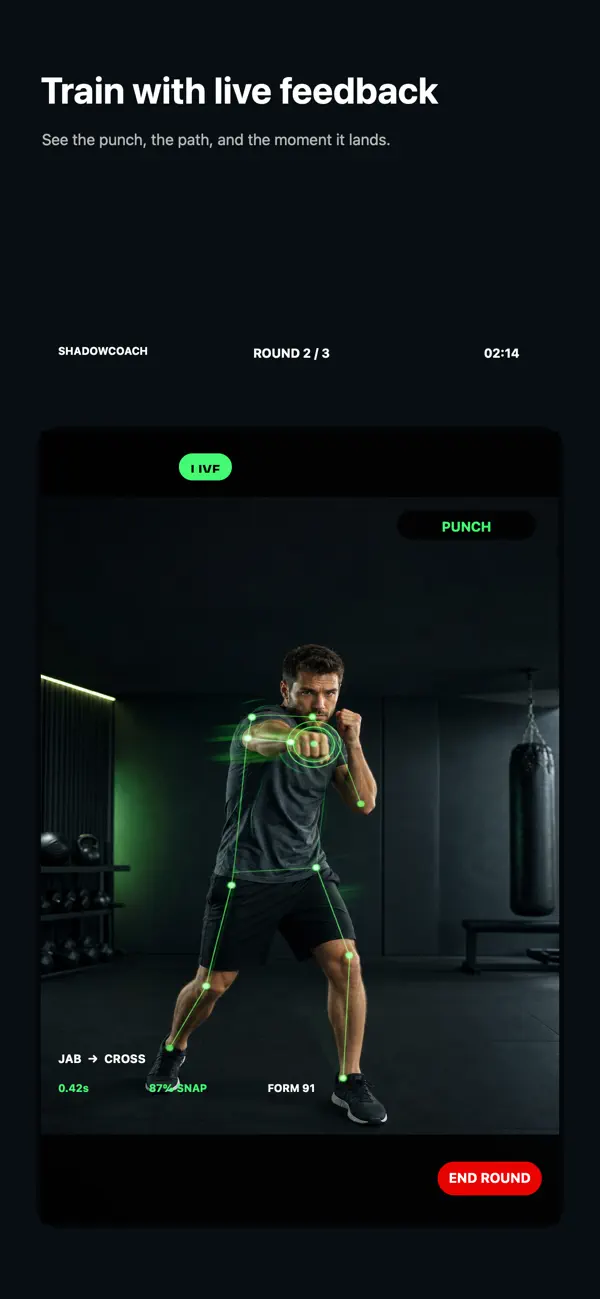
Recording a boxing round at home is most useful when you are trying to answer one small question: did the hand return to guard, could you stop in balance, or did the feet cross when you moved? A phone video is not a coach and it cannot explain every mistake. It can, however, help you notice a repeatable pattern that is difficult to feel while moving.
The setup matters. A camera that cuts off your feet cannot help you review stance. A phone balanced on a chair beside a doorway can fall at exactly the wrong moment. Take a minute to make the room and the frame safe before you begin.
1. Make the space safe before placing the phone
Clear a full step of room in every direction, including behind you. Check for rugs that slide, low tables, pets, glass and anything you might hit while moving laterally. Use a stable tripod or a broad, secure shelf; do not balance the phone on a narrow ledge or put it where a missed punch could knock it down.
If you are using a stand, keep it outside your movement path. A phone should observe the round, not become an obstacle in it. If the room is too small to move safely, shorten the footwork or do a stationary drill rather than trying to squeeze in a bigger session.
2. Choose a view that shows the whole movement
For a general technique check, start with the camera around torso height and far enough back to include your head, hands and feet throughout the round. A slight diagonal view often reveals both your stance and the line of a punch. A side view can make balance and weight transfer easier to notice; a front view can make guard symmetry easier to compare.
Do not chase a single “perfect” angle. The right view is the one that keeps the relevant body parts visible without distortion. If you are reviewing footwork, frame the floor. If you are checking the return of the hands, make sure the gloves or fists are not hidden by the edge of the picture.
3. Keep light in front of you
Face a window or a steady lamp where possible. A bright window behind you can turn your body into a silhouette, while a single overhead light can cast the hands into shadow. You do not need studio lighting: the practical goal is simply to make your outline and movement easy to see.
Before the round, record five seconds and check that the image is steady and that your feet remain in frame. That small test saves the frustration of finishing a good session only to discover the camera pointed at the floor.
4. Review one cue, not your whole identity
Watch one short passage at normal speed. Choose one question and answer it with evidence from the clip. For example: “After the cross, did my rear hand come back?” is easier to answer than “Was that good boxing?” If you spot one thing to adjust, repeat the same drill at a comfortable pace and check again.
A useful review loop is: set a cue, work a short round, pause, notice one pattern, then repeat. Avoid replaying every second or trying to correct five things at once. If a detail is unclear, ask a qualified coach rather than treating a phone recording or automated cue as a final judgment.
5. Keep the phone from changing how you move
It is easy to start performing for the camera: bigger punches, faster combinations, longer sessions. Resist that urge. Use a pace at which you can keep balance and breathe, and stop if you feel pain, dizziness or unusual symptoms. A recording is useful only if the movement is close to your ordinary practice.
Also decide what you want to do with the video. Keep it private, delete it when you are finished, or share it only with a coach you trust. You do not need to post a training clip publicly in order to learn from it.
Turn a clip into a next-round plan
Write down one observation and one adjustment: “My stance narrows after I step right; keep the step smaller.” That is enough. You can use the free boxing form cue tool to turn a focus into a short reminder, or read the at-home boxing form-check guide for a repeatable review sequence.
ShadowCoach is an iPhone training companion for solo shadowboxing. It can count common punches, measure speed and offer live form cues while you practise. Camera feedback is a prompt to notice movement, not a replacement for a qualified human coach or a guarantee of correct technique. See ShadowCoach and its current App Store details.
For more detail, start with the boxing form check at home, the beginner no-equipment workout, or the ShadowCoach Boxing Desk.